Adobe Launch Not Registering Events | Adobe Higher Education
Skip to main content
Level 2
July 3, 2023
Beantwortet

Adobe Launch Not Registering Events

  • July 3, 2023
  • 2 Antworten
  • 2820 Ansichten

Hey guys, 


I have an AEM site w/ the launch script installed following these guidelines https://experienceleague.adobe.com/docs/platform-learn/implement-in-websites/configure-tags/add-embed-code.html?lang=en

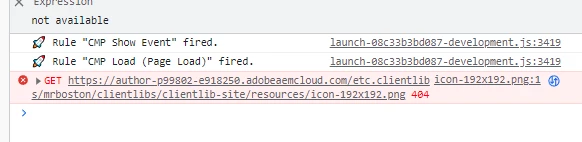
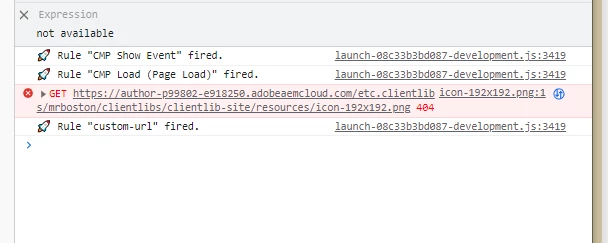
Unfortunately I'm facing an issue where certain events are not firing consistently across the site. For example I'll see the 'custom-url' event appear in the console after loading a page (using _satellite.setDebug(true)), but after a cache clear + refresh the event will no longer fire on load.


Because the behavior is inconsistent / varies on reload I'm assuming the root cause is a race condition... but I haven't had any luck in tracking down the code or setting that is responsible. I've included two screenshots -- the first showing a custom-url firing as expected, and the second showing a case where it's not firing. From investigating the adobeDataLayer object I can tell the custom-url event is being added correctly, seems like launch is just not recognizing it as it fires


Dieses Thema wurde für Antworten geschlossen.
Beste Antwort von EstebanBustamante

Unfortunately switching to the synchronous implementation doesn't seem to solve the problem ... the events are still loading inconsistently


If that's not the issue you need to check the rules which are triggering "custom-url" event. Take a closer look at your DOM to identify any missing elements or attributes that could be causing the inconsistent behavior.

2 Antworten

EstebanBustamante
Community Advisor and Adobe Champion
July 3, 2023

Are you using your Launch script in the header section? Is this script synchronous? Or are you using the async version of it? 

Esteban Bustamante
Level 2
July 3, 2023

Hey Esteban -- it's in the <head> & we're using the async version.

EstebanBustamante
Community Advisor and Adobe Champion
July 3, 2023

Well, that's likely the issue, if you switch to the sync version you will solve your problem (at least you can try it to make sure that is the root cause of the issue).

This is what is suggested to solve this type of issue:

“If you see things occurring out of order, it is likely that you have some timing issues to work through. Deployments requiring precise timing might need to use event listeners and the Custom Event or Direct Call event type to make their implementations more robust and consistent.

You can read more here: https://experienceleague.adobe.com/docs/experience-platform/tags/client-side/asynchronous-deployment.html?lang=en#considerations-to-asynchronous-deployment

Esteban Bustamante
Tanika02
Level 7
July 3, 2023

Hello @user00928 - 


  • Consider the timing of the event firing in relation to the page load process. Are there any dependencies on certain elements or resources that may not be consistently available on every page load? Evaluate if there are any delays or race conditions that could impact the firing of the event. [Consider adding deliberate delays or throttling mechanisms to event triggers to mitigate race conditions.]
  • Check for any caching issues that could interfere with the event firing. Clear the cache thoroughly and test the event on a clean session to see if the issue persists. Consider any caching mechanisms in place at the server, browser, or CDN level that could impact event delivery.
  • Have you ruled out the possibility if this issue is not related to a specific environment only ?
Level 2
July 3, 2023

Hey Tanika -- unfortunately after a few days of testing I haven't been able to establish any connection between cache & whether or not launch records the events correctly. It doesn't seem to be correlated as it will work / not work regardless of if I've cleared cache (browser, cdn, dispatcher). 

The issue seems to be happening across all our environments. 


Do you have a suggestion for implementing a general throttling method on these data layer events? Or is my best bet just to overlay the OOB adobe code and work through them one at a time