Adobe AEM Cloud - Servlets 403 code in production publish environment | Community
Skip to main content
October 18, 2024

Adobe AEM Cloud - Servlets 403 code in production publish environment

  • October 18, 2024
  • 4 replies
  • 1006 views

Hi,

I have a question regarding the production publish environment. I have several servlets created at /bin path of the project,

and have noticed that the GET ones are working fine, but all of the POST method servlets are returning a 403 code (forbidden)when trying to be reached, only in production publish environment.


I've tested many different configurations to check if there was a dispatcher or configuration problem but can't find the reason why I can' reach the POST servlets. I'm assuming it's not a dispatcher fault because the GET servlets under /bin are reached properly.
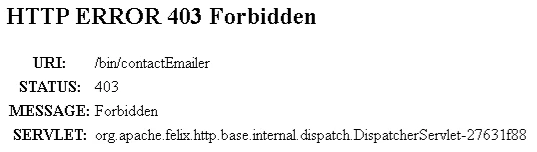


Any ideas? Configuration on Referrer filter?

Thank in advance,


CarlosD


This post is no longer active and is closed to new replies. Need help? Start a new post to ask your question.

4 replies

khamat_bn
Level 4
October 19, 2024

Hello @carlosda2 ,

There are several probabilities for this issues 

403 means its forbidden, so we have CSFR filter , CORS, Permission, Dispatcher rules, all this can leads to this issue 

1. CSFR filter is blocking all the unauthorized POST req. so you need to whitelist your servlet in Adobe Granite CSRF Filter configuration

 2. CORS - Its very common issue is client & server, check if we allowed the domains to make an req., you need to add CORS header in req.

3. Dispatcher - check if you have any dispatcher rule which is allowing the POST calls 
/filter {
/ruleno { /type "allow"    /method "POST"   /url  "/bin/*" }
}


CarlosDa2Author
October 19, 2024

Hi @khamat_bn 

Thanks you for your response!

We have a rule in the dispatcher that allowing POST calls like this

/filter {
/ruleno { /type "allow"    /method "POST"   /url  "/bin/*" }
}

And a referrer filter configuration like this (domain name is the real domain name and extension name is the real extension name):

{
"allow.empty": false,
"allow.hosts.regexp": [
"https://.*\\.domain name\\.extension name"
"https://.*\\.adobe\\.com",
"https://.*\\.adobe\\.net",
"https://.*\\.workfront\\.com",
"https://.*\\.workfront-dev\\.com",
"https://.*\\.dev\\.workfront\\.tech"
],
"filter.methods": [
"POST",
"PUT",
"DELETE",
"COPY",
"MOVE"
],
"osgi.http.whiteboard.context.select": "(osgi.http.whiteboard.context.name=*)"
}
This is a valid configuration? o Maybe it's too restrictive?
Thanks in adavance
CarlosD
MukeshYadav_
Community Advisor
Community Advisor
October 20, 2024

Hi @carlosda2 ,

You may refer https://medium.com/@toimrank/aem-post-servlet-e0b07ecc63ac

  • Check the Allow Empty checkbox and remove POST option from filter methods.
  • Remove POST option from Filter Methods field and add an entry as part of exclude paths.


Thanks

joerghoh
Adobe Employee
Adobe Employee
October 20, 2024

The dispatcher is not involved here, this error message comes from AEM directly.

kautuk_sahni
Community Manager
Community Manager
November 5, 2024

@carlosda2 Did you find the suggestions helpful? Please let us know if you require more information. Otherwise, please mark the answer as correct for posterity. If you've discovered a solution yourself, we would appreciate it if you could share it with the community. Thank you!

Kautuk Sahni