Adding the Multifield with dropdown and fragment path fields in OOB content fragment component | Community
Skip to main content
May 10, 2024
Solved

Adding the Multifield with dropdown and fragment path fields in OOB content fragment component

  • May 10, 2024
  • 1 reply
  • 823 views

Hi,

I need to create the multified with the drop down and fragment path fields in the OOB content fragment component. After doing this it is not showing the variations drop down. Please help with the steps and share the reference example that will be great for me.


Thanks & Regards,

Kalyan 
This post is no longer active and is closed to new replies. Need help? Start a new post to ask your question.
Best answer by Madhur-Madan

Hi @kalyanchakravarthych ,
Below is an example of how you can define the dialog for this component to include a multifield with dropdown and fragment path fields
Dialog: 

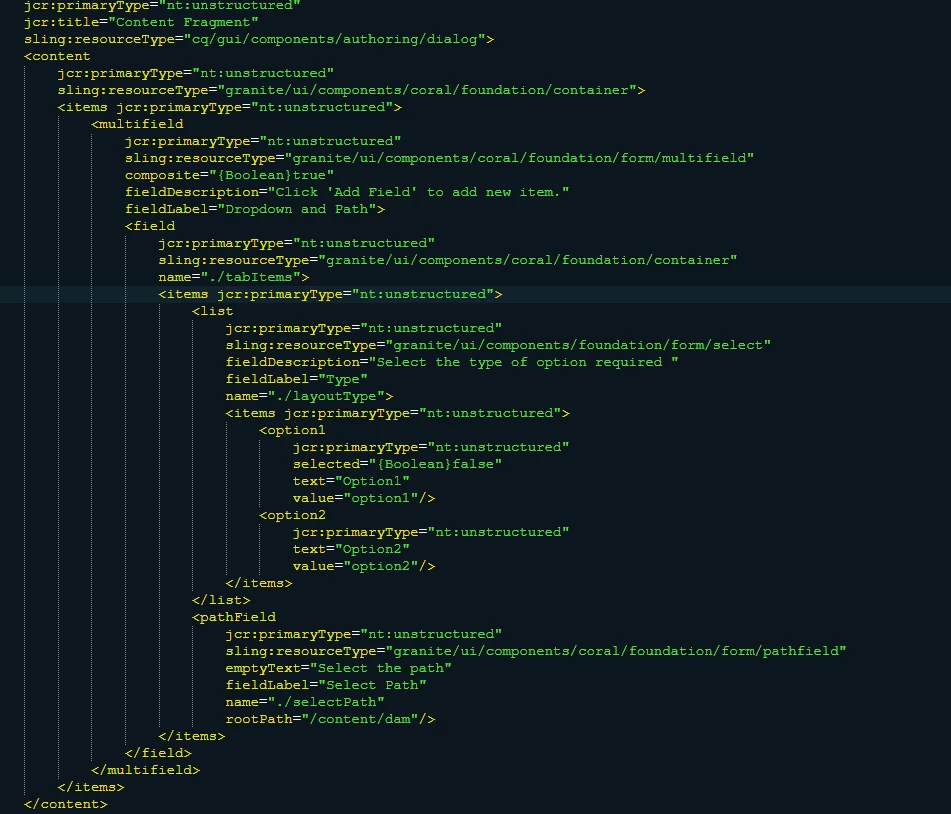
<?xml version="1.0" encoding="UTF-8"?> <jcr:root xmlns:jcr="http://www.jcp.org/jcr/1.0" xmlns:nt="http://www.jcp.org/jcr/nt/1.0" xmlns:cq="http://www.day.com/jcr/cq/1.0" xmlns:sling="http://sling.apache.org/jcr/sling/1.0" jcr:primaryType="nt:unstructured" jcr:title="Content Fragment" sling:resourceType="cq/gui/components/authoring/dialog"> <content jcr:primaryType="nt:unstructured" sling:resourceType="granite/ui/components/coral/foundation/container"> <items jcr:primaryType="nt:unstructured"> <multifield jcr:primaryType="nt:unstructured" sling:resourceType="granite/ui/components/coral/foundation/form/multifield" composite="{Boolean}true" fieldDescription="Click 'Add Field' to add new item." fieldLabel="Dropdown and Path"> <field jcr:primaryType="nt:unstructured" sling:resourceType="granite/ui/components/coral/foundation/container" name="./tabItems"> <items jcr:primaryType="nt:unstructured"> <list jcr:primaryType="nt:unstructured" sling:resourceType="granite/ui/components/foundation/form/select" fieldDescription="Select the type of option required " fieldLabel="Type" name="./layoutType"> <items jcr:primaryType="nt:unstructured"> <option1 jcr:primaryType="nt:unstructured" selected="{Boolean}false" text="Option1" value="option1"/> <option2 jcr:primaryType="nt:unstructured" text="Option2" value="option2"/> </items> </list> <pathField jcr:primaryType="nt:unstructured" sling:resourceType="granite/ui/components/coral/foundation/form/pathfield" emptyText="Select the path" fieldLabel="Select Path" name="./selectPath" rootPath="/content/dam"/> </items> </field> </multifield> </items> </content> </jcr:root>


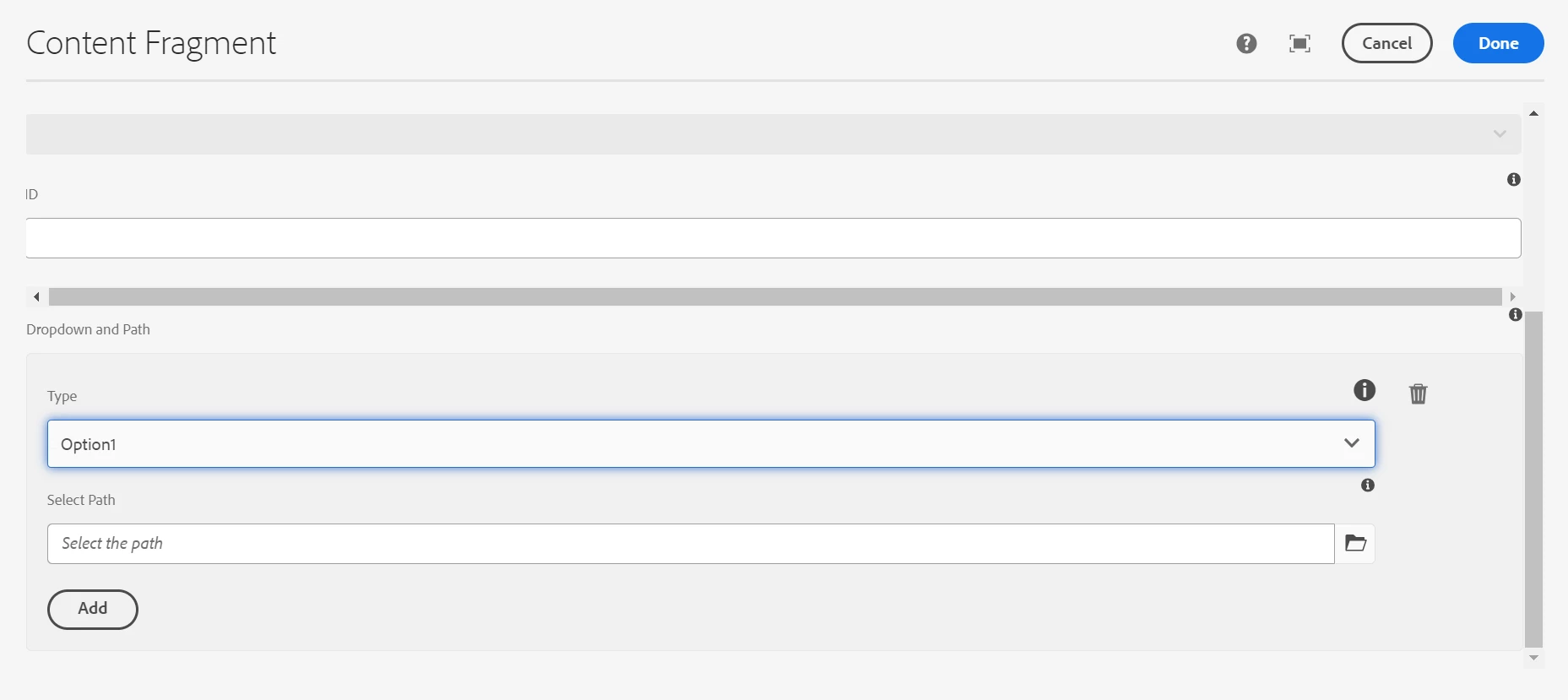
Expected Output:

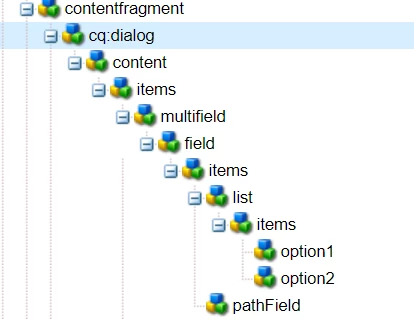
CRX Structure:


Thanks,
Madhur

1 reply

Madhur-Madan
Community Advisor
Madhur-MadanCommunity AdvisorAccepted solution
Community Advisor
May 10, 2024

Hi @kalyanchakravarthych ,
Below is an example of how you can define the dialog for this component to include a multifield with dropdown and fragment path fields
Dialog: 

<?xml version="1.0" encoding="UTF-8"?> <jcr:root xmlns:jcr="http://www.jcp.org/jcr/1.0" xmlns:nt="http://www.jcp.org/jcr/nt/1.0" xmlns:cq="http://www.day.com/jcr/cq/1.0" xmlns:sling="http://sling.apache.org/jcr/sling/1.0" jcr:primaryType="nt:unstructured" jcr:title="Content Fragment" sling:resourceType="cq/gui/components/authoring/dialog"> <content jcr:primaryType="nt:unstructured" sling:resourceType="granite/ui/components/coral/foundation/container"> <items jcr:primaryType="nt:unstructured"> <multifield jcr:primaryType="nt:unstructured" sling:resourceType="granite/ui/components/coral/foundation/form/multifield" composite="{Boolean}true" fieldDescription="Click 'Add Field' to add new item." fieldLabel="Dropdown and Path"> <field jcr:primaryType="nt:unstructured" sling:resourceType="granite/ui/components/coral/foundation/container" name="./tabItems"> <items jcr:primaryType="nt:unstructured"> <list jcr:primaryType="nt:unstructured" sling:resourceType="granite/ui/components/foundation/form/select" fieldDescription="Select the type of option required " fieldLabel="Type" name="./layoutType"> <items jcr:primaryType="nt:unstructured"> <option1 jcr:primaryType="nt:unstructured" selected="{Boolean}false" text="Option1" value="option1"/> <option2 jcr:primaryType="nt:unstructured" text="Option2" value="option2"/> </items> </list> <pathField jcr:primaryType="nt:unstructured" sling:resourceType="granite/ui/components/coral/foundation/form/pathfield" emptyText="Select the path" fieldLabel="Select Path" name="./selectPath" rootPath="/content/dam"/> </items> </field> </multifield> </items> </content> </jcr:root>


Expected Output:

CRX Structure:


Thanks,
Madhur

May 10, 2024

Hi @madhur-madan ,

In oob content fragment dropdown right as it is coming the values dynamically based on the content fragment variations created. This drop down is getting empty as it is not loading elements.html and variations.html similar to oob content fragment component. Please help me on the same in multifield and let me know how to render  the authored mutltifield data on the page


Thanks & Regards,

Kalyan

May 12, 2024

Can anyone help me the above requirement.