Adding new option to Relate List | Community
Skip to main content
Level 2
May 2, 2023

Adding new option to Relate List

  • May 2, 2023
  • 3 replies
  • 2111 views

Hello all, I am attempting to add a new option to the Relate List in AEM. I successfully was able to add the two options needed to the dropdown. But when I go to relate them, nothing appears on the right hand side, showing the Related list. Screenshots of examples below. Does anyone know if this is possible to extend, would love any support here! Thanks. 


As you can see below I added two options to the relate dropdown but when I go to add them. The relation does not take effect and does not display in the Related list/references section.
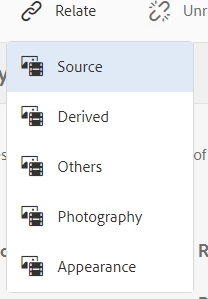
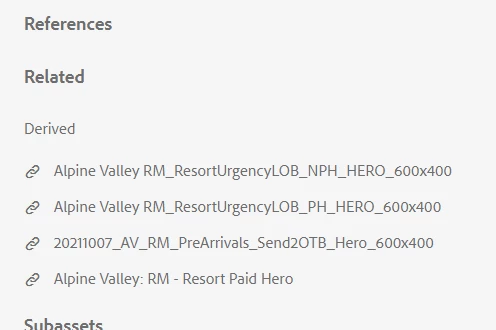


Ideally the image's should be added to this list above.

 

3 replies

Nikhil-Kumar
Community Advisor
Community Advisor
May 2, 2023

I guess you need to override the OOTB JS to make it work!

Level 2
May 23, 2023

Do you have any idea where this JS sits in CRX? Cannot seem to locate that


I located both the relation.js and relateassets.js but it seems like the logic is not really taking place in there to build the related lists

Adilos-Cantuerk
Community Advisor
Community Advisor
July 4, 2023

Did you found a way in the end?

Level 2
April 16, 2024

Bumping this

Adobe Employee
January 29, 2025

Adding a custom Relate option in AEM Assets requires overlaying a few nodes and even creating your own servlet, as the OOTB relate management servlet hardcodes the Source, Service, and Others options.

  1. Overlay the nodes used to populate the Relate options. Create a copy of the relateothers node and modify the properties to your new relate option
    For the metadata editor view (Properties): /libs/dam/gui/content/assets/metadataeditor/jcr:content/actions/relate/items
    For Omnisearch view: /libs/granite/omnisearch/content/metadata/asset/actions/selection/relate
    For assets view (/assets.html/content/dam/...): /libs/dam/gui/content/assets/jcr:content/actions/selection/relate/items
    For collections: /libs/dam/gui/content/collections/collectiondetails/jcr:content/actions/selection/relate/items
  2. Now overlay the relateaset.js file that handles making backend calls when the user clicks the Relate options
    Clientlibs path: /libs/dam/gui/coral/components/admin/relateasset
  3. Search for instances of the word "others" in the overrated relateasset.js, and add your custom relate option; Example, add new global variable:


var RELATION_MYRELATETOPION = "myrelateoption";


4. Create new servlet leveraging Asset Java API (see other forum post for more information: https://experienceleaguecommunities.adobe.com/t5/adobe-experience-manager-assets/retrieving-and-creating-asset-relations-via-the-apis/m-p/567175). You will need to update the SERVLET_URL path that is called in relateasset.js to be your new servlet path