Adding multiple paths in event listener | Community
Skip to main content
Adobe Champion
February 3, 2022
Solved

Adding multiple paths in event listener

  • February 3, 2022
  • 3 replies
  • 2191 views

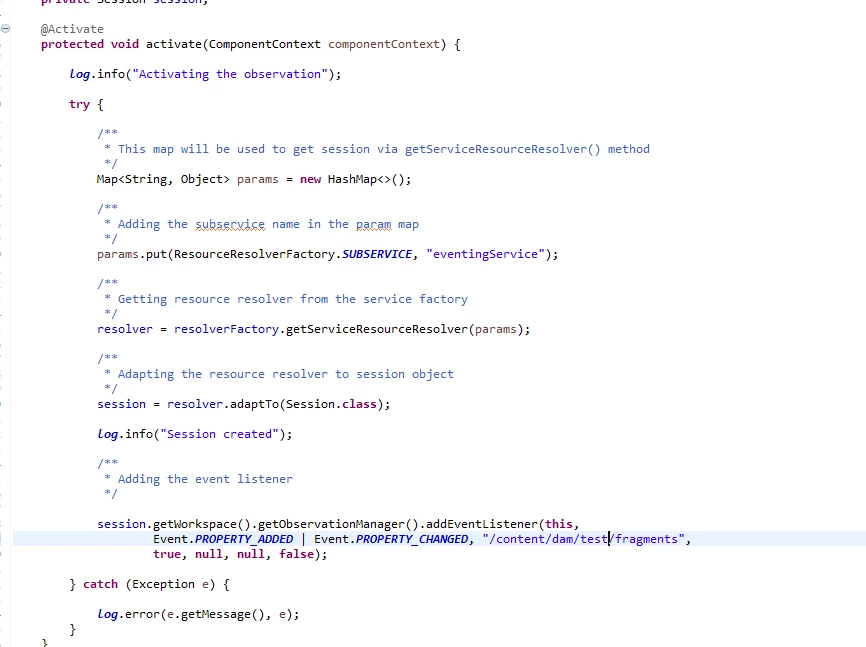
I have an event listener in which I am listening to a path as in the below screenshot using Observation Manger . How can I add multiple paths here , so that I can listen to multiple paths. I cannot add the root path, since I don't want to listen to the root path due to other project requirement constraints.


This post is no longer active and is closed to new replies. Need help? Start a new post to ask your question.
Best answer by Kishore_Kumar_

Hi @p_v_nair ,


Try using ResourceChangeListener to handle multiple paths.


https://techrevel.blog/2017/03/15/resourcechangelistener/ 

3 replies

Kishore_Kumar_
Kishore_Kumar_Accepted solution
Level 9
February 4, 2022

Hi @p_v_nair ,


Try using ResourceChangeListener to handle multiple paths.


https://techrevel.blog/2017/03/15/resourcechangelistener/ 

joerghoh
Adobe Employee
Adobe Employee
February 5, 2022

As @kishore_kumar_ already pointed out, use the ResourceChangeListener.


if that's not possible: 

JackrabbitObservationManager mgr = (JackrabbitObservationManager) session.getWorkspace().getObservationManager;

JackrabbitEventFilter filter = new JackrabbitEventFilter()
  .setAbsPath(PATH1)
  .setAdditionalPaths(PATH2,PATH3, ...)
...

mgr.addEventListener(listener, filter);

This allows to you specify more constraints than the JCR compliant JCR ObservationManager. In Oak the ObservationManager implements the JackrabbitObservationManager.


See

https://jackrabbit.apache.org/api/2.12/org/apache/jackrabbit/api/observation/JackrabbitEventFilter.html https://jackrabbit.apache.org/api/2.12/org/apache/jackrabbit/api/observation/JackrabbitObservationManager.html


Adobe Employee
September 26, 2023

In my case adding multiple paths worked with below syntax


@8220494(service = EventHandler.class, immediate = true, property = { EventConstants.EVENT_TOPIC + "=" + ReplicationAction.EVENT_TOPIC, EventConstants.EVENT_FILTER + "=(|(paths=/content/projectname/*)(paths=/content/dam/projectname/*))" }) @ServiceDescription("Listener to listen on replication action in the resource tree") @Designate(ocd = ReplicationListener.SolrSearchPropertiesConfiguration.class) public class ReplicationListener implements EventHandler {

 Specially when we are working on Sling events like Activate or deactivate, the above piece of code will be really handy because you have to listen to activate or deactivate specific paths under your project related folders only in dam and sites.