Adding Large JS Library to an AEM Component | Community
Skip to main content
August 28, 2017
Solved

Adding Large JS Library to an AEM Component

  • August 28, 2017
  • 8 replies
  • 5465 views

I have a question about adding a large Javascript library to a component in AEM - specifically, Material Design. So far in my experience with AEM, I've added JS files individually to my clientlib folder, but Material Design has dozens (possibly hundreds) of JS files to control the various components in their design. (Here's their Github for reference.)

I tried installing Material Design as a Node package in my clientlib folder, but I couldn't get the package to build after that. Any thoughts on how to get Material Design going in AEM?


This post is no longer active and is closed to new replies. Need help? Start a new post to ask your question.
Best answer by Lokesh_Shivalingaiah

Hi John,

Instead of building the project and using the css and components locally, simply use this CDN to deliver the css and js for you.

CSS:https://unpkg.com/material-components-web@latest/dist/material-components-web.min.css

JS : https://unpkg.com/material-components-web@0.19.0/dist/material-components-web.min.js

So just include below in your template and you should be able to use material components

<link

      rel="stylesheet"

      href="https://unpkg.com/material-components-web@latest/dist/material-components-web.min.css" />

<script src="https://unpkg.com/material-components-web@latest/dist/material-components-web.min.js"></script>

<script>window.mdc.autoInit();</script>

In this approach you dont have to build and manage the 3rd party css and js,  not to worry about caching etc...

However, even if you want to use the material components locally, I think you are missing

<script>window.mdc.autoInit();</script>

which is responsible to attach all the JS components. Check if you have added this in your page.

8 replies

smacdonald2008
August 28, 2017

Whats happening when you put all JS files into a client lib. Is there not a sub set of files that you can use to invoke the functionality that you require?

kautuk_sahni
Community Manager
Community Manager
August 29, 2017

Hi,

You can pull all the JS files under clientlib node of type "cq:ClientLibraryFolder" inside this node the JavaScript and CSS resources are stored. In AEM, a category include will merge and compress all the files into a single js (or css) include. This is done per category include.

Or

You can use many minify tools to club multiple JS file into 1 and then include in AEM.

///I think the YUI Compressor is one of the good options to choose. It minifies JS and CSS.

Lite version of Material design can also be used: https://getmdl.io/started/

~kautuk

Kautuk Sahni
August 29, 2017

Hi -

Thanks for the responses. Unfortunately, I haven't been able to resolve my issue yet.

I tried putting Material Design into my clientlib/js folder by copying and pasting the entire MD folder structure, and I put the index.js into my js.txt file. I got the package to build (using Maven), but the MD functionality didn't work. I should be able to simply give an HTML element a particular class, and Material Design takes over from there - but only the CSS functionality is working, not the Javascript.

The issue, as I mentioned in my original post, is the large number of JS files and folders in the Material Design library. I can't add them all one-by-one into my clientlib folder, and trying to add them all at once didn't work either. Material Design Lite runs into the same problem - dozens and dozens of files that need to be added. (And it's not quite the same as Material Design, in any case.)

smacdonald2008
August 29, 2017

Kautuk has provided the correct answer. There really is no other way of adding JS libs to AEM other then using a client lib.

I am looking at the online docs - it says add these:

<link rel="stylesheet" href="https://code.getmdl.io/1.3.0/material.indigo-pink.min.css">
<script defer src="https://code.getmdl.io/1.3.0/material.min.js"></script

smacdonald2008
August 29, 2017

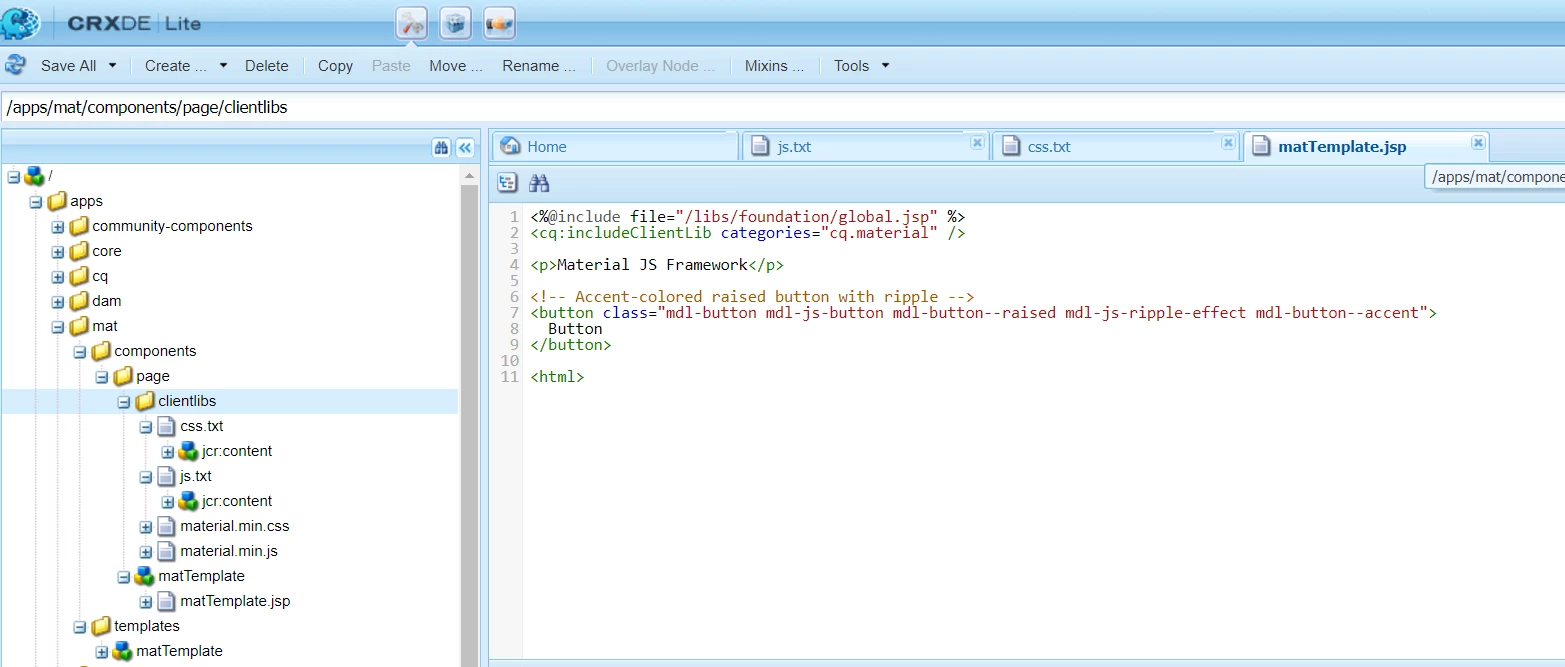
I added this JS file to a client lib - see here:

https://getmdl.io/started/index.html#download

See this pic:

ada

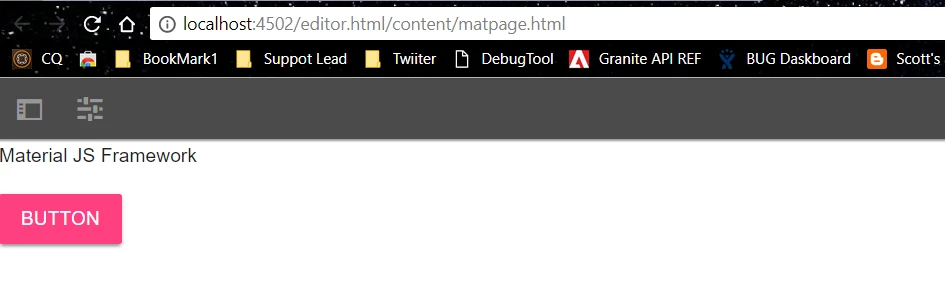
Here is the output - shown the  Material Lite CSS and JavaScript files was successfully integrated into AEM:

smacdonald2008
August 29, 2017

This code works too - as shown here:  https://codepen.io/pen/

<%@include file="/libs/foundation/global.jsp" %>

<cq:includeClientLib categories="cq.material" />

<script>

    $( document ).ready(function() {

    var button = document.createElement('button');

  var textNode = document.createTextNode('Click Me!');

  button.appendChild(textNode);

  button.className = 'mdl-button mdl-js-button mdl-js-ripple-effect';

  componentHandler.upgradeElement(button);

  document.getElementById('container').appendChild(button);

});

</script>   

<p>Material JS Framework</p>

<!-- Accent-colored raised button with ripple -->

<button class="mdl-button mdl-js-button mdl-button--raised mdl-js-ripple-effect mdl-button--accent">

  Button

</button>

<div id="container"/>

</div>

<html>

Lokesh_Shivalingaiah
Lokesh_ShivalingaiahAccepted solution
August 29, 2017

Hi John,

Instead of building the project and using the css and components locally, simply use this CDN to deliver the css and js for you.

CSS:https://unpkg.com/material-components-web@latest/dist/material-components-web.min.css

JS : https://unpkg.com/material-components-web@0.19.0/dist/material-components-web.min.js

So just include below in your template and you should be able to use material components

<link

      rel="stylesheet"

      href="https://unpkg.com/material-components-web@latest/dist/material-components-web.min.css" />

<script src="https://unpkg.com/material-components-web@latest/dist/material-components-web.min.js"></script>

<script>window.mdc.autoInit();</script>

In this approach you dont have to build and manage the 3rd party css and js,  not to worry about caching etc...

However, even if you want to use the material components locally, I think you are missing

<script>window.mdc.autoInit();</script>

which is responsible to attach all the JS components. Check if you have added this in your page.

August 29, 2017

Bsloki's answer did the trick! Thanks, everyone, for your input!