Accessing multivalue dropdown values in sightly | Community
Skip to main content
November 22, 2018
Solved

Accessing multivalue dropdown values in sightly

  • November 22, 2018
  • 1 reply
  • 1274 views

Hi,

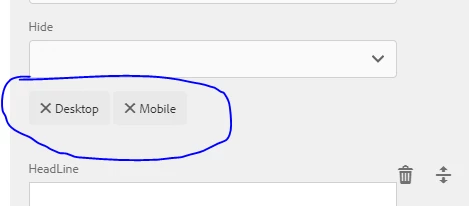
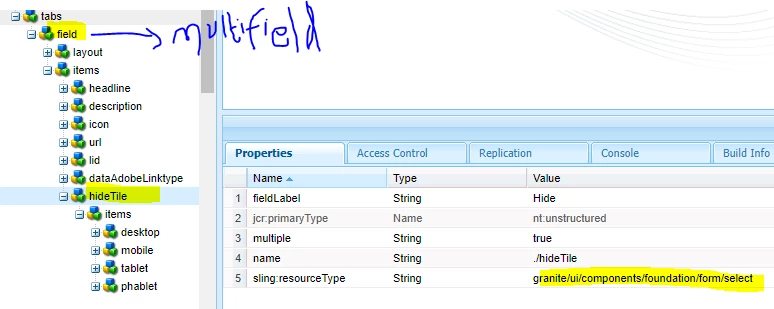
Can anyone help me to iterate multi-value drop-down values to sightly from multi-field  touch ui dialog(AEM6.3)
sightly code

    <section class="lfa-panel-container gcss-theme-${properties.theme} row" data-sly-use.component="${'**********' @compName='******'}" data-sly-list="${componentmultifieldlist}">   Iterating Multifield items

<div data-sly-list.child="${item['hideTile']}}">     -- Trying to iterate multi value dropdown item ([desktop,mobile])

            <div class="${child} " >           


            </div>

</div>

    </section>
AEM - QuestionsAdobe Experience ManagerAdobe Experience Cloud

This post is no longer active and is closed to new replies. Need help? Start a new post to ask your question.
Best answer by arunpatidar

Hi,

You can iterate multivalued property in HTL like below:

<dl data-sly-list="${properties.bgcolor}">

    <dt>index: ${itemList.index}</dt>

    <dd>value: ${item}</dd>

</dl>

If you are using java you can create a list for multiplied and another array or list for multivalued and parse through data-sly-list

1 reply

arunpatidar
Community Advisor
arunpatidarCommunity AdvisorAccepted solution
Community Advisor
November 22, 2018

Hi,

You can iterate multivalued property in HTL like below:

<dl data-sly-list="${properties.bgcolor}">

    <dt>index: ${itemList.index}</dt>

    <dd>value: ${item}</dd>

</dl>

If you are using java you can create a list for multiplied and another array or list for multivalued and parse through data-sly-list

Arun Patidar