Access permissions not working for workflows models | Community
Skip to main content
September 12, 2023
Solved

Access permissions not working for workflows models

  • September 12, 2023
  • 3 replies
  • 821 views

Dear team,


For one of the AEM 6.5.16 environment with nosamplecontent, we have applied deny permissions to any of the workflow models  based on the instructions mentioned in the documentation https://experienceleague.adobe.com/docs/experience-manager-65/administering/operations/workflows-managing.html?lang=en. After applying the deny configurations for OOTB workflow models (Ex: Request for activation) still these workflow models are displaying for the configured users. As this is happening only for one environment need help support with any steps to resolve the issue.


Thanks in advance!
This post is no longer active and is closed to new replies. Need help? Start a new post to ask your question.
Best answer by aanchal-sikka

@shivashankarhr1 


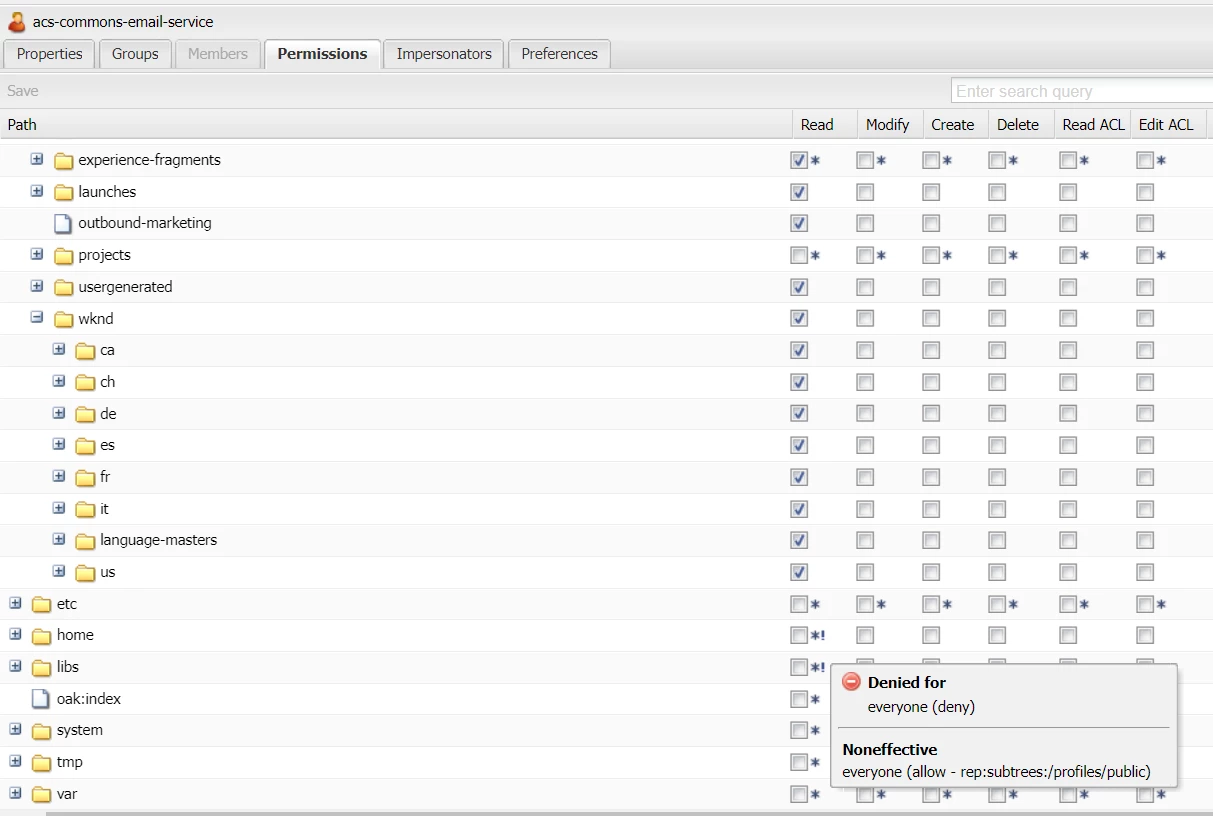
Please visit the useradmin http://localhost:4503/useradmin

- Search for a user, where you feel permissions have an issue

- Go to the workflow node.

- Hover over the '*' on the checkboxes. It would tell us which permissions are effective, which are being ignored. Also, it will tell us the groups from where permissions are flowing.

I hope it helps !

3 replies

A_H_M_Imrul
Community Advisor
Community Advisor
September 12, 2023

Hello @shivashankarhr1,


Access to the workflow elements is connected with the "workflow-users" group. Make sure the users do not have this group assigned.


Thanks


aanchal-sikka
Community Advisor
aanchal-sikkaCommunity AdvisorAccepted solution
Community Advisor
September 12, 2023

@shivashankarhr1 


Please visit the useradmin http://localhost:4503/useradmin

- Search for a user, where you feel permissions have an issue

- Go to the workflow node.

- Hover over the '*' on the checkboxes. It would tell us which permissions are effective, which are being ignored. Also, it will tell us the groups from where permissions are flowing.

I hope it helps !

Aanchal Sikka
kautuk_sahni
Community Manager
Community Manager
September 18, 2023

@shivashankarhr1 Did you find the suggestions from users helpful? Please let us know if more information is required. Otherwise, please mark the answer as correct for posterity. If you have found out solution yourself, please share it with the community.

Kautuk Sahni