I wouldn't be doing too much customization on your AEM enterprise website, but if you really wanted to... Another simple way to embed custom HTML, CSS, JS (like a micro-site) would be like this.
1. Upload assets to DAM under /content/dam/microsites/myapp/:
-
bundle.js
-
styles.css
-
any images or assets
After publishing, assets are publicly available at:
/content/dam/microsites/myapp/bundle.js
/content/dam/microsites/myapp/styles.css
2. Create a new AEM page using any editable template. Add a Rich Text component (Text or RTE) to the body. In source mode, paste the following:
Your bundle.js should contain the logic to mount a SPA into the #my-app-root container.
Example (React):
import React from 'react';
import { createRoot } from 'react-dom/client';
import App from './App';

const container = document.getElementById('my-app-root');
const root = createRoot(container);
root.render(<App />);
Upload AEM Assets (make sure both external CSS and JS files exists), and ensure the rich-text editor renders the custom code. If successful, the page will render the SPA inside the RTE component.
Real Example: SourcedCode CURL Generator Tool
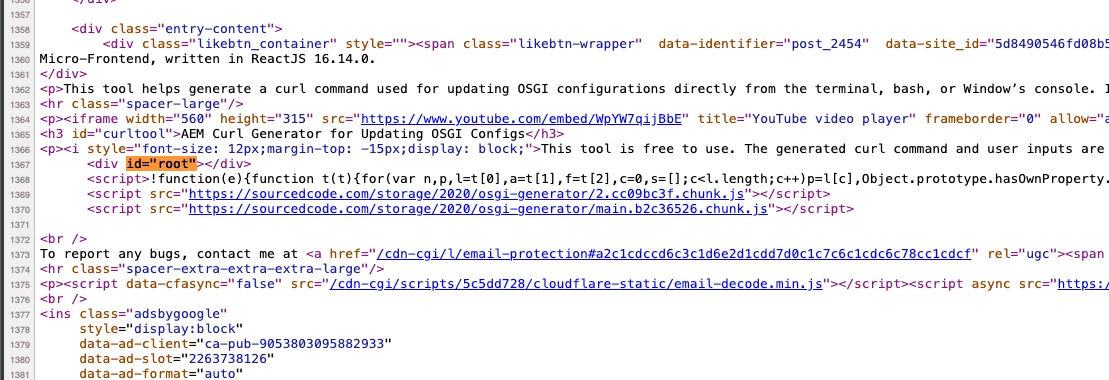
In this example, my website, I applied the same steps as above, but instead of hosting files on AEM, I hosted the files on Wordpress https://sourcedcode.com/blog/aem/tool-generate-curl-command-to-update-osgi-configurations#curltool
As you can see in the screenshot, this is where step #2 comes in. An id="root" (in my case) for my bundle in line:1368 to be loaded. The CSS must be somewhere along the top of the page.