A Container Doesn't Snap to Columns | Community
Skip to main content
March 27, 2021
Solved

A Container Doesn't Snap to Columns

  • March 27, 2021
  • 2 replies
  • 2111 views

Hi,

I am using AEM 6.5.  I have a problem to layout containers.
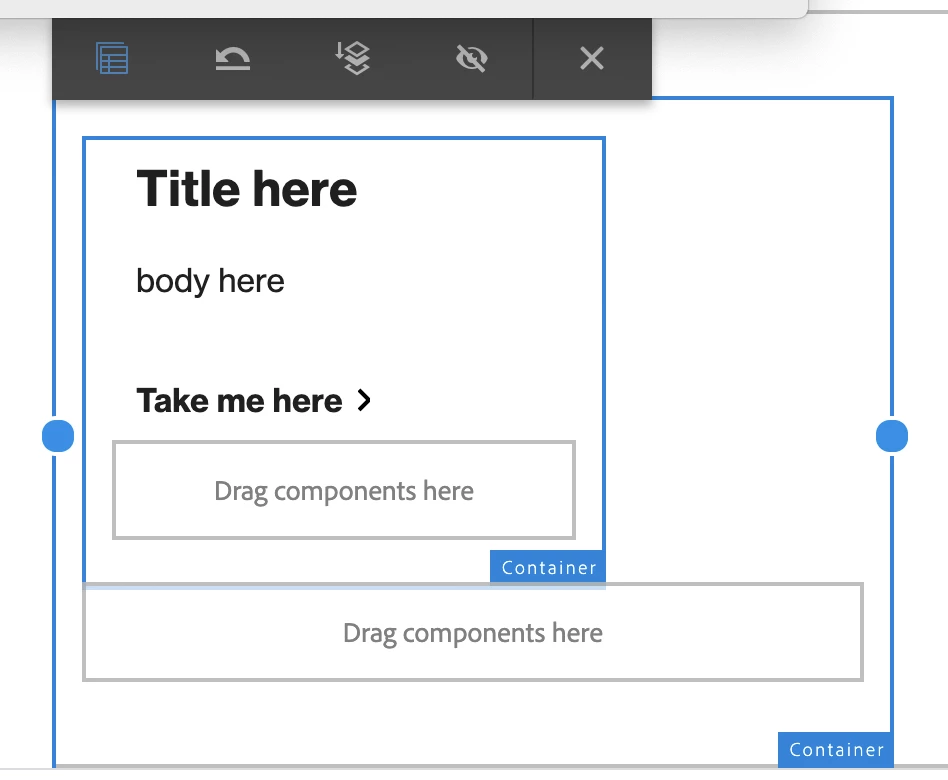
I have a title, body and a button netted inside 2 containers (as image 1 below).  I want to make the outmost container smaller by dragging a blue dot. 

The problem is wherever I drag, the container moves back to where it was, it doesn't snap to the columns layout! For example, it was in column 1, I drag it to column 4, then it moves back to column 1 by itself (second image).


I already have app.ui.apps0.0.1-SNAPSHOT.zip installed


How can I get a container snapped to the columns layout?
In order to get a container snapped to columns, should I have to have double containers set up like this?  or can I have only one container?

Please give me a hand.  Thanks


This post is no longer active and is closed to new replies. Need help? Start a new post to ask your question.
Best answer by Asutosh_Jena_

Hi @aemstu 

Please update the core component dependency version to latest (currently 2.15.2) and re-validate.

Please look for the following dependency in pom.xml


<dependency>
<groupId>com.adobe.cq</groupId>
<artifactId>core.wcm.components.core</artifactId>
<version>2.15.2</version>
<scope>provided</scope>
</dependency>
<dependency>
<groupId>com.adobe.cq</groupId>
<artifactId>core.wcm.components.all</artifactId>
<type>zip</type>
<version>2.15.2</version>
<scope>provided</scope>
</dependency>

https://github.com/adobe/aem-core-wcm-components/releases/tag/core.wcm.components.reactor-2.15.2 


Thanks!

2 replies

arunpatidar
Community Advisor
Community Advisor
March 28, 2021

Hi,

Which version of core components are you using? there was an issue with responsiveness with core container component with layout mode.

Arun Patidar
AEMStuAuthor
March 28, 2021

Hi Arun, Thank you very much for your comment! I think my core V. is 2.3.2 (would you please take a look at my last attachment above).

If my core version is old, please direct me a source and how to update it to a new version which can solve the problem.  Thanks!

Asutosh_Jena_
Community Advisor
Asutosh_Jena_Community AdvisorAccepted solution
Community Advisor
March 29, 2021

Hi @aemstu 

Please update the core component dependency version to latest (currently 2.15.2) and re-validate.

Please look for the following dependency in pom.xml


<dependency>
<groupId>com.adobe.cq</groupId>
<artifactId>core.wcm.components.core</artifactId>
<version>2.15.2</version>
<scope>provided</scope>
</dependency>
<dependency>
<groupId>com.adobe.cq</groupId>
<artifactId>core.wcm.components.all</artifactId>
<type>zip</type>
<version>2.15.2</version>
<scope>provided</scope>
</dependency>

https://github.com/adobe/aem-core-wcm-components/releases/tag/core.wcm.components.reactor-2.15.2 


Thanks!

AEMStuAuthor
March 29, 2021

Thank you, Arun!
Currently in my local I have:

core.wcm.components.content-2.3.2.zip core.wcm.components.config-2.3.2.zip core.wcm.components.all-2.3.2.zip core.wcm.components.extension.contentfragment.content-1.0.12.zip core.wcm.components.extension-1.0.12.zip core.wcm.components.examples-2.3.2.zip

And from the link you provided, there are:

core.wcm.components.all-2.15.2.zip
core.wcm.components.core-2.15.2-javadoc.jar
core.wcm.components.examples.all-2.15.2.zip
core.wcm.components.extensions.amp-2.15.2.jar
core.wcm.components.extensions.amp.content-2.15.2.zip

Is it ok if the update version doesn't have what I have in my local?  For instance, my local has  core.wcm.components.extension.contentfragment.content,  core.wcm.components.config, but the new version doesn't.

Please let me know.  Thanks!

