6.5: cannot add any components (custom/built-in) to pages | Community
Skip to main content
jayv25585659
Level 8
January 22, 2021
Solved

6.5: cannot add any components (custom/built-in) to pages

  • January 22, 2021
  • 2 replies
  • 1817 views

background info: we are in the process of upgrading to 6.5 on an AMS hosted environment. They provided a sandbox area for us so we can test our custom code.

problem: After merging our 6.4 and 6.5 code base, I cannot add components anymore.

When clicking on a component, all I get is this:
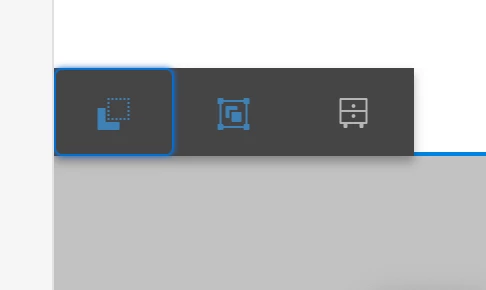
I also cannot drag-and-drop components anymore.

I'm looking for suggestions on what files/configs to check.

1. I checked the error and project logs but nothing related jumps out.

2. I fixed an NPE error in our custom code (which seems to be unrelated) and reinstalled the new package and it didn't fix it.

Thank you.


edit1: I started encountering this issue in local which could be related to the issue with the AMS sandbox environment.

edit2: Seems my local and AMS sandbox is fixed after reinstalling the package. The weird thing with local is that if I had to restart my computer for whatever, I get the problem but if I reinstall our custom package, it starts working again.

This post is no longer active and is closed to new replies. Need help? Start a new post to ask your question.
Best answer by arunpatidar

Addition to allow components in the parsys, the issue could be with your page component dialog overlays. The dialog structure of OOTB page component is changed in 6.5 so when you overlay, you have to follow the same structure.


you can delete the dialog from your project page component and verify if this is the cause.

2 replies

Suraj_Kamdi
Community Advisor
Community Advisor
January 22, 2021

@jayv25585659 It might be possible that there no policy configured to allow components inside the layout container.

Go to the edit template option and check if the policy for the respective layout container is defined or not.

jayv25585659
Level 8
February 1, 2021
can you please tell me which file to check? Thanks
arunpatidar
Community Advisor
arunpatidarCommunity AdvisorAccepted solution
Community Advisor
January 22, 2021

Addition to allow components in the parsys, the issue could be with your page component dialog overlays. The dialog structure of OOTB page component is changed in 6.5 so when you overlay, you have to follow the same structure.


you can delete the dialog from your project page component and verify if this is the cause.

Arun Patidar
jayv25585659
Level 8
February 1, 2021
I started encountering this issue in local which could be related to the issue with the AMS sandbox environment.Seems my local and AMS sandbox is fixed after reinstalling the package. The weird thing with local is that if I had to restart my computer for whatever, I get the problem but if I reinstall our custom package, it starts working again.