6.4 JCR data using the QueryBuilder API tutorial trouble | Community
Skip to main content
May 16, 2019
Solved

6.4 JCR data using the QueryBuilder API tutorial trouble

  • May 16, 2019
  • 2 replies
  • 3362 views

Hi Experts,

I've been following the "Querying Adobe Experience Manager 6.4 JCR data using the QueryBuilder API" tutorial.

Adobe Experience Manager Help | Querying Adobe Experience Manager 6.4 JCR data using the QueryBuilder API

I'm currently using AEM 6.5 and I create the project using archetype version 18 and not 13.

However I've been having trouble with the Sling servlet, I've pretty much followed the tutorial exactly.

The get Employees button in the HTL sends a JQuery AJAX request to post data to a Sling Servlet.

The path which I set in the servlet is:

@Component(service=Servlet.class,

property={

        Constants.SERVICE_DESCRIPTION + "=Simple Demo Servlet",

        "sling.servlet.methods=" + HttpConstants.METHOD_GET,

        "sling.servlet.paths="+ "/bin/myCustData"

   })

I try to access this servlet by:

$.ajax({

type: 'GET',   

url:'/bin/myCustData',

data:'type=' + 'data',

success: function(msg){

var xml = msg;

var oTable = $('#myTable').dataTable();

oTable.fnClearTable(true);

//Loop through this function for each Employee element in the returned XML

$(xml).find('Employee').each(function(){


            var $field = $(this);

            var Name = $field.find('Name').text();

            var Job = $field.find('Position').text();

            var Address = $field.find('Address').text();

            var Age = $field.find('Age').text();

            var Date = $field.find('Date').text();  

            var Salary = $field.find('Salary').text();    

            //Set the new data

        oTable.fnAddData( [

                Name,

                Job,

                Address,

                Age,

                Date,

                Salary,,]

            );

            });

       }

});

However I'm getting the error below.

*INFO* [0:0:0:0:0:0:0:1 [1557972332514] GET /bin/myCustData HTTP/1.1] org.apache.sling.engine.impl.SlingRequestProcessorImpl service: Resource /bin/myCustData not found

The QUeryJCR64 - CoreQUeryJCR64.core bundle is active and the servlet is being registered. But there is no path field showing?
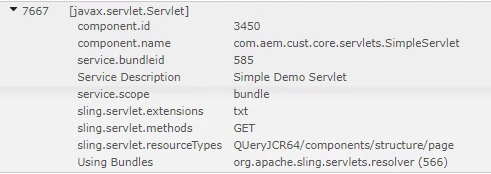
Any clues on what might be the problem would be appreciated,

Thank you,

This post is no longer active and is closed to new replies. Need help? Start a new post to ask your question.
Best answer by PriyankaBiswal

Hi ,

pointers below might help you debug.

1. Check if your servlet is being Resolved http://localhost:4502/system/console/servletresolver , Give your Servlet path and see what is the serving url.

2. Check  if the OSGI Component is Active or not, An osgi component may not be in active state if all its references are not satisfied.

Go to  http://localhost:4502/system/console/components , Search with fully qualified name of your Osgi Component e.g

com.adobe.cq.account.api.AccountManagementService

3. You can check if  your Servlet path is allowed in Apache Sling Servlet/Script Resolver and Error Handler

2 replies

PriyankaBiswal
PriyankaBiswalAccepted solution
Level 2
May 16, 2019

Hi ,

pointers below might help you debug.

1. Check if your servlet is being Resolved http://localhost:4502/system/console/servletresolver , Give your Servlet path and see what is the serving url.

2. Check  if the OSGI Component is Active or not, An osgi component may not be in active state if all its references are not satisfied.

Go to  http://localhost:4502/system/console/components , Search with fully qualified name of your Osgi Component e.g

com.adobe.cq.account.api.AccountManagementService

3. You can check if  your Servlet path is allowed in Apache Sling Servlet/Script Resolver and Error Handler

smacdonald2008
Level 10
May 16, 2019

As you pointed out that was for AEM 6.4 and tested on that version. I am not sure if something would need to be modified to work on AEM 6.5 and Maven Arch 18.