403 forbidden for Anonymous user URL /system/console/configMgr | Community
Skip to main content
Level 5
November 4, 2020
Solved

403 forbidden for Anonymous user URL /system/console/configMgr

  • November 4, 2020
  • 2 replies
  • 5759 views

Hi,

As admin user, I am unable to access urls after changing the Apache Sling Auth Service -> Anonoymous Username to anonymous. This change was done from URL server:port/system/console/configMgr. After this change, I am unable to undo the change since

1. When trying to access URL server:port/system/console/configMgr the following error is displayed.

HTTP ERROR 403
Problem accessing /libs/granite/core/content/login.html. Reason: Forbidden

2. When trying to access URL server:port/crx/de the following error is displayed. 

HTTP ERROR 403 problem accessing /crx/de reason forbidden

3. When trying to access URL server:port/aem/start.html the following error is displayed. 

HTTP ERROR 403 Problem accessing /libs/granite/core/content/login.html. Reason: Forbidden


This issue occurs in AEM 6.5 and I can login to server:port/crx/explorer/index.jsp as admin. How can this be fixed?


Thanks in advance for the help.
This post is no longer active and is closed to new replies. Need help? Start a new post to ask your question.
Best answer by Jineet_Vora

Hello @aemuser001,

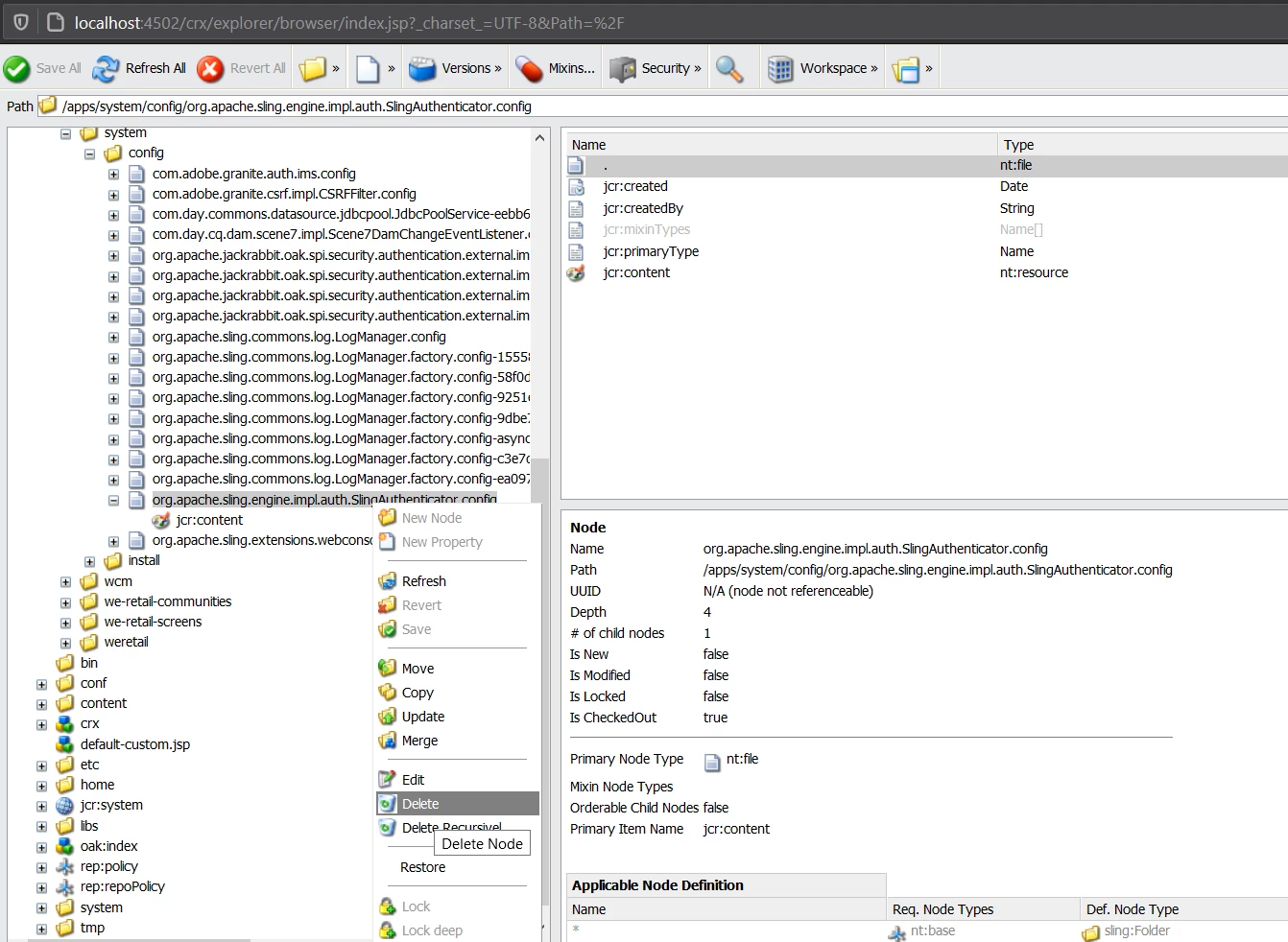
As you said you're able to login to /crx/explorer then you can login using admin and go to 'Content Explorer'. The config 'Apache Sling Authentication Service' you will find under /apps/system/config/org.apache.sling.engine.impl.auth.SlingAuthenticator.config. Delete this node and click on 'Save All' and you should be able to login as you would generally. Alternatively, you can also use CURL command to delete the config but this should also work and is a easy approach.


2 replies

Jineet_Vora
Community Advisor and Adobe Champion
Jineet_VoraCommunity Advisor and Adobe ChampionAccepted solution
Community Advisor and Adobe Champion
November 4, 2020

Hello @aemuser001,

As you said you're able to login to /crx/explorer then you can login using admin and go to 'Content Explorer'. The config 'Apache Sling Authentication Service' you will find under /apps/system/config/org.apache.sling.engine.impl.auth.SlingAuthenticator.config. Delete this node and click on 'Save All' and you should be able to login as you would generally. Alternatively, you can also use CURL command to delete the config but this should also work and is a easy approach.


Level 5
November 4, 2020
Thank you for providing the solution. It worked.
November 7, 2023

Jineet_Vora,


Thank you. You are a genius. - JP Terry