
Why are the Web viewer and Device sign in boxes different? | Community
Skip to main content
Keith_Gilbert
Level 3
July 27, 2016
Solved

Why are the Web viewer and Device sign in boxes different?

  • July 27, 2016
  • 4 replies
  • 2340 views

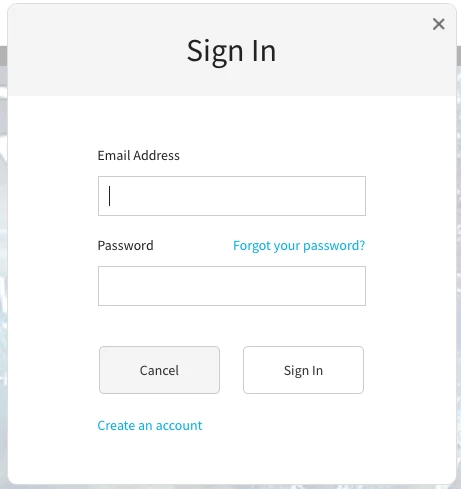
We are creating an AEM app that uses V2 entitlement. I just noticed that the sign in dialog for the Web Viewer looks like this:
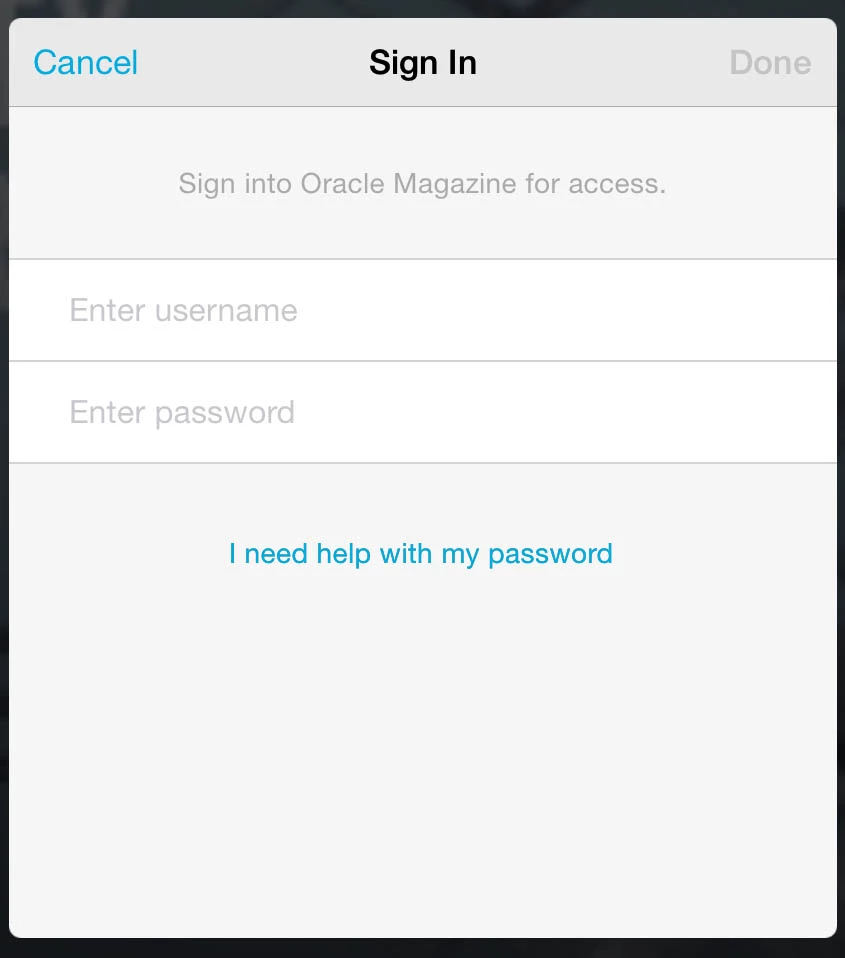
But the sign in dialog for the iOS devices looks like this:
Wondering why they are different? Differences that matter to us:

1. The tablet screen says "Username" but the Web viewer says "Email Address" (We prefer email address)

2. The tablet screen doesn't have a link to "create an account" but the Web viewer does. This is important. We need this.

Is there any way to make these to screens match? Why are the different?

Thanks.

This post is no longer active and is closed to new replies. Need help? Start a new post to ask your question.
Best answer by nathanm206

Keith, the "create account" link on iOS is in the "Account" dialog, beneath the "sign in" button. iOS is the only app that has an Account dialog, because iOS has a few other configuration options to handle different store scenarios not present on the other platforms. Are you not seeing it in that location?

Regarding the string, the difference is unintentional. Username is the more generic term and one we use across all mobile device viewers. We chose username because some authentication providers don't require an email address, so labeling it "email address" may be inaccurate.

4 replies

Marco_Aurélio_S
July 28, 2016

Hi Keith,

You can try this steps:

Edit your project settings, click the Access tab, and specify the following options:

  • If desired, specify Create Account URL and Forgot Password options. Your users can tap these buttons to view the web page you specify.

Source: Set up entitlement in AEM Mobile apps

I try this in my project and works.

nathanm206Adobe EmployeeAccepted solution
Adobe Employee
July 28, 2016

Keith, the "create account" link on iOS is in the "Account" dialog, beneath the "sign in" button. iOS is the only app that has an Account dialog, because iOS has a few other configuration options to handle different store scenarios not present on the other platforms. Are you not seeing it in that location?

Regarding the string, the difference is unintentional. Username is the more generic term and one we use across all mobile device viewers. We chose username because some authentication providers don't require an email address, so labeling it "email address" may be inaccurate.

Keith_Gilbert
Level 3
July 28, 2016

Nathan, I understand that the "create account" link on iOS is in the "Account" dialog in the hamburger menu. However, here's the problem: Imagine a new user is in the app, and they do not have an account and are not signed in. They encounter some entitled content with the lock.

When they tap "sign in" from one of these screens, all they see is the log-in screen below on iOS devices.

In this case, they have no idea how to create an account. They aren't going to know to go to the hamburger menu and tap on "account" to find it.

Both the Android and Web Viewer sign in screens have the "Create an account" link. The iOS sign in screen needs to have this as well!

Adobe Employee
July 28, 2016

Ah, I see. Thanks for the context. The differences between iOS and the other platforms was based on what I had said before, but your scenario obviously wasn't considered. I've shared details with the dev team on this.