
Metadata Schema Tags fields | Community
Skip to main content
joe_s66
October 27, 2020
Solved

Metadata Schema Tags fields

  • October 27, 2020
  • 2 replies
  • 2624 views

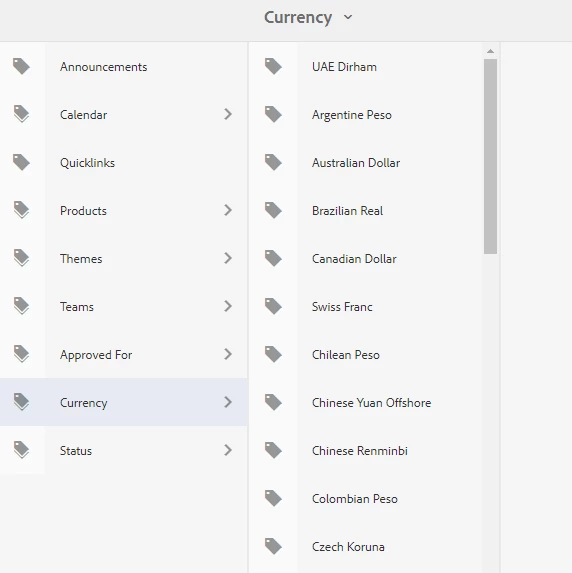
We'd like to fix the behavior of the selection dialog box when authors are tagging metadata properties for assets. In the current behavior, the dialog box for cq tags opens at the root level. How can we modify the dialog box to show the cq tags at the correct level? For example, selecting "currency" will launch the dialog box to open at the cq:tag - currency --> selections. (see screenshot) instead of the root level. Thanks.
 

This post is no longer active and is closed to new replies. Need help? Start a new post to ask your question.
Best answer by debasis-swain

Hi Joe,


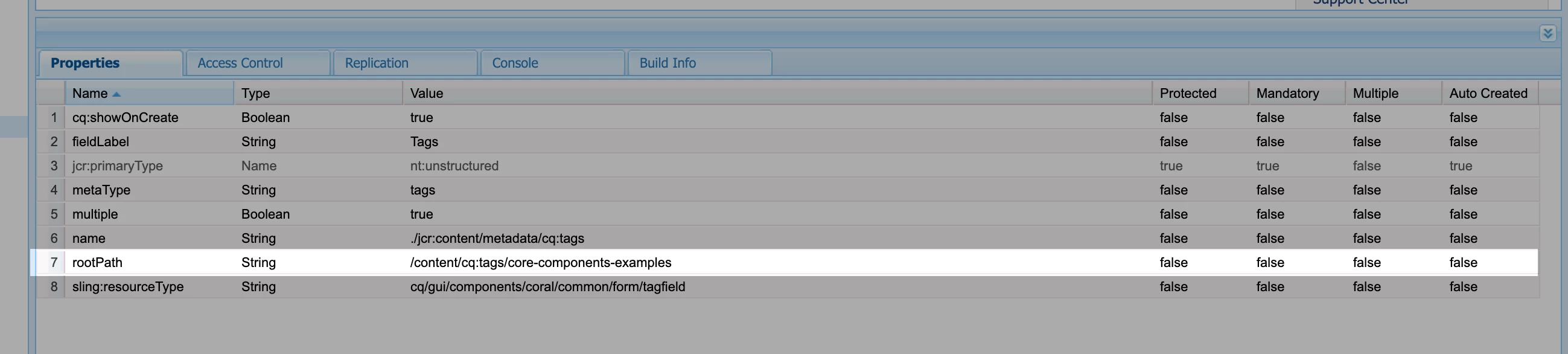
You can add a property ("rootPath") to the node which holds the cq:tag field. Below is a screenshot of the same. You have to add it from crxde as there is no option from the GUI where we edit the metadata schema.


You can find the path of the node in /conf/global/settings/dam/adminui-extension/metadataschema/your_schema


Thanks,

Debasis

2 replies

debasis-swain
October 27, 2020
HI Joe,
debasis-swain
debasis-swainAccepted solution
October 27, 2020

Hi Joe,


You can add a property ("rootPath") to the node which holds the cq:tag field. Below is a screenshot of the same. You have to add it from crxde as there is no option from the GUI where we edit the metadata schema.


You can find the path of the node in /conf/global/settings/dam/adminui-extension/metadataschema/your_schema


Thanks,

Debasis

joe_s66
joe_s66Author
October 27, 2020
Thanks for your help.