Layout for phone and tablet | Community
Skip to main content
Level 2
October 23, 2015
Solved

Layout for phone and tablet

  • October 23, 2015
  • 7 replies
  • 2448 views

I want to make different layouts for phone and tablet - and I was at an Adobe seminar three weeks ago, where they showed that it is possible.

However, I can't find the 'Default phone' and 'Default tablet' in Layouts and Cards - how do I get those?

- Sia
This post is no longer active and is closed to new replies. Need help? Start a new post to ask your question.
Best answer by Florent_Romanet

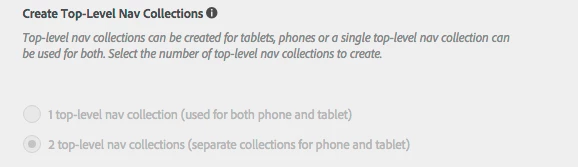
First, did you create a 2 top-level nav collection app ?

if yes, you should see in content/collections 2 different top level navigation collection. Default Tablet and Default Phone:

Collections and articles for tablet in the first, for smartphone in the second

if no, then you must share the same TLC for both phone and tablets. Witch mean that you'll need only one layout for both.

7 replies

October 23, 2015

You have to create both phone and tablet layouts by yourself

Level 2
October 23, 2015

Hi Florent,

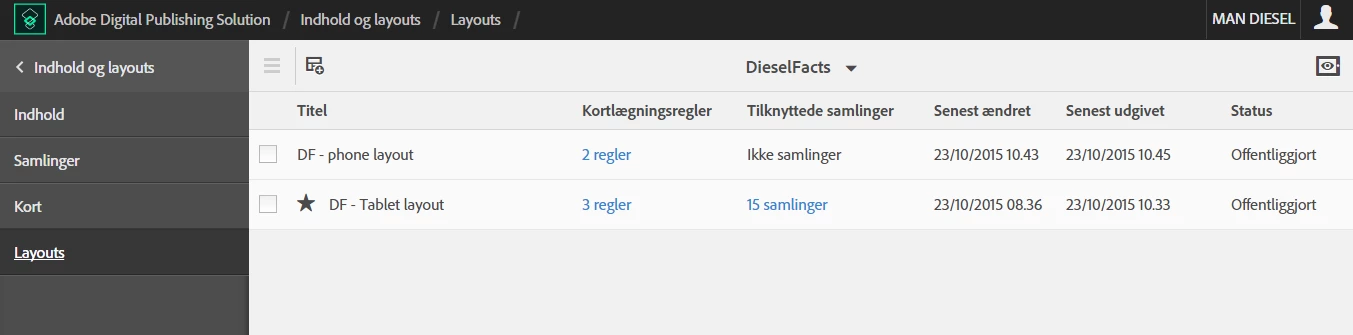
I have tried to create the layouts - but the phone are still using the layout for tablet.

At the seminar, there where a star symbol infront of both layouts.

Can you see, on the below pictures, what I do wrong?

or is there are tutorial somewhere, on how to do this?

Florent_RomanetAccepted solution
October 23, 2015

First, did you create a 2 top-level nav collection app ?

if yes, you should see in content/collections 2 different top level navigation collection. Default Tablet and Default Phone:

Collections and articles for tablet in the first, for smartphone in the second

if no, then you must share the same TLC for both phone and tablets. Witch mean that you'll need only one layout for both.

Level 2
October 23, 2015

Thanks Florent, that's why it don't work.

Is it possible to change it after the project are already created ? Or shall I start from scratch...

October 23, 2015

I'm afraid to answer that question

Adobe Employee
October 23, 2015

Unfortunately, you cannot edit that project setting at this time. You need to create a new project. There is also no way at this time to copy content between projects.

Level 2
October 23, 2015

Thanks Bob.

After Florent answer I already dublicated my work So I'm up and running again.