Generating and submitting a zip file | Community
Skip to main content
This post is no longer active and is closed to new replies. Need help? Start a new post to ask your question.
Best answer by ktukker

Hi,

You can download the unsigned-app from the DPS Portal and use the DPS App Signing utility to generate your distribution zip.

https://helpx.adobe.com/digital-publishing-solution/how-to/create-ios-app.html

-Klaasjan

16 replies

ktukkerAdobe EmployeeAccepted solution
Adobe Employee
August 21, 2015

Hi,

You can download the unsigned-app from the DPS Portal and use the DPS App Signing utility to generate your distribution zip.

https://helpx.adobe.com/digital-publishing-solution/how-to/create-ios-app.html

-Klaasjan

Level 3
August 21, 2015

Klaasjan, we downloaded our unsigned-app and we used the Adobe Publishing signing tool to sign with distribution certificates, but it just generates a .ipa, not a zip for distribution. What should we do to generate the zip?

Neil_Enns_-_Ado
Adobe Employee
Adobe Employee
August 21, 2015

You don't need to, you can just upload the .ipa file.

Neil

Level 3
August 21, 2015

Oh, ok!!! Thanks!!!

Level 3
August 21, 2015

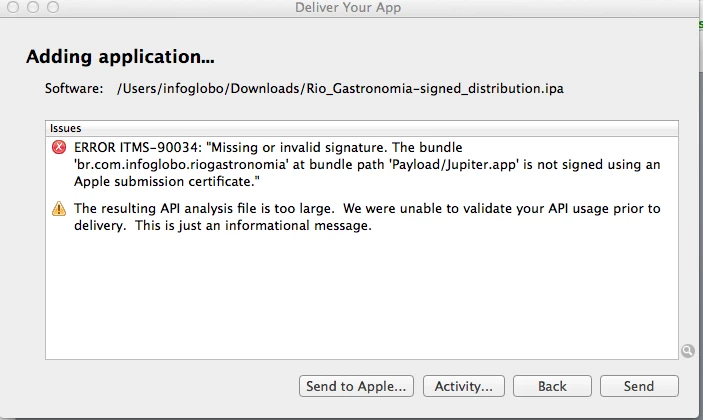
Neil, we are facing an error when we try to submit. Do you know what's going on?

Neil_Enns_-_Ado
Adobe Employee
Adobe Employee
August 21, 2015

You need to sign the viewer using the DPS Signing tool before uploading it.

Neil

Level 3
August 21, 2015

We did this. Actually it's basically the same that we do with android apps, right? I'm putting step by step. Here what we did:

  1. we did the build
  2. we downloaded a unsigned build
  3. we've signed
  4. once we try to upload to app store this error appears
Neil_Enns_-_Ado
Adobe Employee
Adobe Employee
August 21, 2015

Are you sure the certificate you used to sign the file was the one from Apple, and was the distribution certificate? Given the error message ("not signed using an Apple submission certificate") that sounds suspiciously that the certificate you used isn't correct, or wasn't the right one.

Neil

Level 3
August 21, 2015

Neil, what's the difference between version of marketing and version? The marketing version that we put when we are building is the same that we need to use on itunes?

We need to upload it today. We reviewed our certificates, and apparently they are correct. What's the meaning of bundle path 'Payload/Jupiter.app'?

Neil_Enns_-_Ado
Adobe Employee
Adobe Employee
August 21, 2015

Information about the version field is available at Digital Publishing Solution Help | Change the app version number. This topic is available via the "learn more" link directly next to the version field in App Builder.

You should call enterprise support for assistance with your signing issue, especially since it's time critical.

Neil