Folio Overlays features replacement? | Community
Skip to main content
Folobo
Level 2
June 29, 2015
Solved

Folio Overlays features replacement?

  • June 29, 2015
  • 15 replies
  • 6298 views

Hi all and thanks to have build this new forum!

Here we are happy about the new DPSolution but also we are concerned about the lost of folio overlays animation.

Our client want these animation and here we have to understand how replace them!

  1. Hyperlink
  2. Slideshow (we are terribly concerned about this)
  3. Image Sequence (we are terribly concerned about this)
  4. Audio & Video
  5. Panorama
  6. Web Content

Thanks for the support!

This post is no longer active and is closed to new replies. Need help? Start a new post to ask your question.
Best answer by BobLevine

Did you install the new tools? The new overlays panel is identical to the old folio overlays panel with the exception of the already deprecated panorama.

15 replies

BobLevine
BobLevineAccepted solution
Level 6
June 29, 2015

Did you install the new tools? The new overlays panel is identical to the old folio overlays panel with the exception of the already deprecated panorama.

Felipe_-_dualpi
Level 3
June 29, 2015

Hi,

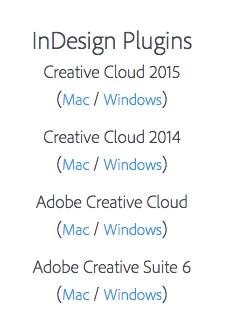
Here the link to install the new tools suitable from CS6

Digital Publishing Solution | Beta Resources

Folobo
FoloboAuthor
Level 2
June 29, 2015

Thanks Bob and Felipe!

Please confirm i need to install the first of the image for Indd CC2015?

For the rest: in another 2 computer i have CS6 and CC2014 - how to update them to DPS 2015?

I need before remove DPS Tools 2014?

Really thanks!

BobLevine
Level 6
June 29, 2015

I don't know how much more straight forward this can be. That list has the links for CS6 through CC2015 for Mac and Windows.

There is no need to replace the prior tools. The old and new versions can sit side by side.

Folobo
FoloboAuthor
Level 2
June 29, 2015

Sorry Bob, so with CS6 or CC2014 i can install both DPS Tools 2014 and 2015, confirm?

NB: only CC2015 can not be used with DPS Tools 2014 - yes, i understand this!

Thanks again!

Adobe Employee
June 29, 2015

Yes, you can install both. You should run multiple versions of InDesign. Use InDesign CS6 or CC2014 for the earlier DPS workflow (with Folio Builder), and use any version of InDesign for DPS 2015.

When you go to update InDesign, choose Advanced Options and then turn off the setting to remove the previous version. And if you accidentally uninstall the previous versions, you can reinstall them. Let us know if that happens and we can guide you.

Folobo
FoloboAuthor
Level 2
July 2, 2015

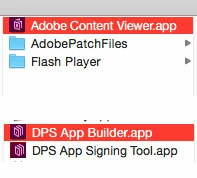
Hi Bob, i do not understand why on my mac with only updated CC2015 i still have these 3 tools (i think the unistaller of CC2014 remove them!).

These 3 tools are for DPS CC2014, NOT DPS CC2015!

  1. Adobe Content Viewer
  2. DPS App Builder
  3. DPS App Signing Tool


What do you think?

Colin_Fleming
Level 6
July 2, 2015

Those are leftover DPS tools, they're not removed when you delete InDesign. All three are for the older, DPS 2014 workflow and not needed when working with DPS 2015.

You may delete them if you're only using DPS 2015.

Folobo
FoloboAuthor
Level 2
July 3, 2015

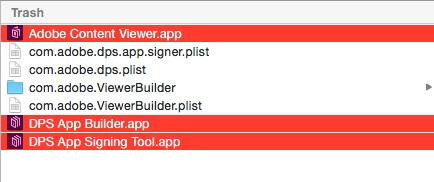
Many thanks Colin, please see the image - can you confirm that is correct remove these list of file (and user preferences)?

Really thanks!

Colin_Fleming
Level 6
July 3, 2015

If you are only using the DPS 2015 workflow, those apps are not required.

If you delete them, and then realize you need to use ID CC 2014 to make content for a DPS 2014 app, you can re-install the DPS Tools for ID CC 2104 -- and the Content Viewer app would be installed.

App Builder would be a download, if you need to build/update a DPS 2014 app.

The App signing tool you highlight would be a download if you need to sign an Android app built using the DPS 2014 workflow.