Cards titles look different when published | Community
Skip to main content
Level 3
March 24, 2016
Solved

Cards titles look different when published

  • March 24, 2016
  • 18 replies
  • 7848 views

Here is what is happening. I have created my layout and cards using custom fonts. The problem is I get them to look the way I want them in the layout template, but when I publish the App for test viewing the leading is different on the iPad. And even more the Android looks different than both the iPad and Layout Template. Here are some screen grabs to explain:

Here is what they look like in the layout template.

And here is what the iPad ends up looking like. Just to be clear. The icons and "ambitconnection" are built into the card image.
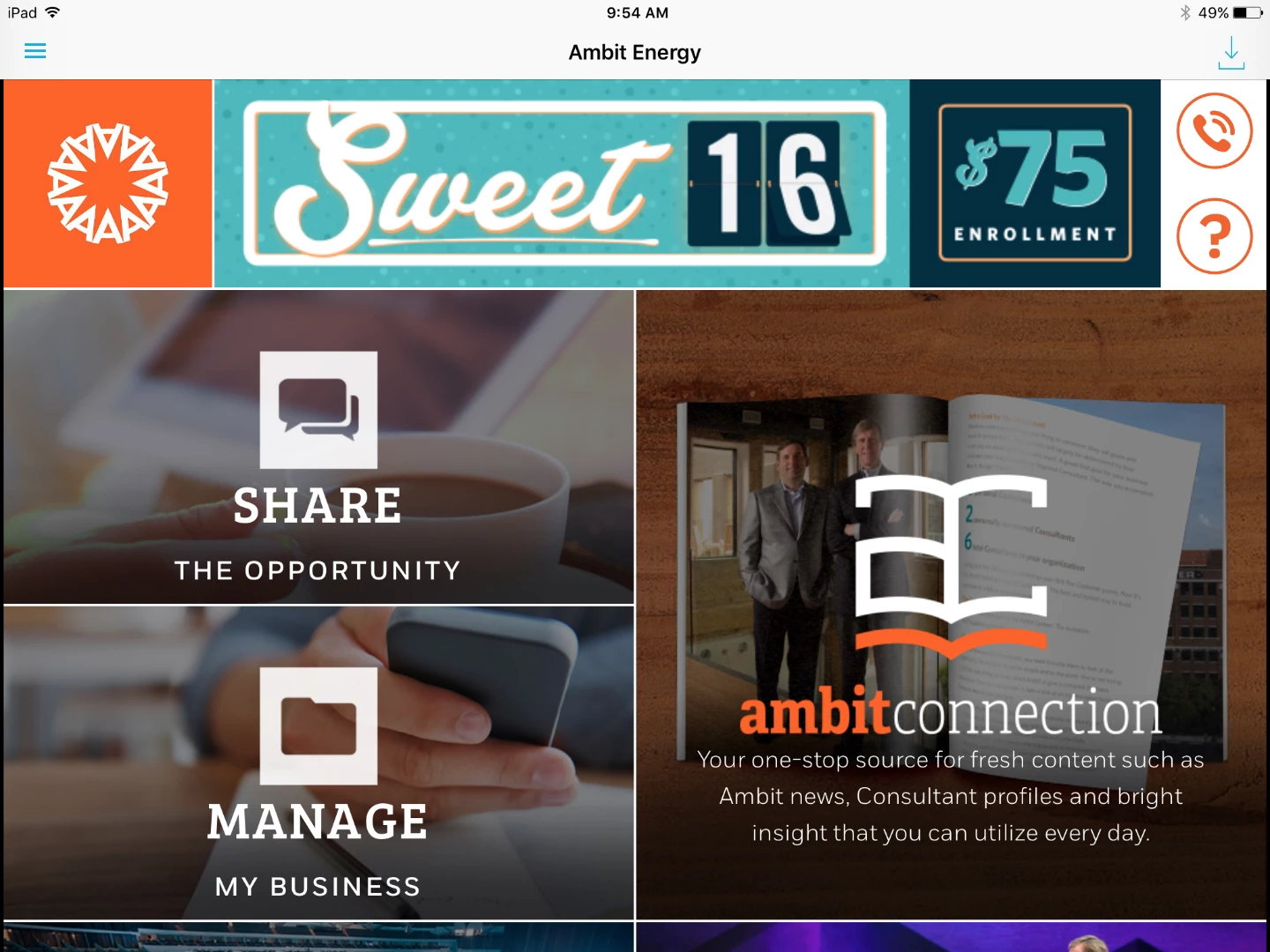
It seems like since my layout template is set to iPad that it should look exactly like that when I publish to the iPad. Any thoughts on why this is happening?

This post is no longer active and is closed to new replies. Need help? Start a new post to ask your question.
Best answer by andreig1004688

Hi, ambitappa77373764‌, Keith,

As Nathan pointed out, there are a few OS - differences that lead to differences in how text is rendered. This is especially true for leading values smaller than 1.1.

The only current work-around is to use leading values of 1.1 or larger and adjust your font metrics in a glyph editor to create the tighter leading for you fonts. 

Andrei

18 replies

Colin_Fleming
Level 6
March 24, 2016

A quick comparison of the two images and it strikes me that the treatment of the cards and banners is the same. Line ends, crops, grids are the same... What's different is that Layout Templates doesn't show the OS bar at the top and it doesn't "crop" the page to only show the aspect ratio of the iPad... so I have the impression that the preview in Layout Templates is the wrong shape, specifically it's too tall.

So the impression from Layout Templates is that I'll see all of the third row of cards, but the iPad isn't that shape. Layout Templates isn't particularly strong at reflecting the height of the selected screen dimension, IMO, but the overall design is there.

HTH -- Colin

Level 3
March 24, 2016

Sorry, I may not have been clear about what is different between the 2. Yes, the crops, grids are the same, but I'm specifically talking about the way the card titles are treated. More specifically the leading. The leading on the cards are much different between the layout template and the published app. And it becomes even more apparent if you see the android version which is different than both the layout template and the published iPad app.

Colin_Fleming
Level 6
March 24, 2016

Got it. Sorry I missed that you're mostly focused on the fonts.

So what fonts did you load? Type/format.

The iOS and Android apps will tend to use the TTF or OTF font resource, Windows will want a WOFF format, and the Layout Templates will also want a WOFF resource.

Level 3
March 24, 2016

The screen shots you see here were made with a pair of OTF fonts. The slab serif we've been able to convert to a WOFF for the Layout Templates. The other we can't find a WOFF version of, nor will it permit conversion. So we're looking for a replacement that provides web formats or will permit conversion.

Colin_Fleming
Level 6
March 24, 2016

Sounds like you've identified the issue.

Level 3
March 24, 2016

Well, we thought we did, but after replacing the font with one that had a TTF and WOFF it actually made the leading issue worse. See screenshot:

Colin_Fleming
Level 6
March 24, 2016

A different font file/resource may have a different design -- you may need to readjust the leading or spacing values for the different font.

Level 3
March 24, 2016

‌Yes, we have done this. I guess the problem boils down to this. We can get it to look exactly the way we want on the layout template set to iPad, but when we update the test app the leading and even the appearance of the font in some cases looks totally different. It actually looks closer to the way we want it on the Android test app.

Gronckle
Level 2
March 25, 2016

I had a similar problem - At least on mine, the layout template is basically an approximation of the final product. The fonts on the layout preview display about 30% smaller than the app and the margins / paddings are nowhere close to the final app's display. I just kept using the live App to judge my adjustments - not worrying about the details on the layout template. After much adjusting, my layout preview looks terrible, but my live app looks just how I wanted. *shrugs*

Level 3
March 28, 2016

‌I guess it's reassuring that someone else has had this same problem but surely this is not what Adobe intended. I'm guessing that most users are not having to look at the live app to see their changes. It just seems like you could skip the layout templates if this was the case. I feel like it must be on my end somewhere. I've just done everything I can think of, and it's still not working.