Cards titles look different when published | Community
Skip to main content
Level 3
March 24, 2016
Solved

Cards titles look different when published

  • March 24, 2016
  • 18 replies
  • 7848 views

Here is what is happening. I have created my layout and cards using custom fonts. The problem is I get them to look the way I want them in the layout template, but when I publish the App for test viewing the leading is different on the iPad. And even more the Android looks different than both the iPad and Layout Template. Here are some screen grabs to explain:

Here is what they look like in the layout template.

And here is what the iPad ends up looking like. Just to be clear. The icons and "ambitconnection" are built into the card image.
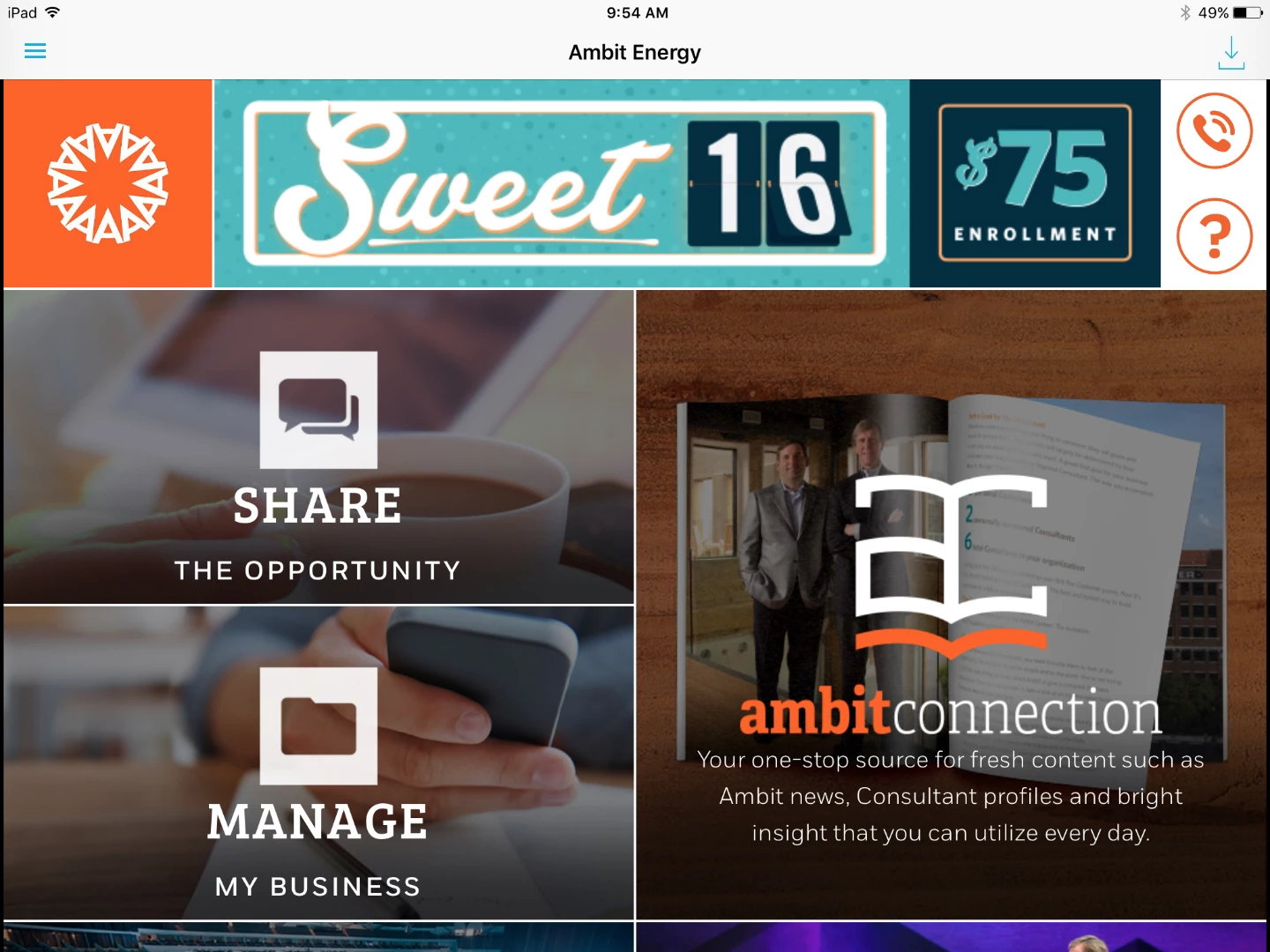
It seems like since my layout template is set to iPad that it should look exactly like that when I publish to the iPad. Any thoughts on why this is happening?

This post is no longer active and is closed to new replies. Need help? Start a new post to ask your question.
Best answer by andreig1004688

Hi, ambitappa77373764‌, Keith,

As Nathan pointed out, there are a few OS - differences that lead to differences in how text is rendered. This is especially true for leading values smaller than 1.1.

The only current work-around is to use leading values of 1.1 or larger and adjust your font metrics in a glyph editor to create the tighter leading for you fonts. 

Andrei

18 replies

Keith_Gilbert
Level 3
March 30, 2016

Funny, we've been struggling this week with exactly the same issue. I've identified a repeatable bug:

If you use a leading value of 1.0 or less for the text on a card, the text will display as expected on Android devices and in the Layout Template view. But the leading appears really large on iOS devices. If you use a leading value of 1.1 or larger, then the text display matches across iOS, Android, and the Layout Template.

We encountered this bug because, like you, we have large icons with small type below them, so we were messing with leading values less than 1.0 to try to get the lines of type close together.

Level 3
March 31, 2016

‌thanks for the response. Did you end up getting any answers? We've tried every leading value and still are having trouble with it matching across iOS, android and layout template. It becomes worse when adding more than one text field.

Keith_Gilbert
Level 3
March 31, 2016

For us, the text display matches across iOS, Android, and the layout template with multiple text fields as long as we use a leading value of 1.1 or larger for each text field.

Level 3
March 31, 2016

Thanks Keith. That at least tells me it is possible. For a reason we can't figure out we can't get a consistent look across all platforms no matter what we do with leading, padding, margins. It's really not even close. But now I've at least got confirmation it's not acting the way it's supposed to. Is there a place where I can walk through the problem with someone at Adobe?

Adobe Employee
March 31, 2016

I passed this on to some colleagues to take a look. They may reach out to dive deeper. There may be some OS-level differences in text compositions, or possible a bug.

andreig1004688
Adobe Employee
andreig1004688Adobe EmployeeAccepted solution
Adobe Employee
April 1, 2016

Hi, ambitappa77373764‌, Keith,

As Nathan pointed out, there are a few OS - differences that lead to differences in how text is rendered. This is especially true for leading values smaller than 1.1.

The only current work-around is to use leading values of 1.1 or larger and adjust your font metrics in a glyph editor to create the tighter leading for you fonts. 

Andrei

andreig1004688
Adobe Employee
Adobe Employee
April 1, 2016

ambitappa77373764, I'd be happy to connect.

Do send me a line at ganci@adobe.com and we'll see what we can do.

Thanks,

Andrei

August 18, 2016

Hi I'm having the exact same issue. So nearly4 months later we are still facing the prob.

My template Layout does not look similar on my Ipad devices especially on the fonts. SO I'm kind of blind when I do my design on AEM.

Help would be appreciated