2018.1.001 app icons show Preflight icons | Adobe Higher Education
Skip to main content
Scott_Landis
Level 2
January 25, 2018
Resuelto

2018.1.001 app icons show Preflight icons

  • January 25, 2018
  • 16 respuestas
  • 16485 visualizaciones

Hi All,

Just built for the first time for iOS with 2018.1.001. The icons and splash screens for the app are now showing the preflight icon instead of my app icon.

The app is signed for enterprise distribution.

Please advise on a fix.

-Scott
Este tema ha sido cerrado para respuestas.
Mejor respuesta de penguinant

The missing splash screen image for iPhoneX is a known issue and a fix is currently being implemented for an upcoming release of AEM Mobile.

In the meantime there is a workaround you could do.

  • Unzip the downloaded IPA
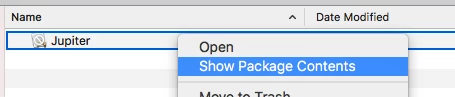
  • Show package contents of Jupiter
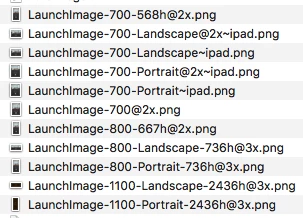
  • Replace 'LaunchImage-1100-Landscape-2436h@3x.png' and 'LaunchImage-1100-Portrait-2436h@3x.png' with your own splash screen images
  • Re-zip the IPA
  • Run the IPA through the signing tool as usual

Anthony

16 respuestas

Adobe Employee
February 6, 2018

Along with newer version of AEM Mobile App Signing tool. You also need to update to Xcode 9.2 or later. To download Xcode for free from the Apple app store, go to https://itunes.apple.com/us/app/xcode/id497799835.

--

Vinod Tanwar

Scott_Landis
Level 2
February 6, 2018

Vinod, Going to Xcode 9.2 fixes the app icon issue but does not fix the splash screen on the iPhone X. Is there any timeline for that fix? I'm quickly approaching a deployment deadline and cannot deploy with the iPhone X displaying a mismatched splash screen.

TommyDAQ-Bates
Level 6
February 6, 2018

Thank you! Updating now.

penguinantAdobe EmployeeRespuesta
Adobe Employee
February 7, 2018

The missing splash screen image for iPhoneX is a known issue and a fix is currently being implemented for an upcoming release of AEM Mobile.

In the meantime there is a workaround you could do.

  • Unzip the downloaded IPA
  • Show package contents of Jupiter
  • Replace 'LaunchImage-1100-Landscape-2436h@3x.png' and 'LaunchImage-1100-Portrait-2436h@3x.png' with your own splash screen images
  • Re-zip the IPA
  • Run the IPA through the signing tool as usual

Anthony

Scott_Landis
Level 2
February 7, 2018

Thanks Anthony.

AndrewTop
Adobe Employee
Adobe Employee
February 14, 2018

You should now be able to upload iPhone X splash screens when editing the Apps in the portal.  Those will be used in the IPA as the 1100 images.

Please let us know if you run into any problems.