2018.1.001 app icons show Preflight icons | Adobe Higher Education
Skip to main content
Scott_Landis
Level 2
January 25, 2018
Resuelto

2018.1.001 app icons show Preflight icons

  • January 25, 2018
  • 16 respuestas
  • 16485 visualizaciones

Hi All,

Just built for the first time for iOS with 2018.1.001. The icons and splash screens for the app are now showing the preflight icon instead of my app icon.

The app is signed for enterprise distribution.

Please advise on a fix.

-Scott
Este tema ha sido cerrado para respuestas.
Mejor respuesta de penguinant

The missing splash screen image for iPhoneX is a known issue and a fix is currently being implemented for an upcoming release of AEM Mobile.

In the meantime there is a workaround you could do.

  • Unzip the downloaded IPA
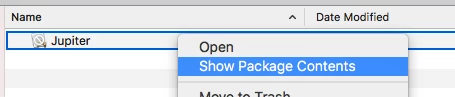
  • Show package contents of Jupiter
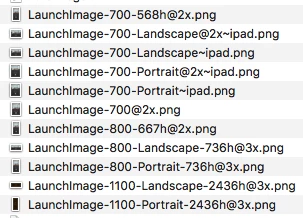
  • Replace 'LaunchImage-1100-Landscape-2436h@3x.png' and 'LaunchImage-1100-Portrait-2436h@3x.png' with your own splash screen images
  • Re-zip the IPA
  • Run the IPA through the signing tool as usual

Anthony

16 respuestas

Adobe Employee
January 25, 2018

Hi Scott,

Are you enterprise signing your app with the 2018.1 version of the app signing tool?

The 2018.1 version of the iOS viewer upgraded to using XCode9 in order to better support iOS 11 which also required an update to the signing tool as well.

Anthony

Scott_Landis
Level 2
January 25, 2018

Yes, I am using the updated version of the app signing tool.

Adobe Employee
January 25, 2018

The signing tool should be handling the icon replacement now so it does sound like you may have discovered an issue.

Adobe Employee
January 25, 2018

Have you also upgraded all your tools to XCode 9?

Adobe Employee
January 25, 2018

Something like this: Unauthorized - Apple Developer

Unless you have the full XCode IDE installed.

Adobe Employee
January 25, 2018

If you are still having issues please attach your ~/aemm-sign-tool.log.

Scott_Landis
Level 2
January 25, 2018

Opened Xcode to confirm version and I got a new set of patches, which seems to have fixed the issue.

Thanks for the help.

Scott_Landis
Level 2
January 25, 2018

Sorry Anthony, spoke too soon.

By getting the new patches I got the fix needed on iPad but iPhone X still displays the Preflight splash screen (icon is fine).

Scott_Landis
Level 2
January 26, 2018

After re-reading the release notes for 2018.1.001, it seems that it is intended that the iPhone X displays the "default" images for the iPhone X, since there is no option to add iPhone X sized splash screens in the App Build menu. And the default images are Adobe branded Preflight assets?

Is this true?

I can't see how I can convince a client that this is ok, and I do not expect that Apple will accept an app that has a mismatched splash screen on their flagship phone.

TommyDAQ-Bates
Level 6
February 6, 2018

Jumping on this band wagon. We are building a custom Preflight app, actually updating one that we've been using for the past year.

Signing Tool: release.2018.1

Xcode: 9.1

Splash Screens are appearing. However...

App Icon is showing default AEM Preflight icon.

The Custom app icon is visible DURING the installation process, but as soon as installation is finished, it reverts to the AEM icon.

Is there a fix for this?