
New
Could there be some consistency in the language used in the UI in Managing Publications workflow?
| Request for Feature Enhancement (RFE) Summary: | Update page titles and labels in Manage Publication flow |
| Use-case: | When using the Manage Publication option to publish pages, when you choose to unpublish a page and go through the steps, there is still areas on the steps that says "Publish". From an editor/authoring POV this can be confusing as you want to be sure you are in the right area. |
| Current/Experienced Behavior: | Page titles and radio labels inconsistent with the action taken. "Unpublish" sitting next to "Publish" button looks disabled rather than active. |
| Improved/Expected Behavior: | Title: Manage Publication (Unpublish) Destination Label : Unpublish Improve the contrast on the selected/active button (consider not using shades of grey). |
| Environment Details (AEM version/service pack, any other specifics if applicable): | |
| Customer-name/Organization name: | The University of Canterbury |
| Screenshot (if applicable): | 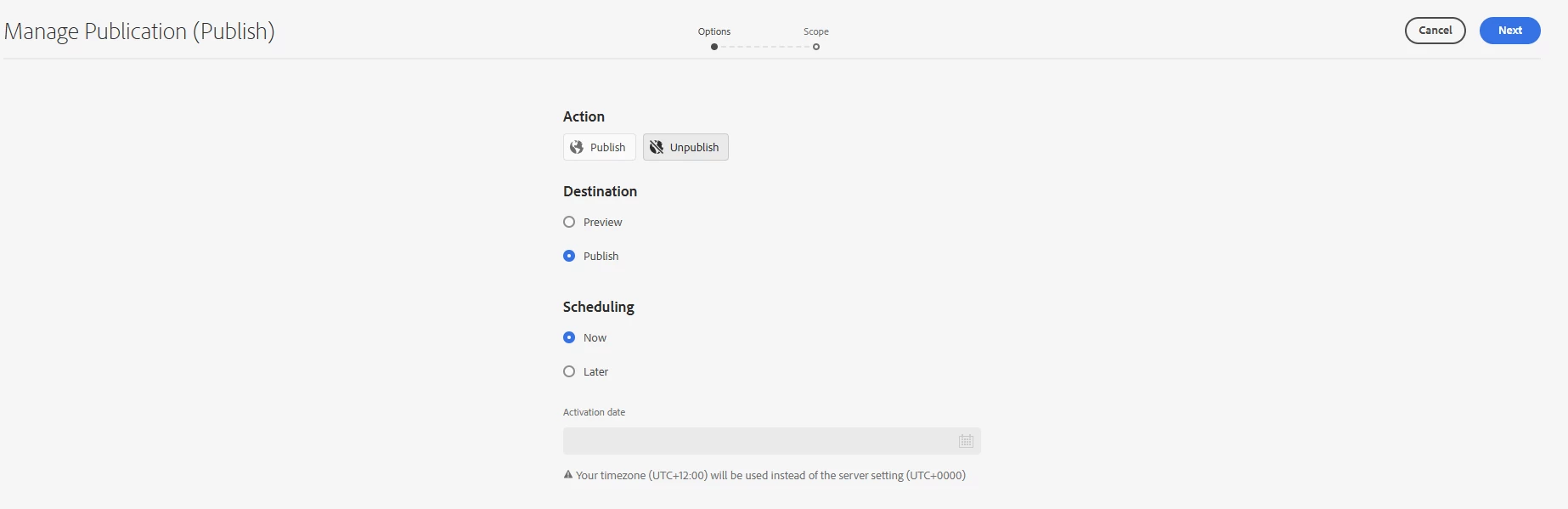
"Manage Publication (Publish) 
|
| Code package (if applicable): |