
Show/Hide cq-dialog Fields based on Drop-Down Selection in AEM | Community
Skip to main content
MayurSatav
Community Advisor and Adobe Champion
December 19, 2022

Show/Hide cq-dialog Fields based on Drop-Down Selection in AEM

  • December 19, 2022
  • 11 replies
  • 31174 views

Show/Hide cq-dialog Fields based on Drop-Down Selection In AEM

  by Mayur Satav

In this blog post, we will see how to use OOTB show/hide functionality for CQ-dialogs fields based on the drop-down selection in AEM.In AEM, CQ-dialogs are one of the most important components. It is possible to greatly improve the user experience by strategically hiding dialog fields until a specific option is selected by the user.


It’s time to get started, so let’s do it step by step.


Step 1 — First create one node list of type nt:unstructured for the drop-down list and add below properties.

a. class— cq-dialog-dropdown-showhide*.

b. cq-dialog-dropdown-showhide-target— .{{anyClassName}}-showhide-target*.

e.g.

.test-options-showhide-target

c. fieldLabel— Options Type.

d. name — ./optionsType.

e. sling:resourceType — granite/ui/components/foundation/form/select*.

NOTE — properties marked as * are madatory

Once parent node list is created. Create item node of type nt:unstructured under list node. Then create one node of type nt:unstructured for each drop-down option. List node hierarchy should look like this.
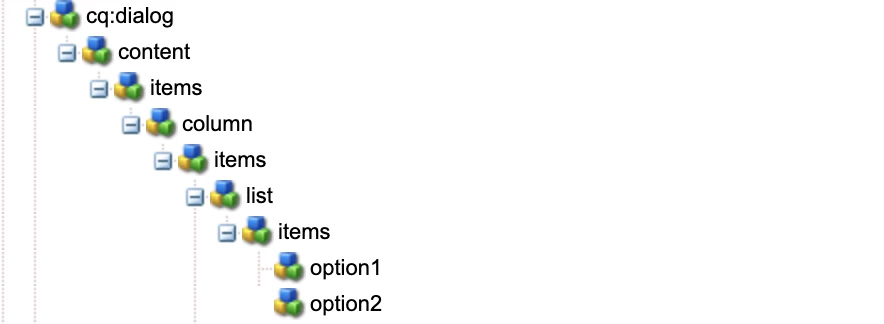
 

And here we are done with list structure.

You can refer below node structure for Step 1 

<list jcr:primaryType="nt:unstructured" sling:resourceType="granite/ui/components/foundation/form/select" class="cq-dialog-dropdown-showhide" cq-dialog-dropdown-showhide-target=".test-options-showhide-target" fieldLabel="Options Type" name="./optionsType"> <items jcr:primaryType="nt:unstructured"> <option1 jcr:primaryType="nt:unstructured" text="Option1" value="option1"/> <option2 jcr:primaryType="nt:unstructured" text="Option2" value="option2"/> </items> </list>


Next, Will create node structure for each drop-down option.

Step 2 — Create container node option1Group of type nt:unstructured and add below properties.

a. class — hide {{anyClassName}}-showhide-target

e.g.

hide test-options-showhide-target

b. showhidetargetvalue — option1

on the basis of showhidetargetvalue, option1Group container will display and hide the fields added under it. showhidetargetvalue value should be same as value given for the option.

c. sling:resourceType — granite/ui/components/foundation/container

till here we are done with main logic of show/hide functionality. Now you can add different fields as per your requirements.


Similarly, follow Step 2 for each drop-down option.

You can refer below node structure for Step 2 

<option1group jcr:primaryType="nt:unstructured" sling:resourceType="granite/ui/components/foundation/container" class="hide test-options-showhide-target" showhidetargetvalue="option1"> <items jcr:primaryType="nt:unstructured"> <heading jcr:primaryType="nt:unstructured" sling:resourceType="granite/ui/components/foundation/heading" class="coral-Heading coral-Heading--4" level="{Long}4" text="Options 1 Group"/> <well jcr:primaryType="nt:unstructured" sling:resourceType="granite/ui/components/foundation/container"> <layout jcr:primaryType="nt:unstructured" sling:resourceType="granite/ui/components/foundation/layouts/well"/> <items jcr:primaryType="nt:unstructured"> <webUrl jcr:primaryType="nt:unstructured" sling:resourceType="granite/ui/components/coral/foundation/form/textfield" fieldLabel="Web Url" name="./webUrl"/> </items> </well> </items> </option1group> <option2group jcr:primaryType="nt:unstructured" sling:resourceType="granite/ui/components/foundation/container" class="hide test-options-showhide-target foundation-layout-util-vmargin" showhidetargetvalue="option2"> <items jcr:primaryType="nt:unstructured"> <heading jcr:primaryType="nt:unstructured" sling:resourceType="granite/ui/components/foundation/heading" class="coral-Heading coral-Heading--4" level="{Long}4" text="Options 2 Group"/> <well jcr:primaryType="nt:unstructured" sling:resourceType="granite/ui/components/foundation/container"> <layout jcr:primaryType="nt:unstructured" sling:resourceType="granite/ui/components/foundation/layouts/well"/> <items jcr:primaryType="nt:unstructured"> <htmlSnippet jcr:primaryType="nt:unstructured" sling:resourceType="granite/ui/components/foundation/form/pathbrowser" fieldLabel="Upload HTML Snippet" name="./htmlSnippet" rootPath="/content/dam/"/> </items> </well> </items> </option2group>​


I am sharing with you complete dialog structure also for your reference.
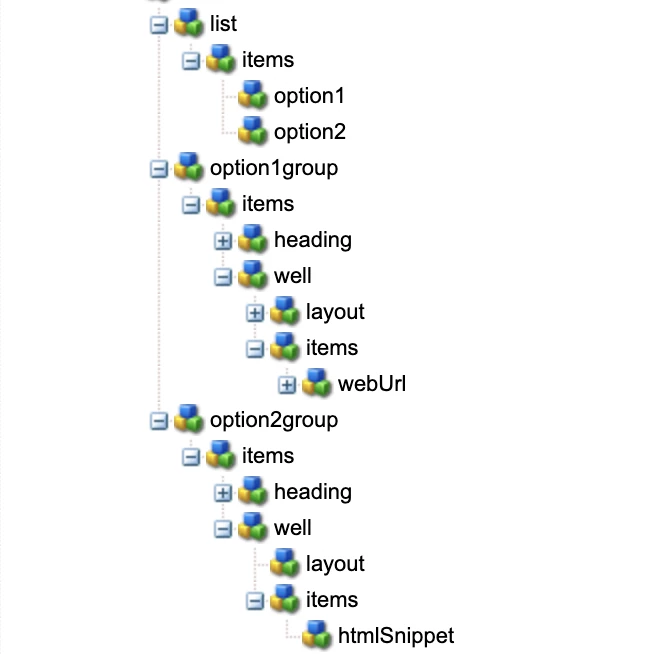
 

<?xml version="1.0" encoding="UTF-8"?> <jcr:root xmlns:sling="http://sling.apache.org/jcr/sling/1.0" xmlns:cq="http://www.day.com/jcr/cq/1.0" xmlns:jcr="http://www.jcp.org/jcr/1.0" xmlns:nt="http://www.jcp.org/jcr/nt/1.0" jcr:primaryType="nt:unstructured" jcr:title="Test Dialog" sling:resourceType="cq/gui/components/authoring/dialog"> <content jcr:primaryType="nt:unstructured" sling:resourceType="granite/ui/components/foundation/container"> <items jcr:primaryType="nt:unstructured"> <column jcr:primaryType="nt:unstructured" sling:resourceType="granite/ui/components/foundation/container"> <items jcr:primaryType="nt:unstructured"> <list jcr:primaryType="nt:unstructured" sling:resourceType="granite/ui/components/foundation/form/select" class="cq-dialog-dropdown-showhide" cq-dialog-dropdown-showhide-target=".test-options-showhide-target" fieldLabel="Options Type" name="./optionsType"> <items jcr:primaryType="nt:unstructured"> <option1 jcr:primaryType="nt:unstructured" text="Option1" value="option1"/> <option2 jcr:primaryType="nt:unstructured" text="Option2" value="option2"/> </items> </list> <option1group jcr:primaryType="nt:unstructured" sling:resourceType="granite/ui/components/foundation/container" class="hide test-options-showhide-target" showhidetargetvalue="option1"> <items jcr:primaryType="nt:unstructured"> <heading jcr:primaryType="nt:unstructured" sling:resourceType="granite/ui/components/foundation/heading" class="coral-Heading coral-Heading--4" level="{Long}4" text="Options 1 Group"/> <well jcr:primaryType="nt:unstructured" sling:resourceType="granite/ui/components/foundation/container"> <layout jcr:primaryType="nt:unstructured" sling:resourceType="granite/ui/components/foundation/layouts/well"/> <items jcr:primaryType="nt:unstructured"> <webUrl jcr:primaryType="nt:unstructured" sling:resourceType="granite/ui/components/coral/foundation/form/textfield" fieldLabel="Web Url" name="./webUrl"/> </items> </well> </items> </option1group> <option2group jcr:primaryType="nt:unstructured" sling:resourceType="granite/ui/components/foundation/container" class="hide test-options-showhide-target foundation-layout-util-vmargin" showhidetargetvalue="option2"> <items jcr:primaryType="nt:unstructured"> <heading jcr:primaryType="nt:unstructured" sling:resourceType="granite/ui/components/foundation/heading" class="coral-Heading coral-Heading--4" level="{Long}4" text="Options 2 Group"/> <well jcr:primaryType="nt:unstructured" sling:resourceType="granite/ui/components/foundation/container"> <layout jcr:primaryType="nt:unstructured" sling:resourceType="granite/ui/components/foundation/layouts/well"/> <items jcr:primaryType="nt:unstructured"> <htmlSnippet jcr:primaryType="nt:unstructured" sling:resourceType="granite/ui/components/foundation/form/pathbrowser" fieldLabel="Upload HTML Snippet" name="./htmlSnippet" rootPath="/content/dam/"/> </items> </well> </items> </option2group> </items> </column> </items> </content> </jcr:root>

Output
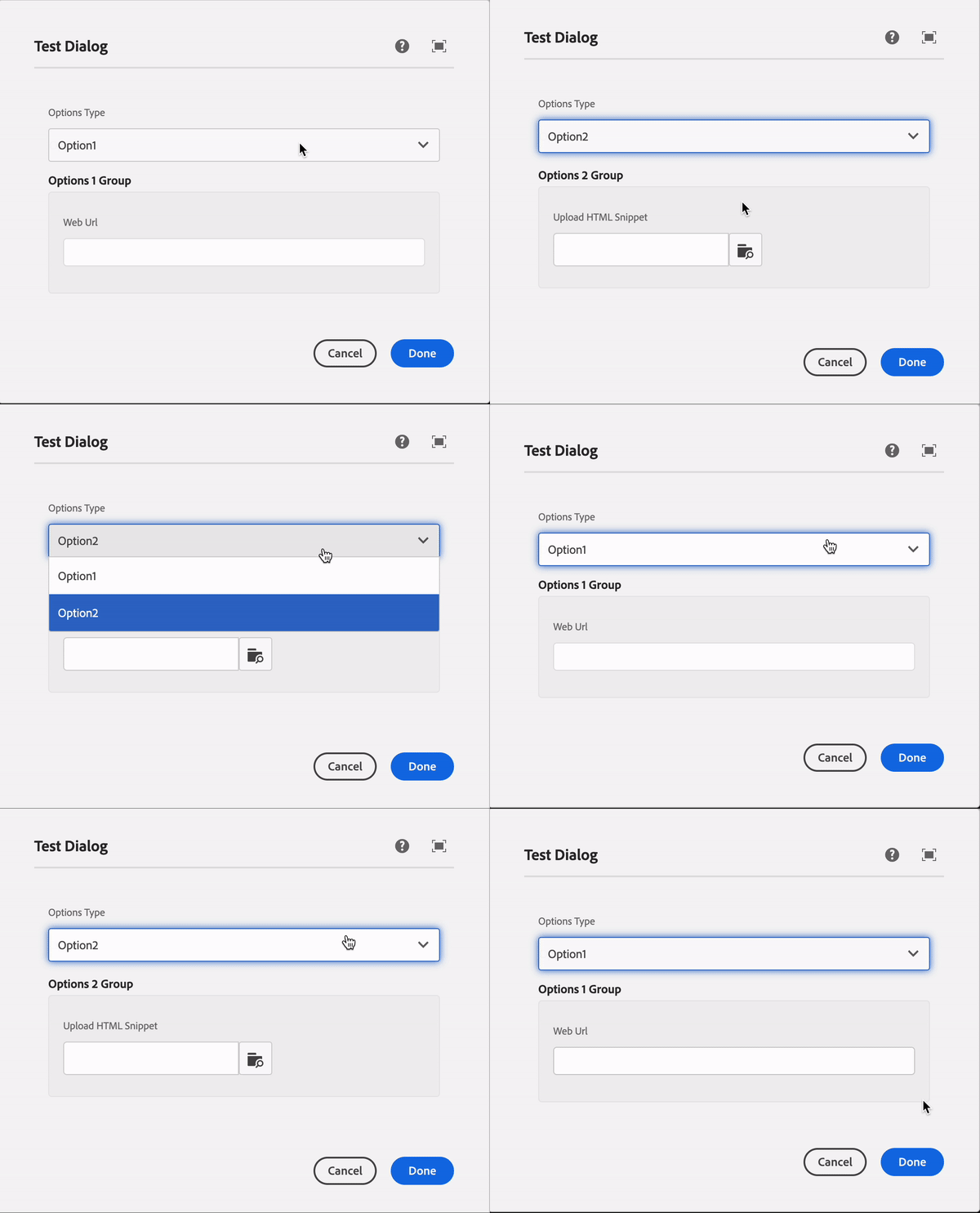
 

Summary

Basically, class and cq-dialog-dropdown-showhide-target these both properties are mandatory for hiding container based on showhidetargetvalue property value.

In short —

  1. add class — cq-dialog-dropdown-showhide and cq-dialog-dropdown-showhide-target — .{anyName}-showhide-target in your dropdown list node
  2. Add class — hide {anyName}-showhide-target and showhidetargetvalue — { value of drop down option } in each container of your drop-down list option.
 
For more visit
 

Q&A

Please use this thread to ask questions relating to this article

This post is no longer active and is closed to new replies. Need help? Start a new post to ask your question.

11 replies

kautuk_sahni
Community Manager
Community Manager
January 6, 2023

@mayursatav , this is helpful and relevant. As I have seen many questions in the community asking about this. Keep on writing such a great articles for the AEM community. 

Kautuk Sahni
sesmic
Level 4
April 14, 2023

Hi @mayursatav !
Thanks for this brief explanation. Is the method for this functionality different for different AEM versions? Because I'm using AEM Cloud SDK, I followed your instructions but it didn't work. But if I follow steps as given by Theo in his article show-hide field works. Curious to know what's different in both approach. 

Level 3
May 18, 2023

When I change select field the text field of the previous option remais filled in. How can I delete the content of the previous option so that there is no duplication ? 

January 10, 2024

@mayursatav, while using showhide dropdown in multifield, it is not working as expected.

for example: we have dropdown with Options Type [Option1, Option 2], if we select Option 1, Option1group container should show. if we select Option 2, Option2group should show. is working as expected outside multifield. but it is not working inside multifield.

In my case if I select Option 1, it should remain same not giving any validation for that. if I select Option 2, Option2group container should show

after adding another dropdown in multifield by selecting Option2, it is giving duplicate in other dropdown multifields.

can you please help me to get it resolved.


Level 4
July 2, 2024

I tried the above and created the following, but I'm still seeing the pathfield when it should be hidden. The pathfield (ctaIconPath) should only appear when "Primary Large with Icon" is selected. 

<multiCtaStyle
    jcr:primaryType="nt:unstructured"
    sling:resourceType="granite/ui/components/coral/foundation/form/select"
    class="cq-dialog-dropdown-showhide"
    cq-dialog-dropdown-showhide-target=".test-options-showhide-target"
    defaultValue="btn-primary"
    fieldDescription="CTA style"
    fieldLabel="Select CTA style"
    name="./multiCtaStyle">
    <items jcr:primaryType="nt:unstructured">
        <primary-large
            jcr:primaryType="nt:unstructured"
            text="Primary Large"
            value="btn-primary"/>
        <primary-large-icon
            jcr:primaryType="nt:unstructured"
            text="Primary Large with Icon"
            value="btn-primary btn-primary-icon"/>
        <primary-small
            jcr:primaryType="nt:unstructured"
            text="Primary Small"
            value="btn-primary btn-small"/>
        <secondary-large
            jcr:primaryType="nt:unstructured"
            text="Secondary Large"
            value="btn-secondary"/>
        <secondary-small
            jcr:primaryType="nt:unstructured"
            text="Secondary Small"
            value="btn-secondary btn-small"/>
        <text-link
            jcr:primaryType="nt:unstructured"
            text="Text Link"
            value="primary-cta"/>
    </items>
</multiCtaStyle>
<ctaIconPath
            jcr:primaryType="nt:unstructured"
            sling:resourceType="granite/ui/components/coral/foundation/container"
            class="hide test-options-showhide-target"
            showhidetargetvalue="btn-primary btn-primary-icon">
    <items jcr:primaryType="nt:unstructured">
        <ctaIconPath
            jcr:primaryType="nt:unstructured"
            sling:resourceType="granite/ui/components/coral/foundation/form/pathfield"
            fieldLabel="CTA Button Icon Path"
            name="./ctaIconPath"/>
    </items>
</ctaIconPath>


New Member
July 24, 2024

@mayursatav Does not work. Waste of time.

September 5, 2024

Hi @saran_kp  ,


Did you find any solution??


Redgs,

Suraj


October 4, 2024

Hi @surajja3 

If you add -multi after showhide-target it will work.


class="cq-dailog-dropdown-showhide-multi"

October 4, 2024

@saran_kp  ,Thanks for replying.but it still not working ,Please find below code for reference.


<?xml version="1.0" encoding="UTF-8"?>
<root xmlns:sling="http://sling.apache.org/jcr/sling/1.0" xmlns:granite="http://www.adobe.com/jcr/granite/1.0" xmlns:cq="http://www.day.com/jcr/cq/1.0" xmlns:jcr="http://www.jcp.org/jcr/1.0" xmlns:nt="http://www.jcp.org/jcr/nt/1.0" jcr:primaryType="nt:unstructured" jcr:title="Dummy" sling:resourceType="cq/gui/components/authoring/dialog" >
<content jcr:primaryType="nt:unstructured" sling:resourceType="granite/ui/components/coral/foundation/container">
<layout jcr:primaryType="nt:unstructured" sling:resourceType="granite/ui/components/coral/foundation/fixedcolumns" />
<items jcr:primaryType="nt:unstructured">
<column jcr:primaryType="nt:unstructured" sling:resourceType="granite/ui/components/coral/foundation/container">
<items jcr:primaryType="nt:unstructured">
<heading jcr:primaryType="nt:unstructured" sling:resourceType="granite/ui/components/coral/foundation/form/textfield" fieldLabel="Enter Heading" name="./heading" />
<cardSection jcr:primaryType="nt:unstructured" jcr:title="list" sling:resourceType="granite/ui/components/coral/foundation/form/multifield" composite="{Boolean}true" fieldLabel="Card section">
<field jcr:primaryType="nt:unstructured" sling:resourceType="granite/ui/components/coral/foundation/container" name="./cardSection">
<items jcr:primaryType="nt:unstructured">
<column jcr:primaryType="nt:unstructured" sling:resourceType="granite/ui/components/coral/foundation/container">
<items jcr:primaryType="nt:unstructured">
<list1 jcr:primaryType="nt:unstructured" jcr:title="list" sling:resourceType="granite/ui/components/coral/foundation/form/multifield" composite="{Boolean}true" fieldLabel="Add Cards" validation="bfl-multifield">
<field jcr:primaryType="nt:unstructured" sling:resourceType="granite/ui/components/coral/foundation/form/fieldset" eaem-nested="NODE_STORE" name="./imageBoxField">
<items jcr:primaryType="nt:unstructured">
<column jcr:primaryType="nt:unstructured" sling:resourceType="granite/ui/components/coral/foundation/container">
<items jcr:primaryType="nt:unstructured">
<cardType granite:class="cq-dialog-dropdown-showhide" jcr:primaryType="nt:unstructured" sling:resourceType="granite/ui/components/coral/foundation/form/select" fieldLabel="Card Type" name="./cardType">
<data jcr:primaryType="nt:unstructured" cq-dialog-dropdown-showhide-target=".showhidetargets" />
<items jcr:primaryType="nt:unstructured">
<staticCard jcr:primaryType="nt:unstructured" text="Static Card" value="staticCard" />
<dynamicCard jcr:primaryType="nt:unstructured" text="Dynamic card" value="dynamicCard" />
</items>
</cardType>
<staticCard granite:class="showhidetargets" jcr:primaryType="nt:unstructured" sling:resourceType="granite/ui/components/coral/foundation/container">
<items jcr:primaryType="nt:unstructured">
<well jcr:primaryType="nt:unstructured" sling:resourceType="granite/ui/components/coral/foundation/container">
<layout jcr:primaryType="nt:unstructured" sling:resourceType="granite/ui/components/coral/foundation/layouts/well" />
<items jcr:primaryType="nt:unstructured">
<list jcr:primaryType="nt:unstructured" sling:resourceType="granite/ui/components/coral/foundation/form/multifield" composite="{Boolean}true" fieldLabel="Static Card Details" validation="bfl-multifield">
<field jcr:primaryType="nt:unstructured" sling:resourceType="granite/ui/components/coral/foundation/form/fieldset" name="./cardList">
<items jcr:primaryType="nt:unstructured">
<column jcr:primaryType="nt:unstructured" sling:resourceType="granite/ui/components/coral/foundation/container">
<items jcr:primaryType="nt:unstructured">
<cardImage jcr:primaryType="nt:unstructured" sling:resourceType="granite/ui/components/coral/foundation/form/pathbrowser" fieldLabel="Card Image" name="./cardImage" rootPath="/content/dam" />
<cardImageRedirectionLink jcr:primaryType="nt:unstructured" sling:resourceType="granite/ui/components/coral/foundation/form/pathbrowser" fieldLabel="Enter Image Redirection Link" name="./cardImageRedirectionLink" rootPath="/content" />
<sectiontitle jcr:primaryType="nt:unstructured" sling:resourceType="granite/ui/components/coral/foundation/form/textfield" fieldLabel="Section Title" name="./sectionTitle" />
<sectionID jcr:primaryType="nt:unstructured" sling:resourceType="granite/ui/components/coral/foundation/form/textfield" fieldLabel="Section ID" name="./sectionID" />
</items>
</column>
</items>
</field>
<data jcr:primaryType="nt:unstructured" max-elements="3" />
</list>
</items>
</well>
</items>
<data jcr:primaryType="nt:unstructured" showhidetargetvalue="staticCard" />
</staticCard>
<dynamicCard granite:class="showhidetargets" jcr:primaryType="nt:unstructured" sling:resourceType="granite/ui/components/coral/foundation/container">
<items jcr:primaryType="nt:unstructured">
<well jcr:primaryType="nt:unstructured" sling:resourceType="granite/ui/components/coral/foundation/container">
<layout jcr:primaryType="nt:unstructured" sling:resourceType="granite/ui/components/coral/foundation/layouts/well" />
<items jcr:primaryType="nt:unstructured">
<list jcr:primaryType="nt:unstructured" sling:resourceType="granite/ui/components/coral/foundation/form/multifield" composite="{Boolean}true" fieldLabel="Dynamic Card Details" validation="bfl-multifield">
<field jcr:primaryType="nt:unstructured" sling:resourceType="granite/ui/components/coral/foundation/form/fieldset" name="./cardList">
<items jcr:primaryType="nt:unstructured">
<column jcr:primaryType="nt:unstructured" sling:resourceType="granite/ui/components/coral/foundation/container">
<items jcr:primaryType="nt:unstructured">
<cardImage jcr:primaryType="nt:unstructured" sling:resourceType="granite/ui/components/coral/foundation/form/pathbrowser" fieldLabel="Card Image" name="./cardImage" rootPath="/content/dam" />
<cardImageRedirectionLink jcr:primaryType="nt:unstructured" sling:resourceType="granite/ui/components/coral/foundation/form/pathbrowser" fieldLabel="Enter Image Redirection Link" name="./cardImageRedirectionLink" rootPath="/content" />
<sectiontitle jcr:primaryType="nt:unstructured" sling:resourceType="granite/ui/components/coral/foundation/form/textfield" fieldLabel="Section Title" name="./sectionTitle" />
<sectionID jcr:primaryType="nt:unstructured" sling:resourceType="granite/ui/components/coral/foundation/form/textfield" fieldLabel="Section ID" name="./sectionID" />
</items>
</column>
</items>
</field>
<data jcr:primaryType="nt:unstructured" max-elements="3" />
</list>
</items>
</well>
</items>
<data jcr:primaryType="nt:unstructured" showhidetargetvalue="dynamicCard" />
</dynamicCard>
</items>
</column>
</items>
</field>
<data jcr:primaryType="nt:unstructured" max-elements="{Long}4" />
</list1>
</items>
</column>
</items>
</field>
</cardSection>
</items>
</column>
</items>
</content>
</root>
 
 
Thanks and Regds,
Suraj
November 4, 2024

@surajja3  @jasonha14 @saran_kp 

after some search i foud a solution, create a clientlib for my dialog and use this code

important: Create a clientlib for a component is different of create a client lib for a dialog


https://github.com/arunpatidar02/aem63app-repo/blob/master/js/dropdownshowhide-multifield.js

here my multifield code  


<multifield jcr:primaryType="nt:unstructured" sling:resourceType="granite/ui/components/coral/foundation/form/multifield" composite="{Boolean}true" fieldLabel="Configurações" > <field jcr:primaryType="nt:unstructured" sling:resourceType="granite/ui/components/coral/foundation/container" name="./multifield"> <items jcr:primaryType="nt:unstructured"> <column jcr:primaryType="nt:unstructured" sling:resourceType="granite/ui/components/coral/foundation/container"> <items jcr:primaryType="nt:unstructured"> <umbrelaMenu granite:class="cq-dialog-dropdown-showhide-multi" jcr:primaryType="nt:unstructured" sling:resourceType="granite/ui/components/coral/foundation/form/select" fieldDescription="Ação do clique" fieldLabel="Ação do clique" required="{Boolean}true" forceIgnoreFreshness="{Boolean}true" name="./umbrelaMenu"> <items jcr:primaryType="nt:unstructured"> <redirect jcr:primaryType="nt:unstructured" selected="{Boolean}true" text="Redirecionar para pagina interna ou externa" rootPath="/content/dam" value="redirect" /> <download jcr:primaryType="nt:unstructured" text="Download de arquivo" value="download" /> </items> <granite:data jcr:primaryType="nt:unstructured" cq-dialog-dropdown-showhide-target=".umbrelaMenu-showhide-target" /> </umbrelaMenu> <showFileLink granite:class="umbrelaMenu-showhide-target" jcr:primaryType="nt:unstructured" sling:resourceType="granite/ui/components/coral/foundation/well"> <items jcr:primaryType="nt:unstructured"> <linkTarget jcr:primaryType="nt:unstructured" sling:resourceType="cq/gui/components/coral/common/form/pagefield" fieldLabel="Link" rootPath="/content" name="./linkTarget" /> </items> <granite:data jcr:primaryType="nt:unstructured" showhidetargetvalue="download" /> </showFileLink> <actionTypeRedirectGroup granite:class="umbrelaMenu-showhide-target" jcr:primaryType="nt:unstructured" sling:resourceType="granite/ui/components/coral/foundation/well"> <items jcr:primaryType="nt:unstructured"> <linkLabel jcr:primaryType="nt:unstructured" sling:resourceType="granite/ui/components/coral/foundation/form/textfield" fieldLabel="Texto do link" name="./linkLabel" /> <multifieldLinks jcr:primaryType="nt:unstructured" sling:resourceType="granite/ui/components/coral/foundation/form/multifield" fieldLabel="Links" name="./linksUmbrela"> <field jcr:primaryType="nt:unstructured" sling:resourceType="granite/ui/components/coral/foundation/container"> <items jcr:primaryType="nt:unstructured"> <linkLabelUmbrela jcr:primaryType="nt:unstructured" sling:resourceType="granite/ui/components/coral/foundation/form/textfield" fieldLabel="Texto do link" name="./linkLabelUmbrela" /> <linkTargetUmbrela jcr:primaryType="nt:unstructured" sling:resourceType="cq/gui/components/coral/common/form/pagefield" fieldLabel="Link" rootPath="/content" name="./linkTargetUmbrela" /> </items> </field> </multifieldLinks> </items> <granite:data jcr:primaryType="nt:unstructured" showhidetargetvalue="redirect" /> </actionTypeRedirectGroup> </items> </column> </items> </field> </multifield>