
Custom Rating Component in AEM | AEM Community Blog Seeding | Community
Skip to main content
kautuk_sahni
Community Manager
Community Manager
June 1, 2023

Custom Rating Component in AEM | AEM Community Blog Seeding
  • June 1, 2023
  • 3 replies
  • 803 views

BlogImage.jpg

Custom Rating Component in AEM by Anshul Agarwal

Abstract

Rating Component
Learn how to create a custom Rating Component integrated with Google Analytics to track data.

Objective
1. Understand how to create a custom component in AEM.

2. Understand how to integrate Google Analytics with a custom component.

What you will build
A simple Rating component will be built, which will take input from the radio buttons. Depending on user selection, data will be tracked using Google Analytics.

Pre-Requisites
AEM SDK Author

Java JDK

Eclipse

Maven

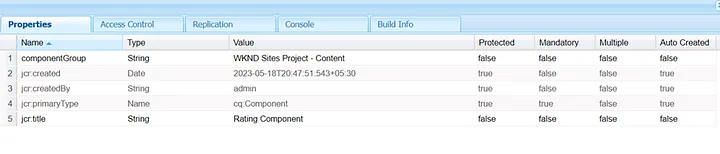
Define the Rating Component
Create a custom component under your project hierarchy,

Ex : /apps/wknd/components/rating

Read Full Blog

Custom Rating Component in AEM

Q&A

Please use this thread to ask the related questions.

This post is no longer active and is closed to new replies. Need help? Start a new post to ask your question.

3 replies

EstebanBustamante
Community Advisor and Adobe Champion
June 2, 2023

I think is a good article, but I would add a warning saying that the analytics should be placed at the page level and not at a component level due it is not recommended by Adobe.  

Esteban Bustamante
iamnjain
Community Advisor
Community Advisor
June 5, 2023

Thanks @kautuk_sahni for this article. and Thanks to Anshul for writing this up.

MayurSatav
Community Advisor and Adobe Champion
June 15, 2023

You are right @estebanbustamanteAdobe's recommendation to place analytics at the page level ensures accurate data, consistent tracking, improved performance, and easier maintenance. It helps in obtaining reliable insights and making informed decisions based on comprehensive data.Nonetheless, it's a great article to begin with, providing valuable insights on the topic. Keep up the good work!