
Solved
Need to clear AEM Assets Inbox
Inbox is showing 100+ messages that I have to clear one at a time. Does anyone know the method to clear the inbox? Or at least have it stop notifying me for messages I have read.
Inbox is showing 100+ messages that I have to clear one at a time. Does anyone know the method to clear the inbox? Or at least have it stop notifying me for messages I have read.
Hi @phillipdunn ,
Yes you can delete the notification in bulk but this is not the recommended way also only for your local aem server.
Step:
1. Go to the below folders

2. Delete the folder under the tasks folder by the date name and it will get removed.
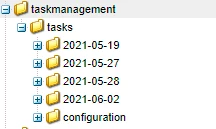
You can also try to configure your notification inbox/email for your user and check if those anything is enabled by default.
If it is an workflow process in your inbox, you need to purge the same.
https://stackoverflow.com/questions/21218426/how-can-i-delete-items-from-cq-workflow-inbox
Reference Docs:
Enter your E-mail address. We'll send you an e-mail with instructions to reset your password.