Unable to Login to Adobe Client Console | Community
Skip to main content
AnushkaRajan
Level 2
April 17, 2020
Solved

Unable to Login to Adobe Client Console

  • April 17, 2020
  • 2 replies
  • 7139 views

Hi Team,


We had recently observed an issue while trying to login to one of our production environments. PFB screenshot for the same.
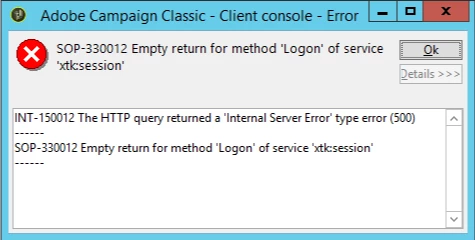
 

The error got resolved post appending port number to the URL. However, I have been using the environment since a long time without the port number in the instance url.


Could anybody please help me understand what might have caused this change and why has the port number become a mandatory parameter in my instance URL now ?


I would also like to mention that this issue was observed only on one of my production instance. I am able to access the other instance without appending the port number in the instance URL.


Regards,

Anushka

This post is no longer active and is closed to new replies. Need help? Start a new post to ask your question.
Best answer by prasannakumarmarru

Hi,


Default port when making html call is 80, if that is changed you have to provide the port number on the instance url.

Let's say you are using windows IIS for redirection, default site in IIS will have 80. If you are using the default site for campaign redirection, you can access instance without port, else you have to provide the port that is used on that site.

Check if your redirection config might have recently changed by some one.


-Prasanna.

2 replies

prasannakumarmarru
prasannakumarmarruAccepted solution
Level 4
April 18, 2020

Hi,


Default port when making html call is 80, if that is changed you have to provide the port number on the instance url.

Let's say you are using windows IIS for redirection, default site in IIS will have 80. If you are using the default site for campaign redirection, you can access instance without port, else you have to provide the port that is used on that site.

Check if your redirection config might have recently changed by some one.


-Prasanna.

AnushkaRajan
Level 2
April 27, 2020
Hi Prasanna, Thanks for the update. I checked the IIS for redirection config which is set to the default 80 port. I retried logging in to my client console without the port number 8080 in my connection URL and now it works. Is there any other possible reason that could have caused this change. Regards, Anushka
AnushkaRajan
Level 2
April 24, 2020

 .