Right Panel Not visible | Community
Skip to main content
June 19, 2020
Solved

Right Panel Not visible

  • June 19, 2020
  • 5 replies
  • 3060 views

I have a peculiar issue with the campaign console. I don't see a detailed view of any object selected on Explorer. The panel on the right with detailed attributes are not seen. Tried logging in on other machine, it works fine. Let me know how to solve this issue.
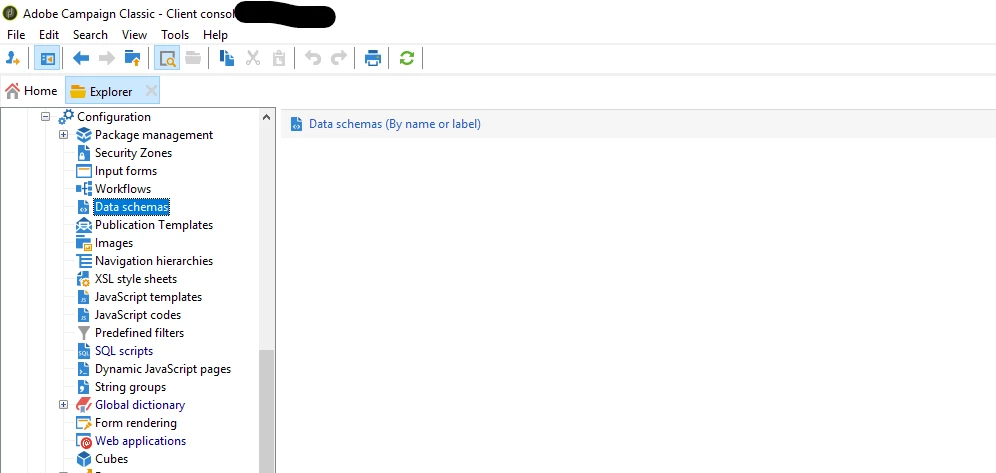


EDIT - Solved - Thank you @isahore , your suggestion solved this issue. Clearing cache wont help. 


This post is no longer active and is closed to new replies. Need help? Start a new post to ask your question.
Best answer by isahore

@vikas_nagabhushana,


I too faced a similar issue.

Try clicking just somewhere below the "Data schemas (By name or label)" and dragging your mouse all the way down. It should then let you see the details view.

I struggled with it a lot once. Nothing resolved it, until I accidentally did the above.


Thanks,

Ishan

5 replies

_Manoj_Kumar_
Community Advisor
Community Advisor
June 20, 2020

Hello @vikas_nagabhushana ,


Try clearing the local cache and it should work.


     Manoj     Find me on LinkedIn
Jonathon_wodnicki
Community Advisor
Community Advisor
June 20, 2020

Hi,


Click top menu, File -> Clear the local cache. Then log out and back in.


Thanks,

-Jon

yuhanlin
June 20, 2020

If you can see the highlighted icon below, try clicking on that Enlarge/Restore your panel views. 


isahore
Community Advisor
isahoreCommunity AdvisorAccepted solution
Community Advisor
June 20, 2020

@vikas_nagabhushana,


I too faced a similar issue.

Try clicking just somewhere below the "Data schemas (By name or label)" and dragging your mouse all the way down. It should then let you see the details view.

I struggled with it a lot once. Nothing resolved it, until I accidentally did the above.


Thanks,

Ishan

July 7, 2020
Thank you @isahore, your suggestion solved this issue
kevinedmond
Level 2
June 22, 2020

hi.

like @yuhanlin  i usually click twice on the enlarge shortcut and it got restored.