
phone - dataPolicy | Community
Skip to main content
Milan_Vucetic
Level 9
August 28, 2019
Solved

phone - dataPolicy

  • August 28, 2019
  • 12 replies
  • 11599 views

Hi all,

I managed to bypass default dataPolicy = "phone" on mobilePhone field in nms:recipient (shema nms:recipient extended and set dataPolicy = "none" ) which enables us storing mobile number as string in prefered format.

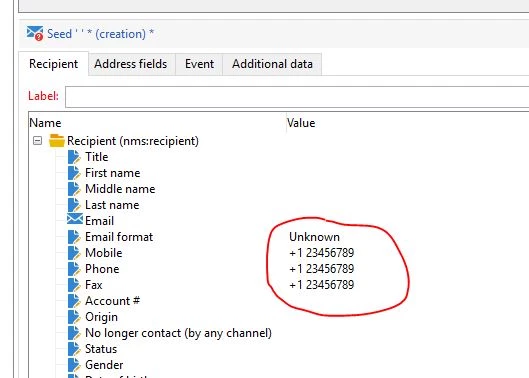
But there is a problem with insert mobile phone in Seed addresses (below) where is used  above mentioned field mobilePhone linked from nms:recipient (for which dataPolicy is already bypassed).

Regex is adding extra space and "+" character in any case and I am unable to bypass this.

I tried to extend nms:seedMember as nms:recipient but without success.

Any idea?
Regards,

Milan
This post is no longer active and is closed to new replies. Need help? Start a new post to ask your question.
Best answer by DavidKangni

milanv69354962

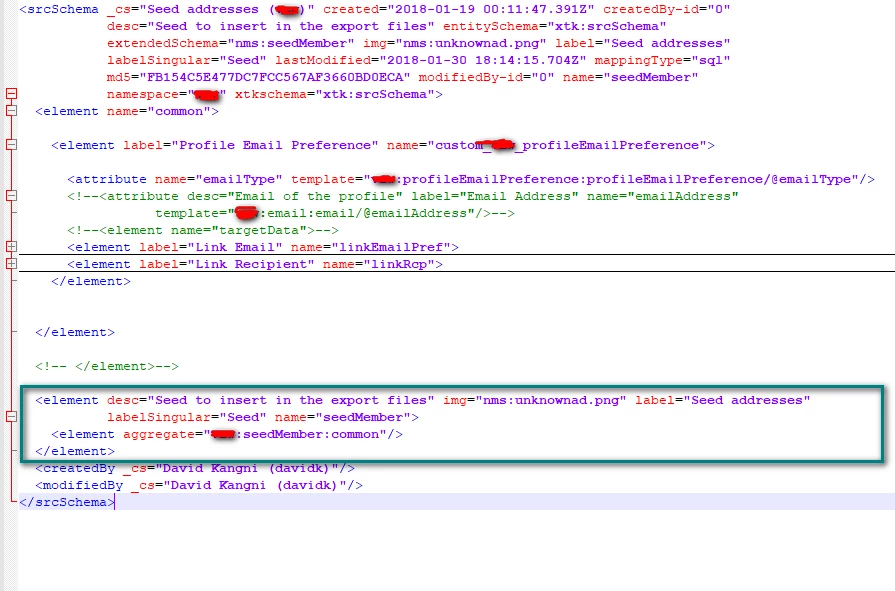
It was missing a piece in your extension schema. Add this xml before the </srcSchema>. and rename cus to your namespace

  <element desc="Seed to insert in the export files" img="nms:unknownad.png" label="Seed addresses"

           labelSingular="Seed" name="seedMember">

    <element aggregate="cus:seedMember:common"/>

  </element>

Thanks

David

12 replies

DavidKangni
Community Advisor
Community Advisor
August 29, 2019

Hi Milan,

See the default seedMember schema, it's using nms:recipient as template.You will need to extend the seedMember schema with your extended recipient as template (see screenshot below)

Thanks

David

David Kangni
Milan_Vucetic
Level 9
August 29, 2019

Hi,

that does not work for me.

Constraint is always there when check field properties and I am trying to find a way to set constraint to No Value by default.

When I change manually it works, but somehow this is reseted after some time again.

I would like to solve this through schema extension to be always safe, but it does not work for some reason.


Regards,

Milan

DavidKangni
Community Advisor
Community Advisor
August 29, 2019

Hi Milan,

That weird i try on a VM and it's working. Otherwise just remove the template in the xml attributes and add dataPolicy and type.

Thanks

David Kangni
Milan_Vucetic
Level 9
August 30, 2019

Hi David,

you are right. Your solution works on fresh installation of Adobe Campaign (checked on VM).

Well, my problem persist  on my prod instance, because there is another additional element (below) with the same name in default seedMember schema. I think this stops your solution to work properly.

This additional element is located after first element (below) with defined templates (I have used your screenshoot, ignore green line)

How can I bypass this element with the same name as element which is already bypassed?

Regards,

Milan

pablo_rosero1
Level 9
September 3, 2019

Hi davidk23955130​,

Thanks for helping out and making a difference in our community!

Please check out Milan's latest response.

Thanks,

Pablo

DavidKangni
Community Advisor
Community Advisor
September 4, 2019

Hi Milan,

Can you please provide a scrennshot of wht you're seeing?

Again below is an example of what you should have in your extended seedMember schema. it will overwrite the default one

The red scratches are used to hide my client namespace. So just replace by the namespace you're using.

David Kangni
Milan_Vucetic
Level 9
September 5, 2019

Hi David,

I am still struggling with this. As mentioned, your solution works on fresh install of ACM (tried on VMs).

Once again, this is how part of default schema looks like:

This is how it looks my extension of nms:seedMember:

Black fields referencing extension of nms:recipient schema.
You will notice common element. Tried without this element and schema preview looks as default one.

With this element schema preview looks like this: (which is fine I would say, but does not work)

Interesting is that there is another element  (below) with name "custom_nms_recipient" in default nms:seedMember schema.

<element name="custom_nms_recipient">

      <attribute dataPolicy="phone" default="@phone" name="mobilePhone" user="true"/>

      <attribute dataPolicy="phone" name="phone"/>

      <attribute dataPolicy="phone" name="fax"/>

    </element>

Is it possible to overwrite these two elements with the same name in schema extension?

Regards,

Milan

DavidKangni
Community Advisor
DavidKangniCommunity AdvisorAccepted solution
Community Advisor
September 5, 2019

milanv69354962

It was missing a piece in your extension schema. Add this xml before the </srcSchema>. and rename cus to your namespace

  <element desc="Seed to insert in the export files" img="nms:unknownad.png" label="Seed addresses"

           labelSingular="Seed" name="seedMember">

    <element aggregate="cus:seedMember:common"/>

  </element>

Thanks

David

David Kangni
Milan_Vucetic
Level 9
September 6, 2019

HI David,

after adding this xml, seed addresses form throws an error: 

Attribute 'folder-id' unknowns (see definition of schema 'Seed addresses (nms:seedMember)').

XTK-170036 Unable to parse expression '[@folder-id] = 1272'

Probably it is referencing on this xml in the default nms:seedMember schema:

<element autopk="true" folderLink="folder" folderModel="nmsSeedList" img="nms:unknownad.png"

           name="seedMember">

    <compute-string expr="@label"/>

    <key name="name">

      <keyfield xpath="@internalName"/>

    </key>

Regards,

Milan

DavidKangni
Community Advisor
Community Advisor
September 8, 2019

can you make sure all  elements are closed correctly or check through a query on xtk folder which folder has the id 1272?

David Kangni