Missing Operator from Control Group | Community
Skip to main content
tejashriw155148
Level 4
September 27, 2019
Solved

Missing Operator from Control Group

  • September 27, 2019
  • 2 replies
  • 3280 views

Hi,

When I add list of operators and name rights inside the operator group and do sign out from Client console and again sign in, I'm not able to see mine operator in the operator group.

Help me to know the cause of root.

Regards,
Tejashri
This post is no longer active and is closed to new replies. Need help? Start a new post to ask your question.
Best answer by somasundaram_h

Possible cause: You can add operators using emails as well as names. So check in which way you have added the operators. Check all the operator "Labels".

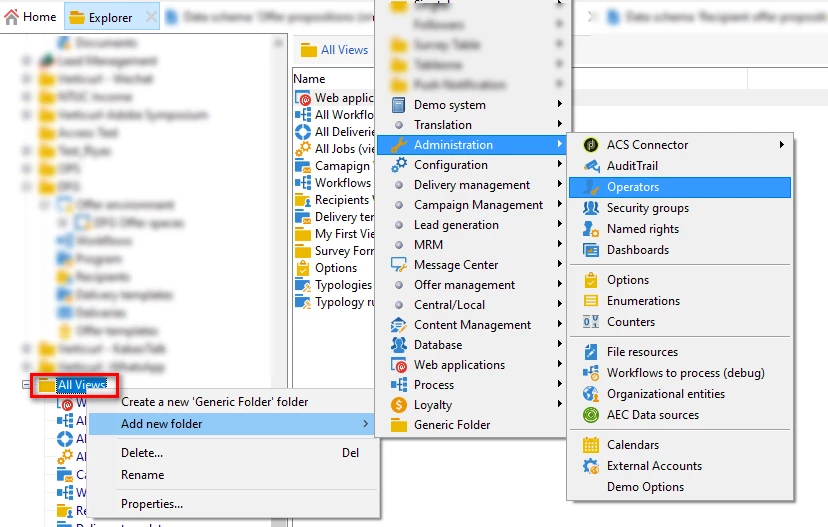
And since you're able to sign in again, your login details will definitely be there. Create a view for operators and check all the operators in one place. Attached screenshot.

2 replies

Raj_Ganta-1
Level 5
October 2, 2019

do you have SSO login for the Adobe Campaign Client Console? If yes, then the permissions and changes made might be overwritten by the admin console if you are making changes in the client console.

somasundaram_h
Community Advisor
somasundaram_hCommunity AdvisorAccepted solution
Community Advisor
October 3, 2019

Possible cause: You can add operators using emails as well as names. So check in which way you have added the operators. Check all the operator "Labels".

And since you're able to sign in again, your login details will definitely be there. Create a view for operators and check all the operators in one place. Attached screenshot.