Failure Reasons and Import Workflow | Community
Skip to main content
Level 2
June 10, 2020
Solved

Failure Reasons and Import Workflow

  • June 10, 2020
  • 2 replies
  • 5225 views

Hi,

Basically, I had two questions, since I am integrating my MTA server with adobe, upon delivery I need to trace back the stats back to adobe for reporting.


1. With resp to failure reasons, like mail box full, not connected, refused, unreachable, what table should I refer to insert the values? Would it be directly 'nmsdeliverylogstats'? Any other tables I need to take care?
Because the delivery success / failures I am inserting in 'nmsbroadlogrcp' table and they auto populate in 'nmsdeliverylogstats'.


2. Is it possible to import / create work-flow in a way to insert the entries in above 2-3 tables at the same time? Currently, my work-flow just inserts entries into 'nmsbroadlogrcp'. Any reference for example?
This post is no longer active and is closed to new replies. Need help? Start a new post to ask your question.
Best answer by isahore

Hi @rohanpat-1 ,

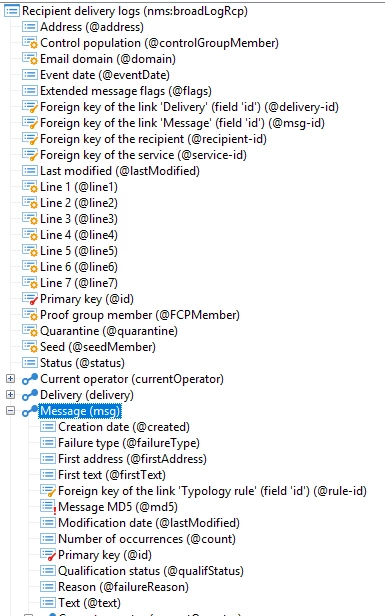
You need to update the failure reasons in the nms:broadLogMsg schema, linked to the nms:broadLogRcp schema with msg-id field. Below screenshot should help.

 For your second question, the answer is yes. How exactly are you receiving the response from the custom MTA? API, files, or something else. Based on that you can build a mechanism to update all tables with proper linked items.

Cheers.

2 replies

isahore
Community Advisor
isahoreCommunity AdvisorAccepted solution
Community Advisor
June 10, 2020

Hi @rohanpat-1 ,

You need to update the failure reasons in the nms:broadLogMsg schema, linked to the nms:broadLogRcp schema with msg-id field. Below screenshot should help.

 For your second question, the answer is yes. How exactly are you receiving the response from the custom MTA? API, files, or something else. Based on that you can build a mechanism to update all tables with proper linked items.

Cheers.

Level 2
June 11, 2020
Hi @isahore, Thanks, will check out the first solution with resp to table. For import, the custom MTA is dumping the data in text files, which I map to corresponding fields in adobe for insertion in broadlogrcp table. But I didn't find a way or option to have import / insertions in multiple table at the same time. Could you please let me know the steps or attach a snap pic for better understanding.
Venu_Reddy
Level 6
June 11, 2020

Hi @rohanpat-1 ,


For the first question, the failure reasons will save automatically into Non Deliverable management (Location as Adminstration -- Campaign Management -- non deliverables and addresses).


You can find all the results here and hope it helps you.