Error on saving report export - works if report page is opened in Internet Explorer directly | Community
Skip to main content
December 1, 2020
Solved

Error on saving report export - works if report page is opened in Internet Explorer directly

  • December 1, 2020
  • 1 reply
  • 1144 views

Hello everyone

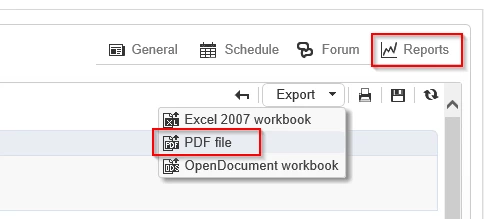
When trying to download the reports generated by Adobe Campagin Classic (PDF/Excel) we get the following error:
Meaning: “This operation has been cancelled due to restrictions in effect on this computer”
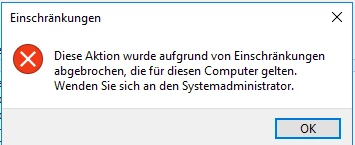
Even the "Save as" Dialog Box isn't showing up. The error is shown directly.

When I check the properties of the report page I see that the Secuirty Zone is set to "Local Intranet" and the Protected Mode is disabled.
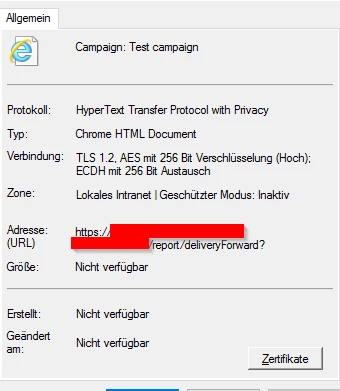

Also on the properties I'm able to see the URL where the report is located.

If I now open the URL directly in Internet Explorer I'm able to download the reports.


I've tried to run the application as Admin => No success
Allowed everything in the "Local Intranet" Seucirty Zone => No success

Checked manuals if any specific security settings are needed => No success

Server and client are running on 7.0.19.1 build 9032.


Thank you very much in advance for your help.

Best regards

Isa

This post is no longer active and is closed to new replies. Need help? Start a new post to ask your question.
Best answer by Shivam_Singh

Hi @isa87 ,


It's an error thrown by Windows OS. Not associated with ACC as far as I know.


There are a lot of troubleshooting steps available on the internet and public forums for this specific error "This operation has been canceled due to restrictions in effect on this computer". Mostly it's suggested to check a few Windows Registry entries and settings. You can get this checked by a Windows system admin.


Regards,
Shivam

1 reply

Shivam_Singh
Adobe Employee
Shivam_SinghAdobe EmployeeAccepted solution
Adobe Employee
December 2, 2020

Hi @isa87 ,


It's an error thrown by Windows OS. Not associated with ACC as far as I know.


There are a lot of troubleshooting steps available on the internet and public forums for this specific error "This operation has been canceled due to restrictions in effect on this computer". Mostly it's suggested to check a few Windows Registry entries and settings. You can get this checked by a Windows system admin.


Regards,
Shivam