Your achievements

Level 1

0% to

Level 2

Tip /
Sign in

Sign in to Community

to gain points, level up, and earn exciting badges like the new
Bedrock Mission!

Learn more

View all

Sign in to view all badges

SOLVED

Email Preview Error - Using a Seed Address

Avatar

Level 4

Hello, 


Trying to generate a email preview and I get the same error - 
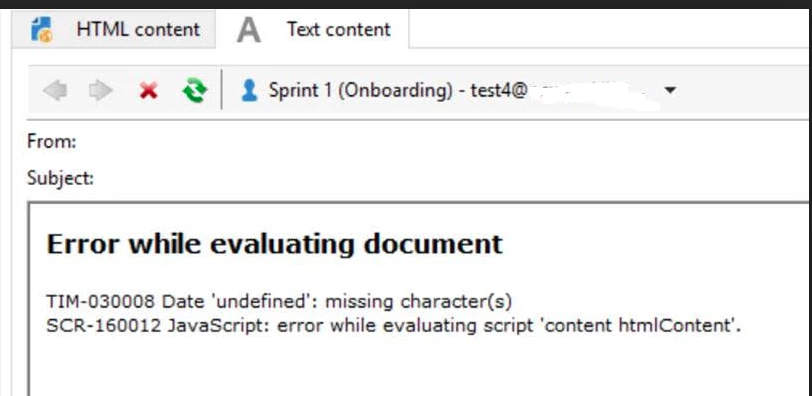


error.png


Here's the variable I have coded in the email: 


var effectiveDate = targetData.effectiveDate


And I'm calling it into the email as: <%=formatDate (effectiveDate, "%Bl %D") %>


The seed I'm using is set-up with effectiveDate in the 'Additional Fields' tab: 
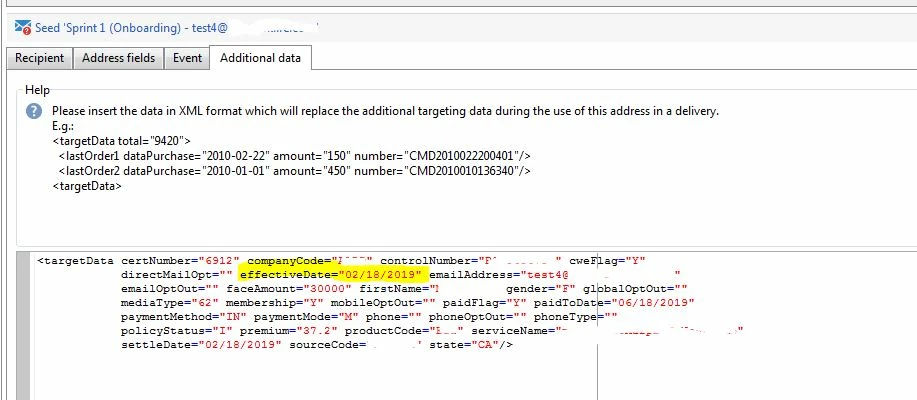
seed.JPG


I tried changing that Date format to : "2020-04-07" and "2020-04-07 12:00:00.177Z" - both formats still gave me the same error. 


I am on Adobe Console - v7 build 8895

Can anyone help why I would get this error when generating a Preview?


FYI - when I send the email to a select test group - the email delivers fine with no errors. 


1 Accepted Solution

Avatar

Correct answer by
Community Advisor

formatDate() requires a Date object and in your additional data, date is a string, which will generate that error. I would say your targetData normally has an actual date object for effectiveDate which is why it works when you run the workflow.

View solution in original post

0 Replies

Avatar

Correct answer by
Community Advisor

formatDate() requires a Date object and in your additional data, date is a string, which will generate that error. I would say your targetData normally has an actual date object for effectiveDate which is why it works when you run the workflow.