Details not Shown in the Final EMail Delivery - Adobe Campaign Classic | Adobe Higher Education
Skip to main content
Level 5
June 25, 2022
해결됨

Details not Shown in the Final EMail Delivery - Adobe Campaign Classic

  • June 25, 2022
  • 2 답변들
  • 1516 조회

Hello All,


I have created a campaign, and have added a recurring delivery to the workflow.

The Email has the following information


Name: <%= message.delivery.operation.internalName %> Label: <%= message.delivery.operation.label %> ID: <%= message.delivery.operation.id %>


When I edit the Delivery and Preview, I see this information correctly displayed in the preview tab.

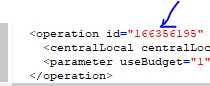
But When I start the delivery and receive the email, the Name and Label value comes as blank, while the id is shown as 0


What could be the reason, that this information is not picked correctly during the Delivery? Request your help


Regards,

Dipendu
이 주제는 답변이 닫혔습니다.
최고의 답변: bogdan_ach

It seems that the link to the Campaign(operation) table is somehow broken.
If you create a new Campaign insinde a Program folder and use the "Recurring delivery" activity, those variables should work in your final email that you receive in your inbox (I've just tested it now).


So I would suggest to either re-create the campaign and the delivery inside the WF, or troubleshoot the broken link: you can remove some of the links such as using this <%= delivery.operation.id %> and see if it works, or inspect the XML content of the created delivery object with Edit -> Edit XML source at the top left of the windiw and check the operations node for its content.

2 답변

DavidKangni
Community Advisor
Community Advisor
June 28, 2022

Some type of delivery in ACC are not automatically tied to a campaign. This is why you may have blank values.

Thanks,

David

David Kangni
dipendu_g작성자
Level 5
June 28, 2022

@davidkangni Hi David, isnt recurring delivery tied to Campaign. I think, Delivery under Actions Tab are not. 


Regards,

DG

Sukrity_Wadhwa
Community Manager
Community Manager
July 12, 2022

Hi @davidkangni

Could you please help @dipendu_g further with their query?

Thnaks!

Sukrity Wadhwa
Adobe Employee
August 4, 2022

It seems that the link to the Campaign(operation) table is somehow broken.
If you create a new Campaign insinde a Program folder and use the "Recurring delivery" activity, those variables should work in your final email that you receive in your inbox (I've just tested it now).


So I would suggest to either re-create the campaign and the delivery inside the WF, or troubleshoot the broken link: you can remove some of the links such as using this <%= delivery.operation.id %> and see if it works, or inspect the XML content of the created delivery object with Edit -> Edit XML source at the top left of the windiw and check the operations node for its content.

Sukrity_Wadhwa
Community Manager
Community Manager
August 24, 2022

Hi @dipendu_g,

Was this solution helpful to resolve your query or do you still need more help here? Do let us know.

Thanks!

Sukrity Wadhwa
dipendu_g작성자
Level 5
August 31, 2022

@sukrity_wadhwa, After recreating the campaign the issue resolved.


Thanks,

DG