Approval activity expiration | Community
Skip to main content
February 4, 2022
Solved

Approval activity expiration

  • February 4, 2022
  • 1 reply
  • 967 views

Hi everyone! I have a question regarding approval activities. I'm not sure if this is something I can do with an approval or if it requires more work.


I need to do the following:

- 30 min before the email is sent to the target audience, I want to send an email to my client for their approval. 

- If they approve, the email is sent at its due time.

- If they don't approve, the email is not sent.

- BUT if they don't do anything, I want the email to be sent anyway at its due time.


Are there any tips you can give me on this?


Thanks!!


Clara

This post is no longer active and is closed to new replies. Need help? Start a new post to ask your question.
Best answer by Marcel_Szimonisz

Hello @clarabalaguer,

You can achieve the same results with different approaches, one that came to my mind immediately is to set up your workflow in following way:
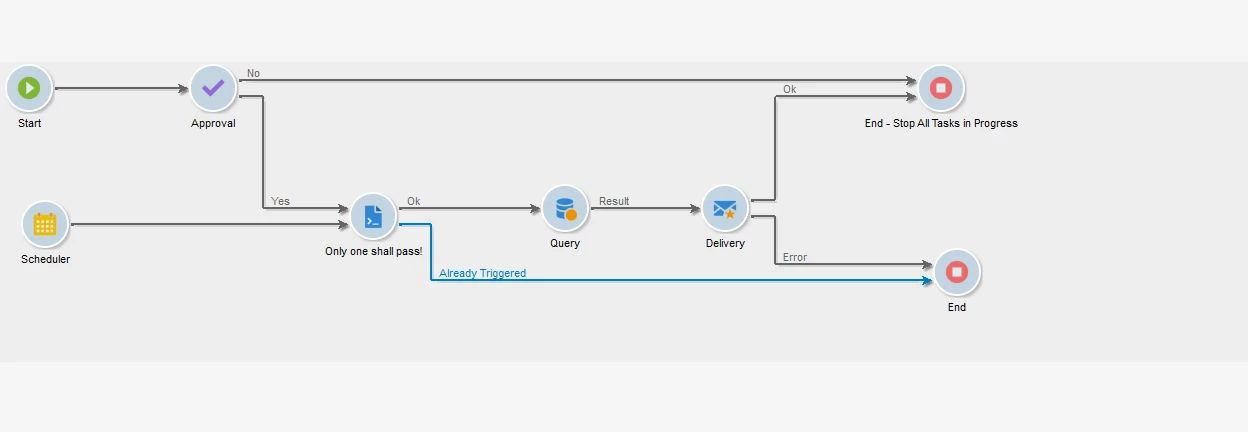


Where following use cases may happen:

  • the email gets rejected and the stop activity will also stop all tasks in progress. So no scheduler is fired.
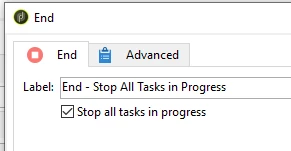


  • the email is nor approved either declined and  will be triggered by scheduler. Approval task will be stopped by the End activity with option stop all tasks in progress enabled
  • when the email gets approved the email runs immediately. In case of approved and scheduler trigger is fired one after another, only one will pass to the delivery so you do not send same email twice. That will be set up in Advanced JavaScript activity 

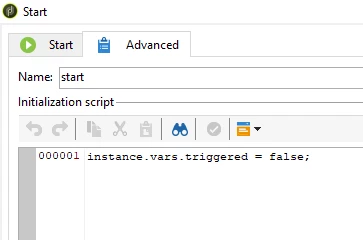
Advanced JS activity will have logic to trigger only once by setting flag that will be saved under instance.vars.triggered. Instance vars because they are visible to entire workflow once set. I would set it in start activity:
 

In the advanced JS add the following, to the tab "next calls" (two can happen)


if (instance.vars.triggered == true){
  task.postEvent(task.transitionByName("alreadyTriggered"));
}else{
  instance.vars.triggered = true;
  task.postEvent(task.transitionByName("ok"));
}
return 0

Where basically with simple condition we set this flag to true when we first run over this JS. Next time the AJS will trigger transition called alreadyTriggered and will finish the workflow. (not the end with stop all tasks.. as the delivery might be processing)
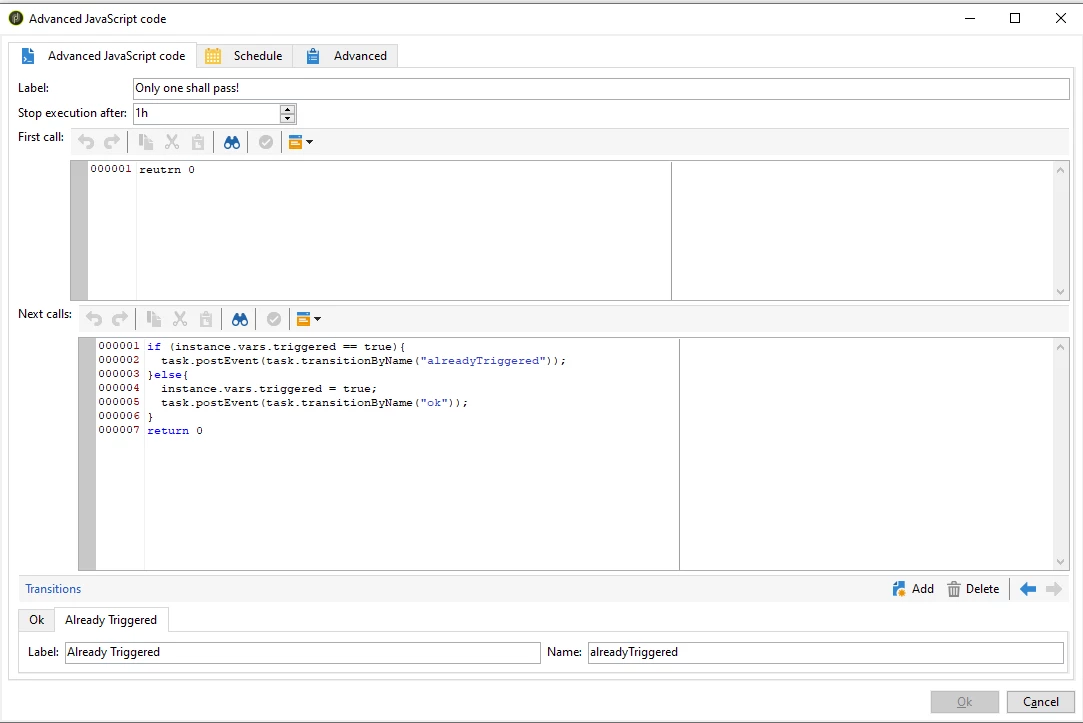
 

Also do not forget to add new transition called alreadyTriggered


Also make sure only decline and delivery done goes to Stop - stop all tasks in progress


Marcel

1 reply

Marcel_Szimonisz
Community Advisor
Marcel_SzimoniszCommunity AdvisorAccepted solution
Community Advisor
February 7, 2022

Hello @clarabalaguer,

You can achieve the same results with different approaches, one that came to my mind immediately is to set up your workflow in following way:


Where following use cases may happen:

  • the email gets rejected and the stop activity will also stop all tasks in progress. So no scheduler is fired.


  • the email is nor approved either declined and  will be triggered by scheduler. Approval task will be stopped by the End activity with option stop all tasks in progress enabled
  • when the email gets approved the email runs immediately. In case of approved and scheduler trigger is fired one after another, only one will pass to the delivery so you do not send same email twice. That will be set up in Advanced JavaScript activity 

Advanced JS activity will have logic to trigger only once by setting flag that will be saved under instance.vars.triggered. Instance vars because they are visible to entire workflow once set. I would set it in start activity:


In the advanced JS add the following, to the tab "next calls" (two can happen)


if (instance.vars.triggered == true){
  task.postEvent(task.transitionByName("alreadyTriggered"));
}else{
  instance.vars.triggered = true;
  task.postEvent(task.transitionByName("ok"));
}
return 0

Where basically with simple condition we set this flag to true when we first run over this JS. Next time the AJS will trigger transition called alreadyTriggered and will finish the workflow. (not the end with stop all tasks.. as the delivery might be processing)


Also do not forget to add new transition called alreadyTriggered


Also make sure only decline and delivery done goes to Stop - stop all tasks in progress


Marcel