Adobe Campaign Classic - Analytics Integration | Community
Skip to main content
_abhishek_
Level 3
September 26, 2023
Solved

Adobe Campaign Classic - Analytics Integration

  • September 26, 2023
  • 3 replies
  • 1715 views

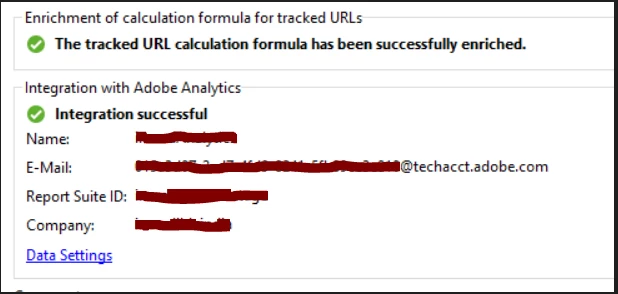
External account says, Integration Successful, as seen below in the Screenshot.
 

"Sending of indicators and campaign attributes" OOB Technical Workflow is getting errored out, attached the Screenshot for reference.
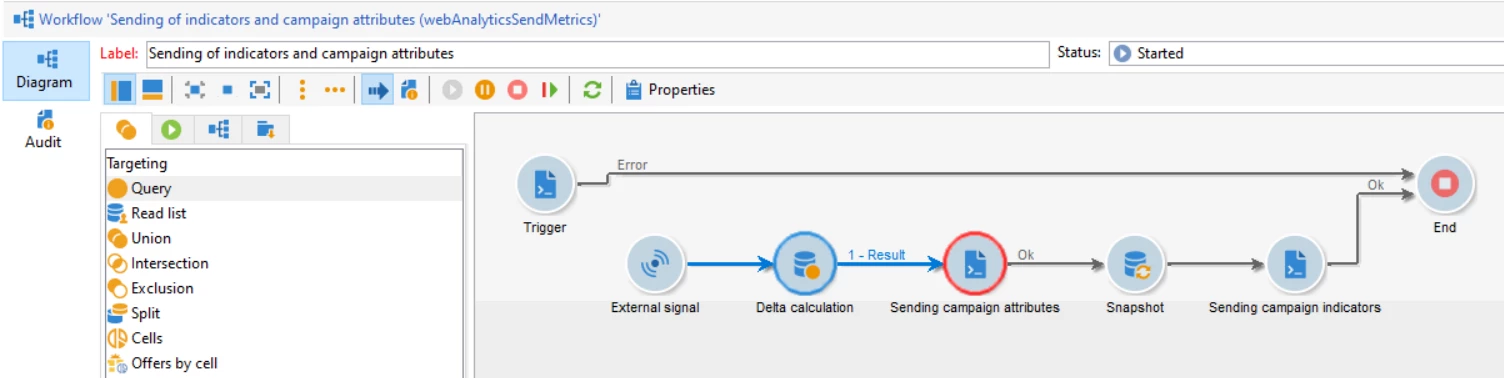


Error in the WF:

 

Note: whenever this Workflow is running, the 'camapign Id' and 'Broadlog ID' reference is getting reset from the external account. tried adding multiple times in the configure tab, still it is getting reset.

 

Steps taken as of now to fix it:

  • Adobe has increased javascript maxMB from 512 to 1024.
  • we tried recreating the external account as well.

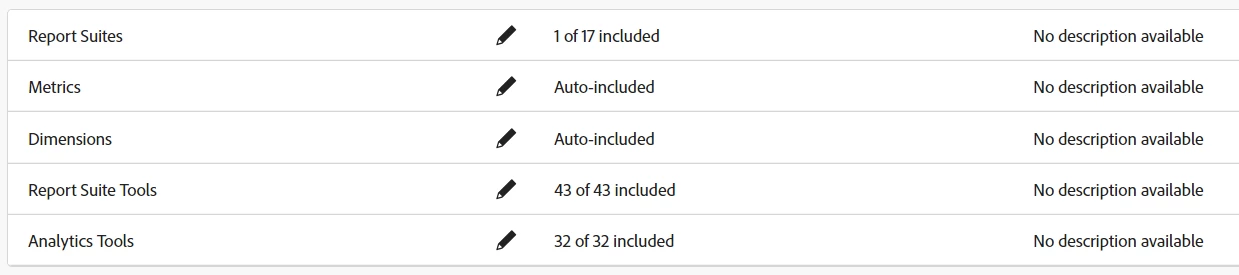
below is the setup in the Analytics:

 

Could you please help on this, what could be the reason?
This post is no longer active and is closed to new replies. Need help? Start a new post to ask your question.
Best answer by _abhishek_

I got the fix. Apart from the Adobe document, I have added all the permission in the product profile on Developer console. It started pushing data to the Analytics. some of the permission might not be required, still have included all of them.


3 replies

Manoj_Kumar
Community Advisor
Community Advisor
September 26, 2023

Hello @_abhishek_ 


Check if the parameters are correctly mapping the data settings of the external account:


More information is available here: Adobe Analytics connector | Adobe Campaign


Also check if your instance build is greater than 9349

Manoj     Find me on LinkedIn
_abhishek_
Level 3
September 26, 2023

@_manoj_kumar_ ,

We have followed all the steps mentioned in the doc.


Below is the Screenshot of Data settings tab, mapping seems to be fine.


Instance build is the latest one :9359


Once we run the "Sending of indicators and campaign attributes" OOB Technical Workflow, it gets errored out and reset the Campaign Id and Broadlog ID in the external account.


LakshmiPravallika
Community Advisor
Community Advisor
September 26, 2023

Hi @_abhishek_ ,


Please enable only one External account for Analytics Integration in your Instance and disable the other External accounts having Analytics Integration if any and Please try running this OOTB Workflow.


Few times the issue can come up due to multiple External accounts for same Integration being configured in the same Instance.


Regards,

Pravallika.

_abhishek_
Level 3
September 26, 2023

@lakshmipravallika, We have only 1 Web Analytics External account configured in our instance.


Regards,

Abhishehk

LakshmiPravallika
Community Advisor
Community Advisor
September 26, 2023

Hi @_abhishek_ ,


Please cross check the Variables mapped at Analytics end, because the error Screenshot you have pasted is looking for a variable of type "metric", but the Campaign ID which is configured is not a metric variable


This needs to be checked at Analytics end also to refresh the Variables what they have created,


Regards,

Pravallika,

_abhishek_
_abhishek_AuthorAccepted solution
Level 3
September 27, 2023

I got the fix. Apart from the Adobe document, I have added all the permission in the product profile on Developer console. It started pushing data to the Analytics. some of the permission might not be required, still have included all of them.