Solved
Workspace - Freeform Table - More than 5 columns
Hi,
How can you get more than 5 columns for the same metric in a freeform Table within Adobe Analytics Workspace ?
Thxs !
Hi,
How can you get more than 5 columns for the same metric in a freeform Table within Adobe Analytics Workspace ?
Thxs !
Hello Adrienm,
There's nothing wrong, that is just drag and drop multiple times the same metric in the columns.

I guess you want to see more than 5 dimensions value in the columns, that depends on you eVar, when you drag and drop the dimension on the head, the table will brought you the top 5 values with more instances.
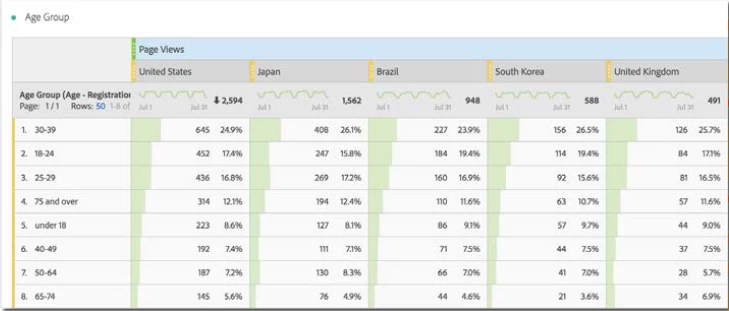
(Workspace student book 2017)
Maybe you should try organize your table or click in the right arrow in the dimensions list, that you can select the values you want, drag and drop, more than you wish.
Regards,
Mauricio Shoji
Enter your E-mail address. We'll send you an e-mail with instructions to reset your password.