Workspace dashboard - Can we set the dimension row values to come one below other rather than depend on metrics values | Community
Skip to main content
Level 4
February 9, 2021
Solved

Workspace dashboard - Can we set the dimension row values to come one below other rather than depend on metrics values

  • February 9, 2021
  • 8 replies
  • 2986 views

Can we set the dimension row values to come one below other rather than metrics count? 
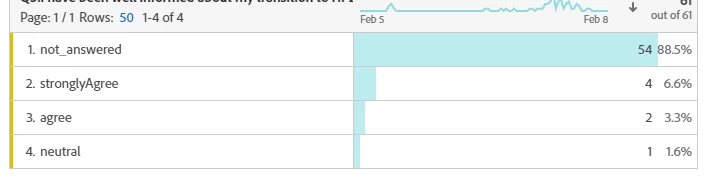
 

As shown in the table, row#1 not_answered. Can I have row #1 stronglyAgree, row2# agree.... 

This post is no longer active and is closed to new replies. Need help? Start a new post to ask your question.
Best answer by Andrew_Wathen_

Instead of using the dimension in your table, you can create segments for each item (e.g. stronglyAgree) and drag them into left side of the table and it will retain the order in which you drop them in.   You may also be able to do this directly with dimension items.

8 replies

Andrew_Wathen_
Community Advisor
Andrew_Wathen_Community AdvisorAccepted solution
Community Advisor
February 9, 2021

Instead of using the dimension in your table, you can create segments for each item (e.g. stronglyAgree) and drag them into left side of the table and it will retain the order in which you drop them in.   You may also be able to do this directly with dimension items.

Level 4
February 9, 2021

@andrew_wathen_ :  Thanks for the answer. but I can't create segment on stronglyAgree or agree dimension values....  As I already created classification rule on eVar to Hold the question, & ratings are getting captured on same eVar.  Any other help will be appreciated.


Andrew_Wathen_
Community Advisor
Community Advisor
February 9, 2021
Apologies in advance if I'm missed something, but could you not just create segments of the classification values if that is what is showing in your screenshot?
Level 4
February 9, 2021

@andrew_wathen_  No worries. Yes stronglyAgree, Agree,,,  are classification values. I created segment for all those values, but I am not able to place multiple segment one below the other, it becoming like breakdown for the above one. Please see in the below screen shot. Q2 & Q1 are two segments. 


Andrew_Wathen_
Community Advisor
Community Advisor
February 9, 2021
Got it - it's where you are dropping the segment in that's causing it to breakdown rather than go one beneath the other. Give me a min and I'll post a screen shot
Andrew_Wathen_
Community Advisor
Community Advisor
February 9, 2021

Screen shot showing where you need to drop the segments in so they stack rather than breaking down:


Note: it will say "+Add" rather than "Breakdown" if you've got it in the right place


Level 4
February 9, 2021

@andrew_wathen_  thanks its working. one more.. can we change the legend colors?


Andrew_Wathen_
Community Advisor
Community Advisor
February 9, 2021
You can customise the colour pallet for the project as a whole (project > project info &settings) - As far as I'm aware, this is the only control you have over the legend colours
Level 4
February 9, 2021

@andrew_wathen_  Thanks a lot 

jantzen_b
Adobe Employee
Adobe Employee
February 9, 2021
Per your survey response. I've removed the answer marked as correct.
jantzen_b
Adobe Employee
Adobe Employee
February 17, 2021
Do @andrew_wathen_'s responses provide an answer to your question? If so, can you pick the most correct answer?