
Why I'm getting more unspecified when I place UV against tracking code | Community
Skip to main content
DhanA2
Level 3
September 5, 2023
Solved

Why I'm getting more unspecified when I place UV against tracking code

  • September 5, 2023
  • 1 reply
  • 1624 views

Hi team, 


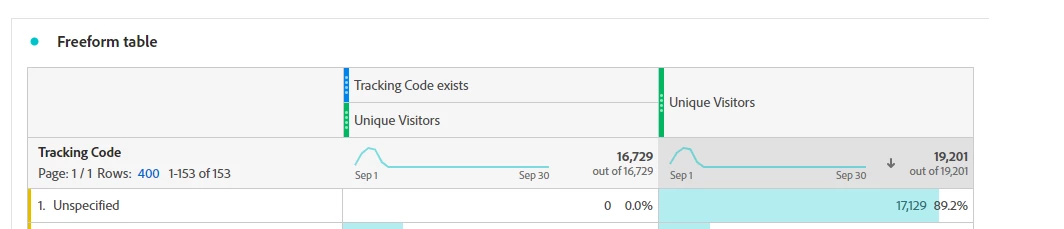
Help me, getting more unspecified on tracking code. what could be the issue?
 

CCing top contributors for quick responses

@jennifer_dungan 

Thanks

This post is no longer active and is closed to new replies. Need help? Start a new post to ask your question.
Best answer by Jennifer_Dungan

Wow! Hats off to you! @jennifer_dungan  No one has ever explained things to me quite like you did. Your explanation was exceptional, and I truly appreciate your effort and clarity. You're a champ! Thank you!

So Final verdict is misinterpretation is culprit. 

Okay, please help me understand how to avoid these situations. For some business users, it's hard to comprehend what's happening in the back-end, leading to misunderstandings and complaints about data quality.

What would your suggestions be for this and similar cases? What best practices should we follow?

Additionally, if you have any resources like Adobe Target pitfalls, especially for Analysis Workspace, this would be really helpful for all web analysts.

Thanks for your valuable time.
Really love your work!


Honestly, Visitors and "visitor overlap" is one of the hardest things to wrap your head around (hence I tried to add as many visuals and examples as possible). I often find myself helping to explain that within my own company...


Now that said, depending on how complex you want to go, you could probably create some non-overlapping segments for Users with Tracking Code vs User without Tracking Code... (for users that have encountered both in the reporting period, you could defer them to the "with" bucket, by using some extra exclusion logic).


You could display as three columns (with, without, and total):


Visitors WITH Tracking Code:



Visitors WITHOUT Tracking Code:
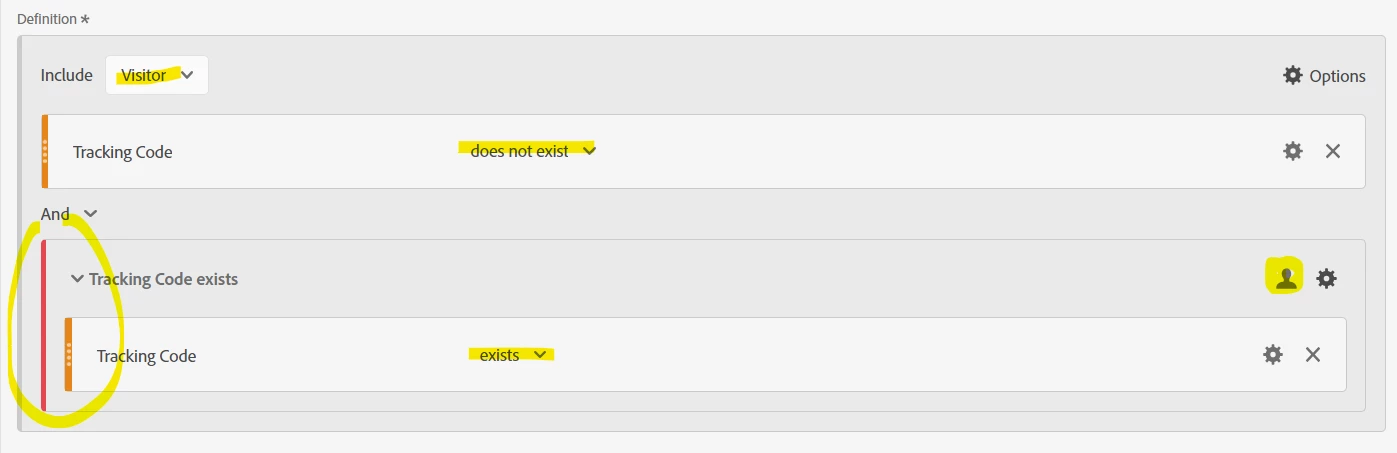
(Notice the inclusion of an exclude container, also at Visitor level, excluding visitors that have tracking code.)


You can pair both segments with the UV metric, and if you pull UVs as it's own column, the two segments added together should match the total users (no overlapping) - this will at least help people read and interpret the report easier 🙂


For other cases, try to think like how a user might interact with your site... each visit will be slightly different, a different way to enter the site, interacting with different touch points. So when you segment by users you have to remember that only one touch point for the user needs to match for the segment to be true for the user, but all the visits that user has won't necessarily....


Even when you are dealing with Users... sometimes a "Visitor" level segment isn't the segment you need... you can always pair UV metric with a segment built on Visit or Hit level logic...


For instance, in the above... you could just build your segments for "Visits with Tracking Code" and "Visits without Tracking Code"... from a Visit perspective, there is no overlap, but at the UV level there will be depending on the various methods that the user came to your site. But this still isn't necessarily wrong.. You did have X Visitors with Tracking Codes, and Y Visitors without... it's just that some of those visitors did both (and it's a good idea to add a description to the table to explain this overlap to the people consuming the report).


And I hear you, business users do like to complain about data quality, usually when they are reading the info wrong. This is why most reports I add descriptions to try and explain exactly what they are looking at, and how best to interpret it.... and there will always be those users who don't read that, but hopefully when those people complain, enough other people will have read it and will realize that person complaining is just wrong....


Now, for Target, we don't actually have Target, but I have worked in another A/B testing tool with integrations (all custom) into our Analytics.. I may not have any of hand pitfalls to help you avoid, but I would expect some of the stuff I have dealt with would have a correlatable equivalence to Target... and I would be happy to help you with specific questions.


Anyway, second novel done 🙂 But I am glad I was able to help you out.

1 reply

Jennifer_Dungan
Community Advisor and Adobe Champion
September 5, 2023

Hi @dhana2,


Keep in mind that many visits to your site won't necessarily have tracking codes.


If I open up a site (https://www.domain.com) directly, or come through an organic search or bookmark, I will not have an tracking params, and therefore no tracking code.


This will be "unspecified" in the reporting.


When I come into a URL with a param (https://www.domain.com/?cid=tracker) then "tracker" will be set into my tracking codes (and if you are using default settings, this value will persist for 1 week, so if I come to the site again in 2 days without any params, "tracker" will be applied to those visits)


Since you are looking at UVs, this would indicate to me that you have either a lot of loyal users or a lot of organic search / social traffic (traffic referrals that aren't coded with specific tracking params). This isn't an issue.

DhanA2
DhanA2Author
Level 3
September 6, 2023

Thanks @jennifer_dungan  for your prompt response.

that I can understand, can  you look at the highlighted total values
Tracking code exist users: 16729
With out tracking code: 19201
With out tracking code(unspecified): 17129
I feel this contradictory.

Thanks,

Jennifer_Dungan
Community Advisor and Adobe Champion
Jennifer_DunganCommunity Advisor and Adobe ChampionAccepted solution
Community Advisor and Adobe Champion
September 6, 2023

Wow! Hats off to you! @jennifer_dungan  No one has ever explained things to me quite like you did. Your explanation was exceptional, and I truly appreciate your effort and clarity. You're a champ! Thank you!

So Final verdict is misinterpretation is culprit. 

Okay, please help me understand how to avoid these situations. For some business users, it's hard to comprehend what's happening in the back-end, leading to misunderstandings and complaints about data quality.

What would your suggestions be for this and similar cases? What best practices should we follow?

Additionally, if you have any resources like Adobe Target pitfalls, especially for Analysis Workspace, this would be really helpful for all web analysts.

Thanks for your valuable time.
Really love your work!


Honestly, Visitors and "visitor overlap" is one of the hardest things to wrap your head around (hence I tried to add as many visuals and examples as possible). I often find myself helping to explain that within my own company...


Now that said, depending on how complex you want to go, you could probably create some non-overlapping segments for Users with Tracking Code vs User without Tracking Code... (for users that have encountered both in the reporting period, you could defer them to the "with" bucket, by using some extra exclusion logic).


You could display as three columns (with, without, and total):


Visitors WITH Tracking Code:


Visitors WITHOUT Tracking Code:

(Notice the inclusion of an exclude container, also at Visitor level, excluding visitors that have tracking code.)


You can pair both segments with the UV metric, and if you pull UVs as it's own column, the two segments added together should match the total users (no overlapping) - this will at least help people read and interpret the report easier 🙂


For other cases, try to think like how a user might interact with your site... each visit will be slightly different, a different way to enter the site, interacting with different touch points. So when you segment by users you have to remember that only one touch point for the user needs to match for the segment to be true for the user, but all the visits that user has won't necessarily....


Even when you are dealing with Users... sometimes a "Visitor" level segment isn't the segment you need... you can always pair UV metric with a segment built on Visit or Hit level logic...


For instance, in the above... you could just build your segments for "Visits with Tracking Code" and "Visits without Tracking Code"... from a Visit perspective, there is no overlap, but at the UV level there will be depending on the various methods that the user came to your site. But this still isn't necessarily wrong.. You did have X Visitors with Tracking Codes, and Y Visitors without... it's just that some of those visitors did both (and it's a good idea to add a description to the table to explain this overlap to the people consuming the report).


And I hear you, business users do like to complain about data quality, usually when they are reading the info wrong. This is why most reports I add descriptions to try and explain exactly what they are looking at, and how best to interpret it.... and there will always be those users who don't read that, but hopefully when those people complain, enough other people will have read it and will realize that person complaining is just wrong....


Now, for Target, we don't actually have Target, but I have worked in another A/B testing tool with integrations (all custom) into our Analytics.. I may not have any of hand pitfalls to help you avoid, but I would expect some of the stuff I have dealt with would have a correlatable equivalence to Target... and I would be happy to help you with specific questions.


Anyway, second novel done 🙂 But I am glad I was able to help you out.