Why event tag (trackAction) implemented by Context data on Mobile App would be fired as page view and Page Dimension captures it as "Other" | Community
Skip to main content
Level 2
December 23, 2022
Solved

Why event tag (trackAction) implemented by Context data on Mobile App would be fired as page view and Page Dimension captures it as "Other"

  • December 23, 2022
  • 1 reply
  • 953 views

For page view tag (trackState), I use page_name to capture page name and use processing rule to overwrite value of page name (Analytics default), page name(Prop2) and page name(eVars1) by page_name(context data) if page_name(context data) is set.


For event tag (trackAction), I use a.page_name to capture page name and use processing rule to overwrite value of only page name(eVars1) by a.page_name(context data) if a.page_name(context data) is set.


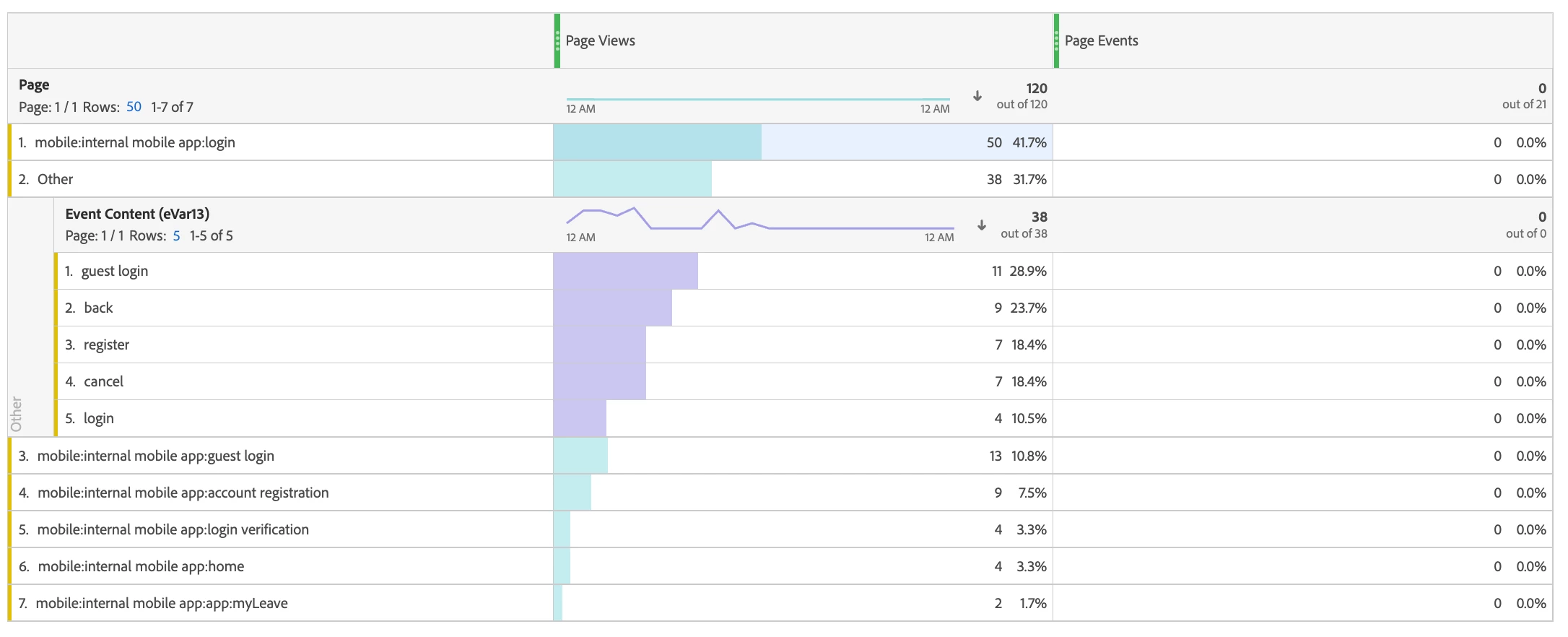
Why event tag is still captured as page view tag? And fall into Page dimension (Analytics default)?


Thank you
 

This post is no longer active and is closed to new replies. Need help? Start a new post to ask your question.
Best answer by Jennifer_Dungan

Is your first rule to set the pageName if your page_name context variable set always triggering?


For page view tag (trackState), I use page_name to capture page name and use processing rule to overwrite value of page name (Analytics default), page name(Prop2) and page name(eVars1) by page_name(context data) if page_name(context data) is set.


Did you ensure that this rule only runs on page views and NOT actions? It's possible your developers are sending that context variable on your trackActions and your first rule is running unexpectedly.


Adobe uses the "pageName" and "URL" values to determine when a page view occurs. If you use Processing Rules to set the PageName value on your actions, that will cause issues with your tracking, and count your actions incorrectly as page views.


On a normal s.tl() call on the web, even though a "pageName" value is passed, the value is actually removed from the tracking; but if you set the value with Processing Rules, it makes your actions "page views".


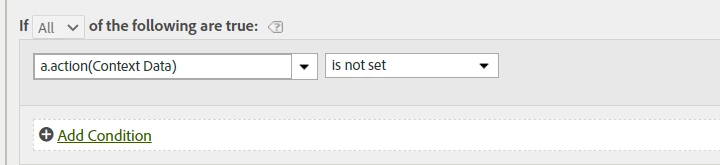
On safety control you can add to your general processing rule (where you set the PageName value) is to add:


1 reply

Jennifer_Dungan
Community Advisor and Adobe Champion
Jennifer_DunganCommunity Advisor and Adobe ChampionAccepted solution
Community Advisor and Adobe Champion
December 25, 2022

Is your first rule to set the pageName if your page_name context variable set always triggering?


For page view tag (trackState), I use page_name to capture page name and use processing rule to overwrite value of page name (Analytics default), page name(Prop2) and page name(eVars1) by page_name(context data) if page_name(context data) is set.


Did you ensure that this rule only runs on page views and NOT actions? It's possible your developers are sending that context variable on your trackActions and your first rule is running unexpectedly.


Adobe uses the "pageName" and "URL" values to determine when a page view occurs. If you use Processing Rules to set the PageName value on your actions, that will cause issues with your tracking, and count your actions incorrectly as page views.


On a normal s.tl() call on the web, even though a "pageName" value is passed, the value is actually removed from the tracking; but if you set the value with Processing Rules, it makes your actions "page views".


On safety control you can add to your general processing rule (where you set the PageName value) is to add:


JosonAuthor
Level 2
January 3, 2023

Thank you for your insight. I have reset the processing rule.

Your answer "Adobe uses the "pageName" and "URL" values to determine when a page view occurs." is useful.


I remove the linkage between hit attribute Page URL (Adobe Analytics Variable) and page_url (Context data); between hit attribute Page Name (Adobe Analytics Variable) and any of page name (Context data) from trackActions call.


And in fact, if context data is correctly implemented, we don't need to set processing rule for hit attributes Page URL and Page Name (Adobe Analytics Variable). They are captured automatically for trackState call. Instead, if we would like to capture Page Name for trackActions call, custom Adobe Analytics Variable (e.g., eVars1) and a.pageName (custom context data) can be linked by processing rule.


The data of Page view and Page event is eventually correctly captured.


Thank you again.

Jennifer_Dungan
Community Advisor and Adobe Champion
January 3, 2023

If it makes you feel better, I had a similar issue on my initial Mobile App implementation too... I had a general rule that was setting the page name and url (cause these are things that are generally part of web calls as well).. but when set with processing rules they don't act the same....
