Where is the Server Call Dashboard | Community
Skip to main content
jakea85004189
Level 2
July 20, 2018
Solved

Where is the Server Call Dashboard

  • July 20, 2018
  • 3 replies
  • 2456 views

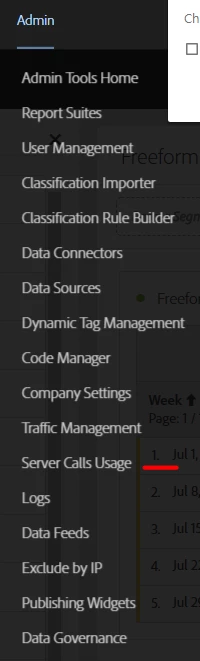
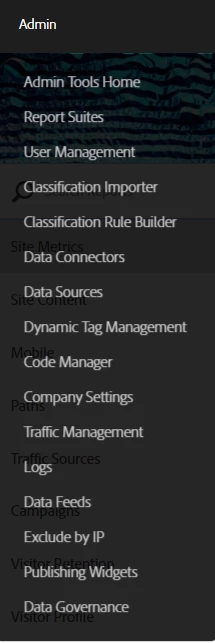
saw an announcement today that there was a new server call dashbaord. The page said it was located at Analytics > Admin > Server Call Usage.

I checked there on an admin account but did not see the dashboard. Where is the dashboard?

This post is no longer active and is closed to new replies. Need help? Start a new post to ask your question.
Best answer by Gigazelle

Chatted with a couple people internally, and found there are a few edge cases that might prevent it from showing:

  • If the login company is flagged as internal to Adobe.
  • If the login company has a custom contract that prevents this menu item from being shown.
  • If the switch to see it wasn't automatically turned on due to the presence of one or more report suites belonging to a different billing customer (common in large orgs that might have multiple billing ID's).

If you've verified you're a full admin (and not a standard user who has many admin console permissions enabled), reaching out to your account manager would be the most ideal way to get this resolved.

3 replies

Level 4
July 20, 2018

I can see it under Admin > Servr Calls Usage

jakea85004189
Level 2
July 20, 2018

Thanks. Looks like whatever the problem is, it's on my own end since I'm not seeing that option yet.

Gigazelle
Adobe Employee
GigazelleAdobe EmployeeAccepted solution
Adobe Employee
July 25, 2018

Chatted with a couple people internally, and found there are a few edge cases that might prevent it from showing:

  • If the login company is flagged as internal to Adobe.
  • If the login company has a custom contract that prevents this menu item from being shown.
  • If the switch to see it wasn't automatically turned on due to the presence of one or more report suites belonging to a different billing customer (common in large orgs that might have multiple billing ID's).

If you've verified you're a full admin (and not a standard user who has many admin console permissions enabled), reaching out to your account manager would be the most ideal way to get this resolved.