Web event data not reaching Adobe Analytics Reports | Community
Skip to main content
Level 2
July 26, 2022
Solved

Web event data not reaching Adobe Analytics Reports

  • July 26, 2022
  • 2 replies
  • 3475 views

Hi, This is my 1st attempt at configuring and sending data from our Dev website to Adobe Analytics. Although I did use another orgs. Report Suite and Tag Properties setup as a template. 

In our Tag Properties Rules we are using:

Events: Core - Direct Call

Then: Actions: 

Adobe Analytics - Set Variables THEN Adobe Analytics - Send Beacon

We have embedded the Tags code in the <head> tag of our document.

We are sending our Data element JS variables to AA using the _satellite.track function.


In the Adobe Experience Platform Debugger, we do see data coming across from Analytics. We see the Props we defined, Page Title, Page URL, etc... However, we do not see any data in our Dev Report Suite. 

How can we troubleshoot if data is even being sent from our website? In Chrome Dev Tools we do not see any indication of making a POST or API call to send data to AA.

Can someone please give some troubleshooting tips to see data going to AA from our website and data being ingested into Report Suite?


Thank you.
This post is no longer active and is closed to new replies. Need help? Start a new post to ask your question.
Best answer by Jennifer_Dungan

Yes, what you're seeing confirms that your hits are not being received by AA's server.

  1. Did you observe any errors in your browser console that might be related to your hits?
  2. Are you using the correct tracking server?

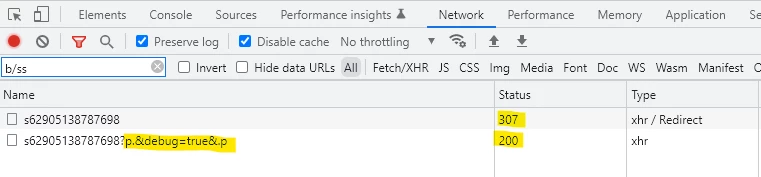
Another thing to look for... in your browser's network panel, what response code are you getting on your tracking call? Note that with the debugger open you will likely see 2 calls (one being a 307 (redirect to the debugger) and then the real call which should be a 200... I suspect you are not getting a 200 response....


Filter by "b/ss" in your network panel:


2 replies

Jennifer_Dungan
Community Advisor and Adobe Champion
July 27, 2022

Hi,


How long did you wait for the data to appear? Adobe Analytics does need some time to process... general rule of thumb is that data should appear in your reports about 1 hour later... if it's been longer than an hour, then there is probably something wrong.. but if you are seeing content in the debugger that should mean that data is being sent... the first thing I would check is what suite is the data going to?


There should be a line in the debugger called reportSuiteIds; make sure that this is in fact your correct dev suite. 

yuhuisg
Community Advisor
Community Advisor
July 27, 2022

In the Adobe debugger, sign in with your Adobe login, then choose your organisation (from the top-right selector of the debugger window). After signing in, test your page, then go to the Analytics screen in the debugger. For each hit that is sent from your browser, you should see two columns of data, instead of the normal one column. The second column is the data that AA's server has received from your hit. If you don't see that second column per hit, then it means your data isn't reaching AA's server. Then you have to troubleshoot your implementation. Jennifer's suggestion about checking your report suite IDs would be the number one thing to check.

Jennifer_Dungan
Community Advisor and Adobe Champion
July 27, 2022

Funny.. Logging in has never worked for me... I do, and I always get the "You do not have permission to see the configured names or post processed hits for this report suite." even though I am the super admin for the entire organization and have access to everything... I thought the tool was just buggy for everyone 😛 (interesting that this works for you)