Using Segments as Dimensions using API 2.0 | Community
Skip to main content
May 31, 2023
Solved

Using Segments as Dimensions using API 2.0

  • May 31, 2023
  • 1 reply
  • 998 views

Hey there, looking to get some information on using a variety of segments as dimensions while using the API. This would allow us to run a single pipeline and pop in a variable to iterate through 30-40 different segments. Is it possible to do this using the API, rather than just within an AA workspace? Thank you in advance.

This post is no longer active and is closed to new replies. Need help? Start a new post to ask your question.
Best answer by Jennifer_Dungan

A little known fact is that Workspace is built on the API 2.0... you can get the API calls that were used to return data in your Workspace and use them as is, or modify them...


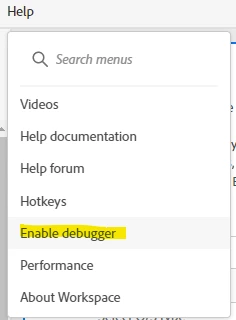
To get access to this, you first need to enable Debug Mode:


This will add a new icon to your tables:


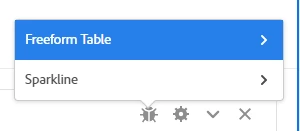
When you click on this, it will give you options for the table or the sparkline..


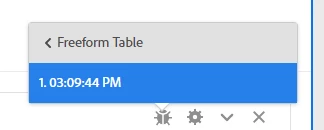
Then when you choose the table, you will be presented with timestamps of the call(s)


Now, selecting that, it will take you to a page that gives you the API call in multiple formats (JSON, curl, etc)


This is a quick way to replicate your Workspaces in the API without having to try and build it all from scratch.

1 reply

Jennifer_Dungan
Community Advisor and Adobe Champion
Jennifer_DunganCommunity Advisor and Adobe ChampionAccepted solution
Community Advisor and Adobe Champion
May 31, 2023

A little known fact is that Workspace is built on the API 2.0... you can get the API calls that were used to return data in your Workspace and use them as is, or modify them...


To get access to this, you first need to enable Debug Mode:


This will add a new icon to your tables:


When you click on this, it will give you options for the table or the sparkline..


Then when you choose the table, you will be presented with timestamps of the call(s)


Now, selecting that, it will take you to a page that gives you the API call in multiple formats (JSON, curl, etc)


This is a quick way to replicate your Workspaces in the API without having to try and build it all from scratch.

GA_CMAuthor
June 6, 2023

Thanks for the response! Would this also account for creating a variable that contains a segment that can be passed through the API?


For example, we'd like to grab data with Segment1 as the variable, once that's finished, we'd pop in Segment2 as the variable and pull the same data, and so on.