
Using a timespan within a segment | Community
Skip to main content
Anna-Lena_DE
July 13, 2022
Solved

Using a timespan within a segment

  • July 13, 2022
  • 1 reply
  • 1091 views

Hi!

I would like to create a segment that filters the following visitors:

All visitors who have had at least 2 hits on a certain product page within the last 14 days. 


It seems to me that this kind of analysis is better done outside of Adobe Analytics, but it would be great if someone knows how to manage it in the segment builder 🙂 


Thanks in advance!

Anna-Lena
@paul_96 

This post is no longer active and is closed to new replies. Need help? Start a new post to ask your question.
Best answer by Jennifer_Dungan

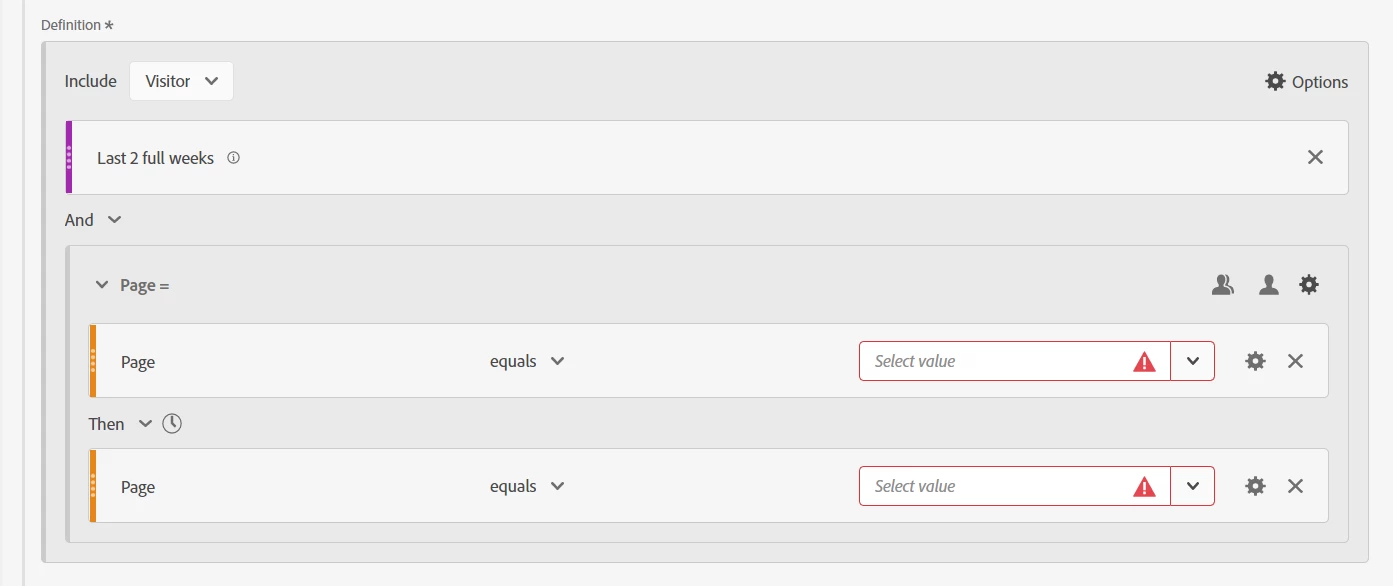
What about a segment like this:


Visitor Level, but locking right into the segment a specified date range (so that this definition doesn't apply to "all time" visitor data)


Then using another "visitor" level container.. looking at hitting your page / page type / etc (choose an appropriate dimension) using a "then" operator.... this should indicate "at least 2 separate pages"

1 reply

Jennifer_Dungan
Community Advisor and Adobe Champion
Jennifer_DunganCommunity Advisor and Adobe ChampionAccepted solution
Community Advisor and Adobe Champion
July 13, 2022

What about a segment like this:


Visitor Level, but locking right into the segment a specified date range (so that this definition doesn't apply to "all time" visitor data)


Then using another "visitor" level container.. looking at hitting your page / page type / etc (choose an appropriate dimension) using a "then" operator.... this should indicate "at least 2 separate pages"

Anna-Lena_DE
July 13, 2022

Thank you! Looks so easy but I didn't think of it... 🙂

Jennifer_Dungan
Community Advisor and Adobe Champion
July 13, 2022

Well make sure it works 😉 


But this is at least a starting point for you.


Just note, the time frame that is "locked" into the segment will stay at that time frame, no matter what time frame is selected on the main report.... might be a good idea to add that note into your panel description or visualization description to remind people about that.