URL Parsing in Tag for Analytics | Community
Skip to main content
June 16, 2023
Solved

URL Parsing in Tag for Analytics

  • June 16, 2023
  • 2 replies
  • 3172 views

Good afternoon.

I would like to know how to parse the URL in the TAG and send it in separate variables to Analytics.

Thanks.

Best answer by Jennifer_Dungan

I generally use Custom Code Data Elements for that... how good are you with JavaScript, and how complex are your parsing rules?


If you just want a simple part 1, part 2, part 3, etc IF it exists, then you could so something like:


var pathName = _satellite.getVar('urlpath'); pathName = pathName.replace(/\/*$/, "").replace(/^\/*/, ""); var pathNameArray = pathName.split('/'); var urlPart = ""; if (pathNameArray[0]){ urlPart = pathNameArray[0]; } return urlPart;


The first part just gets the Path Name from another Data Element for Path Name (or you could pull that using JS, but if you already have it, might as well use it)
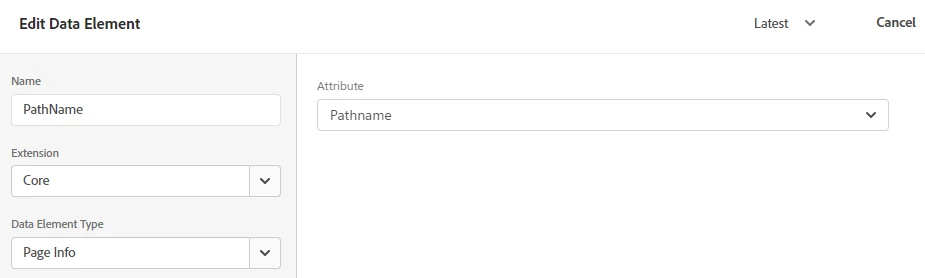
 

The second line just removes the leading and trailing / from your path (when you split the path, you won't end up with empty objects)


Next, we are going to split the URL into an array on "/"  - basically making each part of the URL it's own object.


All of the above code will be in each Data Element... the next part has the variations.


First, we just initiate a urlPart variable, so that when we run the return statement, the variable is defined, and if you happen to be on the home page, with no path parts, it will just be an empty value, or when you are pulling part 3, and you only have 2 parts, again, it returns an empty string.


Now, for each Data Element, we want to check IF there is a URL part at the position, arrays are zero-indexed... so "0" is actually part 1, "1" is actually part 2, etc


If there is a value in the part, set the urlPart variable to the value.

2 replies

Jennifer_Dungan
Community Advisor and Adobe Champion
Jennifer_DunganCommunity Advisor and Adobe ChampionAccepted solution
Community Advisor and Adobe Champion
June 16, 2023

I generally use Custom Code Data Elements for that... how good are you with JavaScript, and how complex are your parsing rules?


If you just want a simple part 1, part 2, part 3, etc IF it exists, then you could so something like:


var pathName = _satellite.getVar('urlpath'); pathName = pathName.replace(/\/*$/, "").replace(/^\/*/, ""); var pathNameArray = pathName.split('/'); var urlPart = ""; if (pathNameArray[0]){ urlPart = pathNameArray[0]; } return urlPart;


The first part just gets the Path Name from another Data Element for Path Name (or you could pull that using JS, but if you already have it, might as well use it)


The second line just removes the leading and trailing / from your path (when you split the path, you won't end up with empty objects)


Next, we are going to split the URL into an array on "/"  - basically making each part of the URL it's own object.


All of the above code will be in each Data Element... the next part has the variations.


First, we just initiate a urlPart variable, so that when we run the return statement, the variable is defined, and if you happen to be on the home page, with no path parts, it will just be an empty value, or when you are pulling part 3, and you only have 2 parts, again, it returns an empty string.


Now, for each Data Element, we want to check IF there is a URL part at the position, arrays are zero-indexed... so "0" is actually part 1, "1" is actually part 2, etc


If there is a value in the part, set the urlPart variable to the value.

yuhuisg
Community Advisor
Community Advisor
June 18, 2023

Use the Core > Page Info data element. It can parse out any part of the URL, even specific query parameters. No coding required!

Jennifer_Dungan
Community Advisor and Adobe Champion
June 19, 2023

Core > Page Info (Pathname) gets the path as one single element... it doesn't parse it into separate parts.. unless I am misunderstanding the question....


It sounded to me like they want "part 1" of the path going to eVarX, and "part 2" of the path going to eVarY, and so on.....since they said:


and send it in separate variables to Analytics

but maybe they just mean into parts like "domain" and "path"... in which case, yes, the Core > Page Info is sufficient.

June 20, 2023

so you are trying to parse an email address out of a URL? How can you be sure that there will always be a . in the email address? How can you be sure the email address is actually a name?


And from a PII standpoint, why is there an email address coded into the URL in the first place?


The code I posted the first time around showed parsing the URL Path by the /... this would require extended JS coding, but could be done in a similar way... but the problem is that the value may not always be populated in this format, so we would also need to understand what should happen for other email formats.....


Jennifer, how do I capture this URL and send it to Analytics. Should I create a rule or a data element?

Do you have any tutorial on how to capture this URL and send it to Analytics?