Unable to use retention template | Community
Skip to main content
September 25, 2021
Solved

Unable to use retention template

  • September 25, 2021
  • 1 reply
  • 968 views

I tried to make use of the retention template for the adobe analytics challenge , but when ever I open the template I get this message:

" This panel contains components that are not enabled in the report suite. Please change the report suite or enable the required components in the report suite. Metrics: First Launches , Launches." 


Could anyone tell me how to enable these components?


Thanks,
This post is no longer active and is closed to new replies. Need help? Start a new post to ask your question.
Best answer by vidurb80577666

@the_brainiac ,

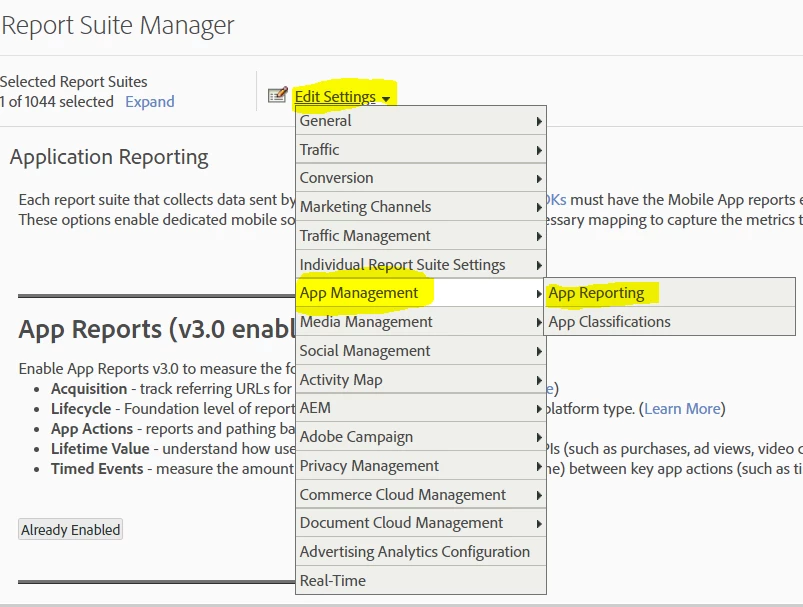
First Launches and Launches are the lifecycle metrics which can be enabled by following the path below:
- Go to Analytics >> Admin >> Report suite
- Select the report suite for which you would like to enable these metrics.
- Click on Edit Settings >> App Management >> App Reporting >> Enable App reports


1 reply

vidurb80577666Adobe EmployeeAccepted solution
Adobe Employee
October 15, 2021

@the_brainiac ,

First Launches and Launches are the lifecycle metrics which can be enabled by following the path below:
- Go to Analytics >> Admin >> Report suite
- Select the report suite for which you would like to enable these metrics.
- Click on Edit Settings >> App Management >> App Reporting >> Enable App reports