Unable to lock visualizations in workspace | Community
Skip to main content
Level 2
June 6, 2017
Solved

Unable to lock visualizations in workspace

  • June 6, 2017
  • 2 replies
  • 2915 views

Hi,

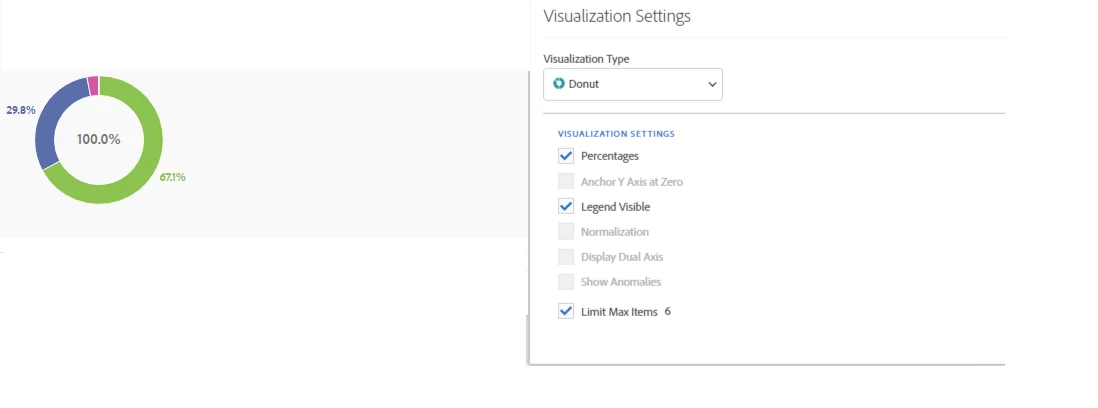
I am trying to lock the visualization with the specific data I have selected in workspace. When I click into the settings button, I'm not seeing the option to lock on the certain data. Am curious if anyone has insights as to why?

These are my options:
Thanks!
This post is no longer active and is closed to new replies. Need help? Start a new post to ask your question.
Best answer by Kaushalendra

Hi ninak78116134​,

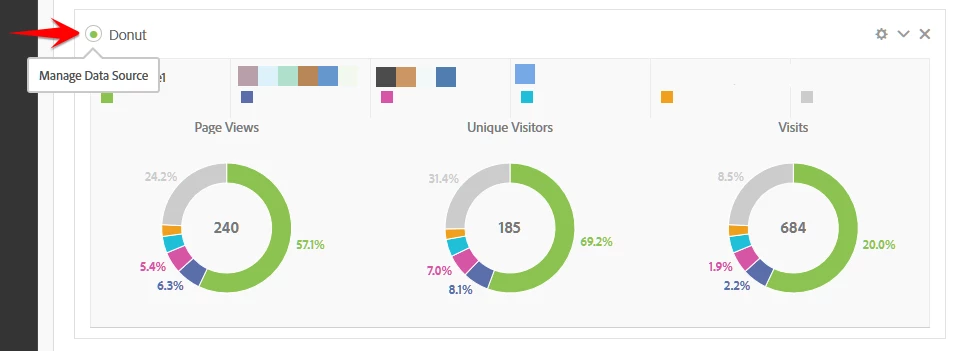
To Lock on the data in visualization you can click on green dot for "Manage Data Source" on the lest of the Visualization as shown below:

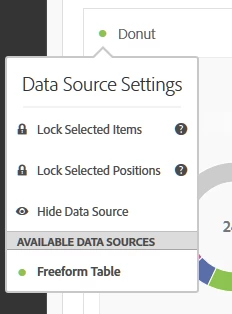
This will open "Data Source Settings" (as shown below) where you can Lock selected items or positions:

2 replies

Kaushalendra
Adobe Employee
KaushalendraAdobe EmployeeAccepted solution
Adobe Employee
June 6, 2017

Hi ninak78116134​,

To Lock on the data in visualization you can click on green dot for "Manage Data Source" on the lest of the Visualization as shown below:

This will open "Data Source Settings" (as shown below) where you can Lock selected items or positions:

Level 2
June 7, 2017

Thank you!