two server call are generated, one is getting through and another is gets failed | Community
Skip to main content
April 16, 2020
Solved

two server call are generated, one is getting through and another is gets failed

  • April 16, 2020
  • 6 replies
  • 13158 views

Hi everyone,

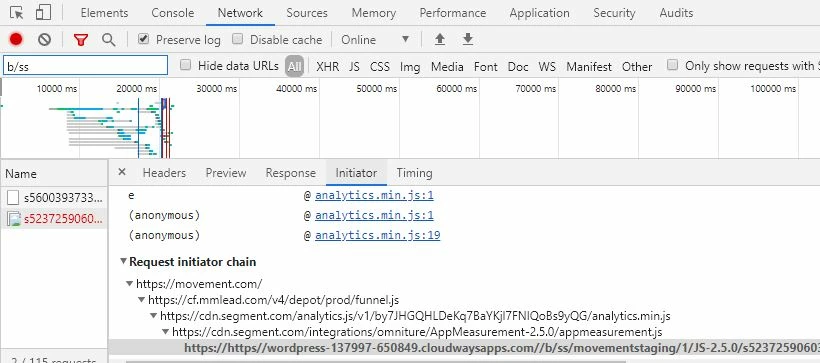
i have noticed that two AA server calls are getting generated on my site, out of this two server calls, 1st is getting through and 2nd is getting failed,

can someone have look on below screenshot, 


This post is no longer active and is closed to new replies. Need help? Start a new post to ask your question.
Best answer by Andrey_Osadchuk

Ashish,

There must be a bug in your implementation. The beacon URL starts with this "https://https//wordpress-137997-650849.cloudwaysapps.com//b/ss/movementstaging/"

The part "https//wordpress-137997-650849.cloudwaysapps.com/" should have been the tracking server, but for some reason it's the wordpress URL. This server call has never reached Adobe Analytics.

The part "movementstaging" is the report suite ID that seems to be dummy in your case. This is another reason why this server call would not be preccessed even if the tracking server was correct.

6 replies

Hyder_Ziaee
Adobe Employee
Adobe Employee
April 16, 2020
Whats the error code?
April 16, 2020
Error code is "net::ERR_NAME_NOT_RESOLVED"
Andrew_Wathen_
Community Advisor
Community Advisor
April 16, 2020

There can be a few different reasons for this (not all bad), what was the status against the failed server call?  (the successful one will have had a status of "200")

vedantr68040072
April 16, 2020
@andrew_wathen_ , status is showing "(failed)"
Andrey_Osadchuk
Level 10
April 16, 2020

Ashish, the request in the screenshot look very odd as it's referring to the incorrect URL (URI format). There may be a bug in the implementation.


Could you copy and paste here the full request (full URL) so we have a closer look and see what type of server call it is?

vedantr68040072
April 17, 2020
@andrey_osadchuk i have message you the request URL, please check
Andrey_Osadchuk
Andrey_OsadchukAccepted solution
Level 10
April 17, 2020

Ashish,

There must be a bug in your implementation. The beacon URL starts with this "https://https//wordpress-137997-650849.cloudwaysapps.com//b/ss/movementstaging/"

The part "https//wordpress-137997-650849.cloudwaysapps.com/" should have been the tracking server, but for some reason it's the wordpress URL. This server call has never reached Adobe Analytics.

The part "movementstaging" is the report suite ID that seems to be dummy in your case. This is another reason why this server call would not be preccessed even if the tracking server was correct.

jantzen_b
Adobe Employee
Adobe Employee
April 23, 2020
Do any of the answers below give you the info you need? If so, could you mark the reply that answers your original question the best as correct? If not, can you provide additional details to help the community better solve your question?