two different outcome for the same date | Community
Skip to main content
March 3, 2025
Solved

two different outcome for the same date

  • March 3, 2025
  • 1 reply
  • 403 views


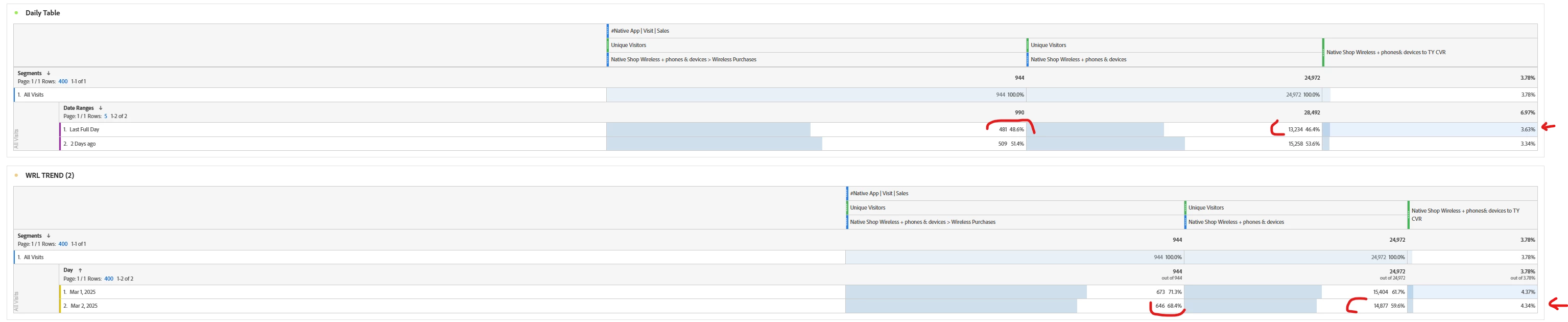
I am trying to understand why I am getting two different results using the same data in the table.  For ex.  the result I got using March 2nd is different than the result for 'last full day'  I am not understanding the reason for the delta even though the dates are the same.


This post is no longer active and is closed to new replies. Need help? Start a new post to ask your question.
Best answer by Harveer_SinghGi1

Hi @shellonpo ,

This is happening as the segments are evaluated against two different periods in both the panels. In first report the segments are evaluated against 2nd March only, in second the segments are evaluated against the time period you have applied at panel level.

If we take a very simple example of below two users,

A segment used to return visitors who viewed "home page" will generate below numbers on 3-Mar,

  • Using "last full day" will show 1 visitor for 2-Mar
  • Using panel date range as 2-Mar to 3-Mar and fetching Day dimension will show 2 visitors against 2-Mar.

If you change the panel date range in 2nd report and choose only 2-Mar, the numbers in both reports should match.

I hope this helps.

Cheers!
 

1 reply

Harveer_SinghGi1
Community Advisor
Harveer_SinghGi1Community AdvisorAccepted solution
Community Advisor
March 3, 2025

Hi @shellonpo ,

This is happening as the segments are evaluated against two different periods in both the panels. In first report the segments are evaluated against 2nd March only, in second the segments are evaluated against the time period you have applied at panel level.

If we take a very simple example of below two users,

A segment used to return visitors who viewed "home page" will generate below numbers on 3-Mar,

  • Using "last full day" will show 1 visitor for 2-Mar
  • Using panel date range as 2-Mar to 3-Mar and fetching Day dimension will show 2 visitors against 2-Mar.

If you change the panel date range in 2nd report and choose only 2-Mar, the numbers in both reports should match.

I hope this helps.

Cheers!