Trouble Locating "Non-Default Attribution Model" Option | Community
Skip to main content
emilies89227955
February 26, 2019
Solved

Trouble Locating "Non-Default Attribution Model" Option

  • February 26, 2019
  • 3 replies
  • 2575 views

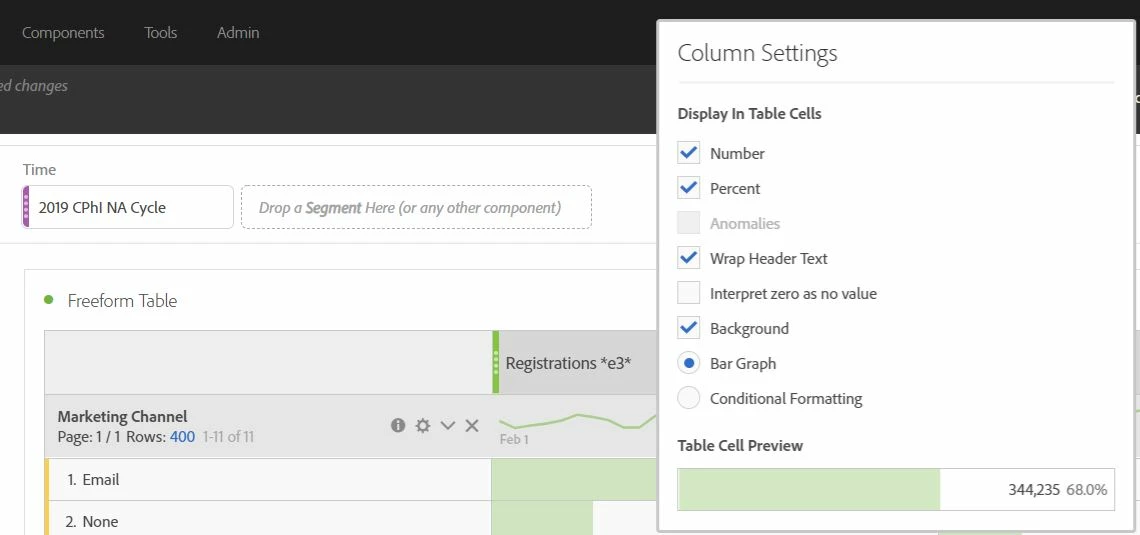
I'm trying to use the new "Non-Default Attribution Model" in Workspace to view participation metrics by marketing channel, but the option to do so isn't popping up in my workspace. Any ideas on what I might be doing wrong?

Based on the tutorials I've watched, the option should appear when I click the gear icon in a metric column.

Screen shot below.
This post is no longer active and is closed to new replies. Need help? Start a new post to ask your question.
Best answer by Gigazelle

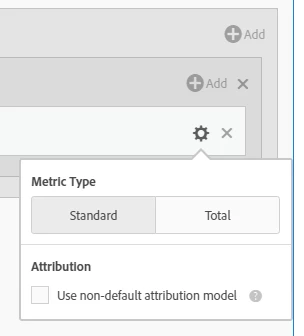
You'll want to click the gear icon while in the calculated metric builder. From there, you'll be able to see the "non-default attribution model' option:

3 replies

Gigazelle
Adobe Employee
GigazelleAdobe EmployeeAccepted solution
Adobe Employee
February 26, 2019

You'll want to click the gear icon while in the calculated metric builder. From there, you'll be able to see the "non-default attribution model' option:

ignasd88191492
May 27, 2019

Hello Gigazelle,

I am having problems understanding this part.

Attribution IQ in Freeform Tables - YouTube

In this video it is shown that Orders can have different attribution models. But you say that I should make a new calculation and apply attribution there. The problem is that Visits is not calculated in Metric build it comes already as a metric.

Gigazelle
Adobe Employee
Adobe Employee
May 30, 2019

Drag the metric you want into the calculated metric builder (orders, visits, etc). It can just be the metric by itself. From there, you can click the gear icon to select non-default attribution.